 KIKOMONO
A small task for the free chat you already use
If your free AI tool accepts pasted text, use the sample below to request a table. You can also complete it manually in a text editor. No paid file export is needed: copy the CSV response and save it as a text file, then inspect it in your intended spreadsheet. Available features and limits depend on your account.
Six invented Maple purchase notes
We wrote these notes as a practice set. They are not purchases from a real business. Keep the source IDs: you will need them to explain why two rows are excluded from the initial subtotals.
M1: notebook, USD 12.50.
M2: folder, CAD 8.00.
M3: pen, $5.00. Currency not stated.
M4: notebook refund, USD -2.00.
M5: paper, EUR 7.00.
M6: binder, USD. Amount not recorded.
M1 and M2 belong to different groups even if your spreadsheet displays both with a dollar sign. M3 supplies a number but no confirmed code. M6 supplies a code but no number. M4 is a negative amount: turning it positive would change the meaning of the note.
Download the input notes, prompt and worked CSV answer. Try making your own table before opening the answer.
Ask for a code column before a total
This prompt defines a narrow job: transcribe and group confirmed amounts, with no exchange-rate lookup. Keeping source text beside parsed values lets you spot a changed sign or an assumed currency.
Turn the Maple notes into CSV with these columns:
source_id,item,source_text,amount,currency_code,status
Keep all six source IDs and the literal source amount text.
Use the stated code; for M3 use UNKNOWN, not USD.
Keep M4's minus sign.
Leave M6's amount empty, not zero.
Use status checked, currency_missing or amount_missing.
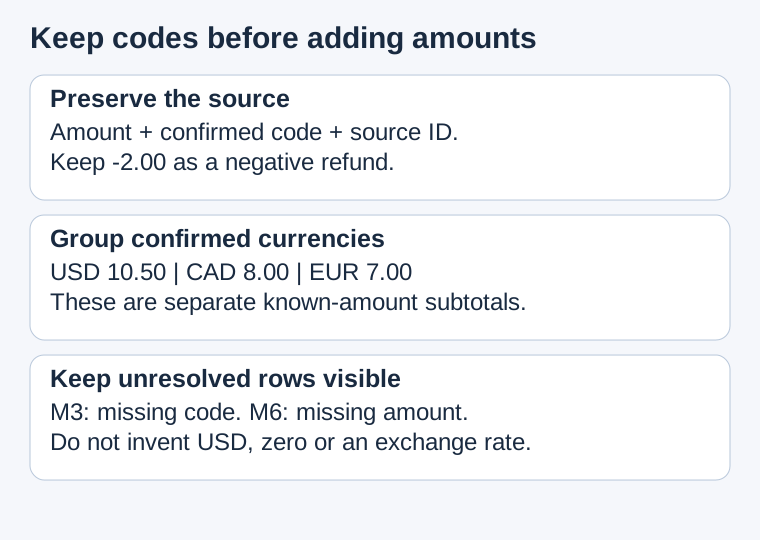
Report separate known-amount subtotals by confirmed code.
Name excluded IDs and the missing fact for each.
Do not convert currencies, invent rates or produce a mixed-currency total.
Before using the result, compare M3 and M4 with the input. If M3 became USD, remove that assumption. If M4 became 2.00, restore -2.00. Recalculate only after the source columns are right; an attractive total cannot repair a wrong row.
The answer has three subtotals, not one total
| Source | Amount | Code | Status |
|---|---|---|---|
| M1 notebook | 12.50 | USD | Checked |
| M2 folder | 8.00 | CAD | Checked |
| M3 pen | 5.00 | UNKNOWN | Currency missing |
| M4 refund | -2.00 | USD | Checked |
| M5 paper | 7.00 | EUR | Checked |
| M6 binder | Empty | USD | Amount missing |
The known USD subtotal is 12.50 - 2.00 = 10.50. CAD is 8.00 and EUR is 7.00. Keep those three results separate. M3 is excluded because its currency is unknown; M6 is excluded because its amount is missing. Label the results “known-amount subtotals,” so a reader does not mistake the USD figure for a complete purchase total.
A result of 25.50 mixes confirmed currencies even after excluding M3 and M6. A result of 30.50 adds the unidentified pen as well. Neither is a meaningful total in a stated currency. Check both the rows and the label; deleting a symbol and adding all the numbers does not solve this exercise.
We verified our answer file with Python decimal arithmetic and a CSV read/write round trip. That tests this supplied fixture, not an AI model's accuracy or a Google Sheets import.
Formatting helps display a value; it does not settle the source
Google's number-formatting instructions describe Format → Number and the Custom currency option. Its locale instructions explain that locale settings affect default currency and number formatting for the whole spreadsheet. Check those settings if a saved file looks different.
Our rule for this exercise is to retain the explicit code in a separate field. A display change cannot tell you which currency M3 originally meant. If you need a converted total later, treat that as another task with a chosen target code and an identified rate, date, direction and rounding rule. No rate is supplied here, so there is no converted total.
Resolve one missing code without rewriting the other rows
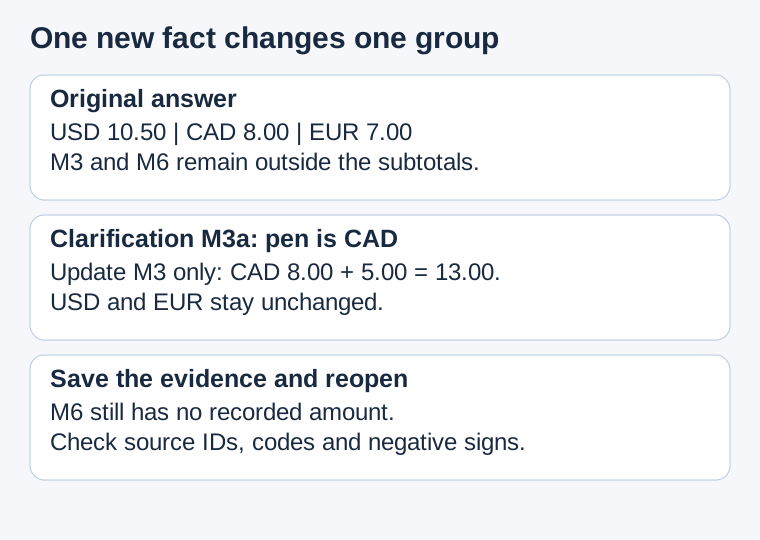
Suppose a later practice note, M3a, says “M3 pen: CAD 5.00.” Save that note and record that it resolves M3. Change M3's code to CAD and its status to checked; preserve the original $5.00 text alongside the clarification. CAD becomes 8.00 + 5.00 = 13.00. USD remains 10.50 and EUR remains 7.00.
M6 still has no amount. Do not mark it complete just because M3 was clarified. Keep the earlier answer as a separate version, and record the source of the change. If a real clarification supplies a different code, use that actual code instead of copying this example's answer.
Six checks for the file you reopen
Save the CSV, reopen it in your intended editor and compare the rows with the notes. If the import merges fields, choose the delimiter deliberately or keep a plain-text copy while fixing the import. Do not replace every missing amount with zero to make a formula run.
Sort by item and repeat the source check. Currency codes must travel with amounts. If the code column stays still while only the amount column moves, the table no longer represents the notes. Restore the rows from the saved source rather than guessing which values belonged together.
Questions about currency in AI tables
Can I treat every dollar sign as USD?
Not in this sample: M3's note does not identify the currency. Ask which code the source means and keep the row unresolved until it answers.
Can I change CAD formatting to USD and then add it?
That changes presentation, not the recorded currency or a conversion calculation. Keep CAD separate unless you perform a documented conversion as another task.
Why isn't the empty USD amount zero?
M6 gives no amount. Zero would be a new factual claim. Exclude it from the known-amount subtotal and state that the amount is missing.
Check physical units separately · Check the export route · Keep missing values distinct
Reviewed October 12, 2026. Maple notes, prompt, worked answers, checks and diagrams are our original practice material. Google references cover display and locale settings. No currency exchange or live rate was tested.