 kikomono-deals
Agree on the meaning before generating the table
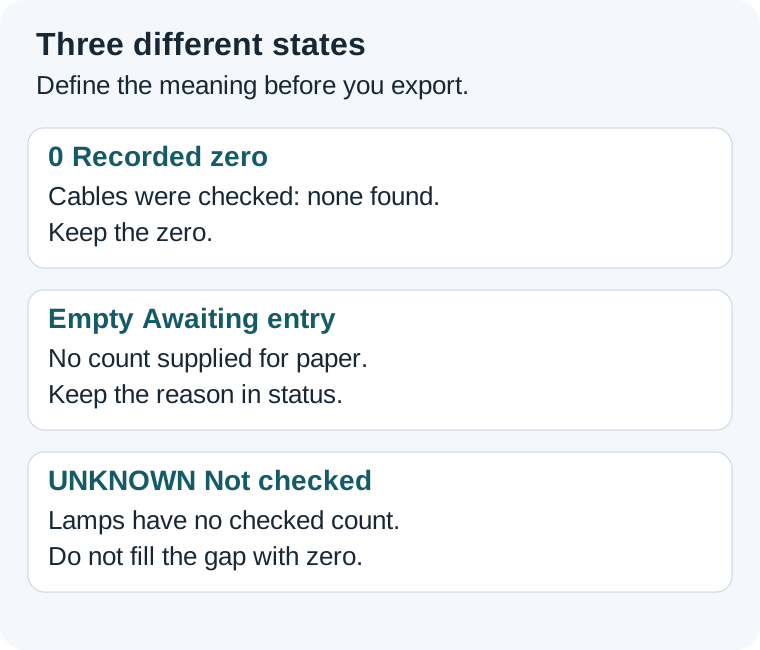
Zero can be a real observation. A blank may mean nobody supplied a value, or that a field does not apply. UNKNOWN is a label you choose for an unresolved fact. Those meanings come from your task, not from the appearance of a cell. Tell the assistant the rule and keep it beside the file you will use.
For a free AI workflow, start with a tiny sample before generating a long table. You can check the sample in a text editor without another AI request. If you use a spreadsheet, inspect the underlying value as well as what the cell displays. A neat layout is not evidence that the original meaning survived.
Practise with five fictional inventory rows
These Juniper cupboard notes are invented. The count is the number of items physically checked today. A row can exist without a count. Do not interpret an unchecked cupboard as empty.
J1 — cables: checked, count 0.
J2 — lamps: not checked, count UNKNOWN.
J3 — cups: checked, count 4.
J4 — paper: count field intentionally empty; awaiting entry.
J5 — clips: checked, count 2.
Use three columns: item, count and status. For this exercise, UNKNOWN is a literal text token in the count column. A truly empty count field has no characters. The status column explains why it is empty or unresolved. The labels are conventions for these notes, not universal CSV rules.
Convert only the Juniper notes to a three-column CSV: item,count,status. Preserve numeric 0 for checked cables, literal UNKNOWN for unchecked lamps, and a genuinely empty count field for paper. Keep the reason in status. Do not infer missing counts, trim away rows or replace blanks with zero. Return the header and five rows, with no additional data.
Compare the saved CSV with this answer key
item,count,status
cables,0,checked
lamps,UNKNOWN,not checked
cups,4,checked
paper,,awaiting entry
clips,2,checked
Save the block as a UTF-8 text file named juniper-counts.csv. Open it in a text editor first. The paper row has two consecutive commas because its middle field is empty. The cables row contains the character 0. The lamps row contains UNKNOWN. A literal space between the commas would be a different field value.
| Row | Count field | Meaning | Reject this change |
|---|---|---|---|
| Cables | 0 | Checked; none found. | Hiding or removing the recorded zero. |
| Lamps | UNKNOWN | Not checked yet. | Replacing it with 0 or dropping the row. |
| Cups | 4 | Checked count. | Moving 4 to another item. |
| Paper | Empty | Entry awaited. | Adding a space, zero or invented count. |
| Clips | 2 | Checked count. | Losing the item label. |
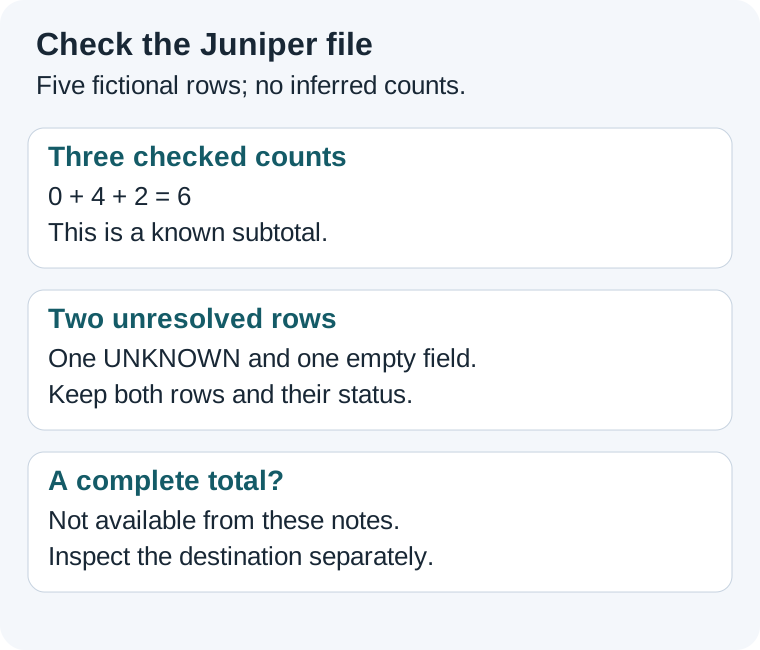
There are five data rows: three checked numeric counts, one UNKNOWN token and one empty field. The known counts add to 6: 0 + 4 + 2. That is the subtotal for checked items, not a complete count of the cupboard. Treating the other two rows as zero would falsely imply that they had been checked.
What we checked locally
We saved this exact fictional CSV and read it with Python's standard CSV parser, then wrote and reopened a copy. The count fields remained the strings “0”, “UNKNOWN”, “4”, an empty string and “2”, in that order. That verifies this fixture's text round trip. It does not verify an AI model, Google Sheets import or every export route.
Check the destination separately
Google's ISBLANK documentation says the function returns FALSE for content including a space, an empty string and hidden characters. A cell that looks empty can therefore behave differently from an empty cell. Use a spare area of your own sheet to inspect the values; do not bulk-clear source data merely to make a test return TRUE.
- Keep the original CSV unchanged and import or paste a copy through the route you intend to use.
- Confirm five rows and the same item labels. Open the cables cell and inspect its value: it must still represent 0.
- Check the lamps token and the paper field separately. If paper contains a space or a formula returning empty text, record that difference instead of calling it a verified empty field.
- If the destination needs a numeric column, leave unresolved numeric entries empty and carry their meanings in status. Preserve the original token-based file so the conversion can be explained.
- Save and reopen the destination. Recheck cables, lamps and paper before sharing the result.
Write a short acceptance record: source file retained; row labels match; recorded zero preserved; unresolved state retained; empty field inspected; destination reopened. Mark a step untested if you have not performed it. A chat preview cannot complete the destination check.
Repair one changed field
Suppose an exported copy changes the lamps count to 0. This is a deliberately faulty example. Repair the copy against J2: restore UNKNOWN, keep “not checked” in status and leave the cables zero alone. Log the item and the change. Do not replace every zero with UNKNOWN; the cables observation was valid.
Now suppose someone checks the lamps and reports 3. Save that new observation with its date and source, update only the lamps row to count 3 and status checked, and retain the earlier file. The checked subtotal becomes 9, but paper still awaits entry. Resolving one row does not resolve every missing value.
Questions about empty values
Should every blank become UNKNOWN?
No. First define whether it means unresolved, intentionally omitted or not applicable. Use a status field when those states matter.
Can I hide zeros for a cleaner display?
Keep the underlying observation and make any display rule explicit. For this acceptance exercise, show the zero so it is easy to check.
Does quoting a CSV field guarantee its spreadsheet type?
No. Inspect the destination's import settings and the resulting value. CSV syntax alone does not prove how a particular spreadsheet interpreted a field.
A community question about empty cells being treated as zero shows why these distinctions can matter. It is an individual workflow question, not a product reliability measurement.
Next, check the whole exported file or ask about a missing fact.
Sources and exercise scope
Official documentation reviewed 2026-10-10. Juniper notes, prompt, answer key and illustrations were created for this guide. The local CSV check uses fictional data; no account-level AI or spreadsheet import test is claimed. Source links are direct non-affiliate links.