 KIKOMONO
Use a small sample in the tool you already have
If your free AI chat can accept pasted text, start with the notes below. You can also arrange them manually in a text editor or spreadsheet. This exercise does not require a paid export feature. Check your account's available options before choosing a file route; the useful result is a table whose numbers you can trace and verify.
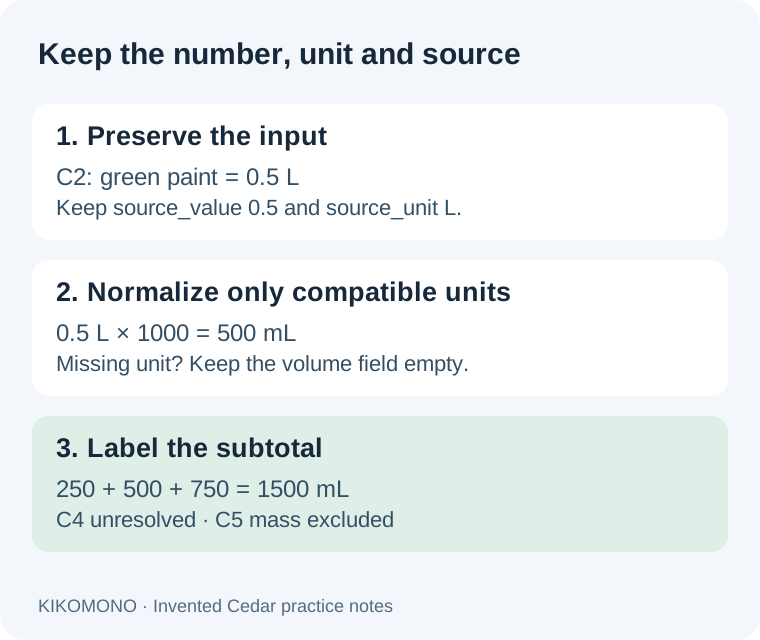
Five invented Cedar supply notes
These are practice notes we wrote for this guide, not measurements from a real workshop. The question is: how much recorded liquid volume is listed? The fourth line is deliberately incomplete; the fifth records a different kind of quantity.
C1: blue paint, 250 mL.
C2: green paint, 0.5 L.
C3: white paint, 750 mL.
C4: varnish, 40. Unit not recorded.
C5: filler, 100 g.
Do not add 250, 0.5, 750, 40 and 100 as though they described the same unit. Do not infer the varnish unit from nearby paint rows. Preserve C1 through C5 so a correction can name one source line instead of changing the whole table.
Download the input notes, copyable prompt and worked CSV answer. Try the input first, then open the answer key. The CSV is plain text with named columns; open it in your intended editor and inspect the imported values.
Ask for two sets of values
One set holds exactly what the source says. The other holds a checked conversion. Keeping both makes a factor-of-one-thousand error easier to find.
Turn the Cedar notes into a CSV with these columns:
source_id,item,source_value,source_unit,volume_ml,status
Preserve the source number and source unit literally.
For C4, use UNKNOWN for source_unit.
Use only this conversion map: mL = value; L = value * 1000.
Leave volume_ml empty for a missing unit or a non-volume unit.
Set status to checked_volume, unit_missing or different_dimension.
Report the known-volume subtotal and the excluded source IDs.
Do not estimate missing units or convert grams into milliliters.
If the answer has only a single “amount” column, ask it to restore the original-value columns before continuing. If it returns a sentence instead of CSV, ask for the same rows with the requested headers. A different layout is repairable; a guessed unit needs to be removed.
The worked answer: 1500 mL of recorded liquid volume
| Source | Original amount | Volume, mL | Status |
|---|---|---|---|
| C1, blue paint | 250 mL | 250 | Checked volume |
| C2, green paint | 0.5 L | 500 | Checked volume |
| C3, white paint | 750 mL | 750 | Checked volume |
| C4, varnish | 40; unit missing | Empty | Unit missing |
| C5, filler | 100 g | Empty | Different dimension |
C2 is 0.5 × 1000 = 500 mL. Add the three checked volume rows: 250 + 500 + 750 = 1500 mL, or 1.5 L. Label that result “known-volume subtotal; C4 unresolved, C5 mass excluded.” It is not a complete volume inventory, and it is not an instruction to mix those products.
The answer key keeps C2's source_value as 0.5 and source_unit as L even though volume_ml is 500. C4 still has its original number 40, with UNKNOWN as its unit and an empty normalized field. C5 retains 100 and g; its empty volume field does not mean the filler amount is zero.
We checked this key locally with Python decimal arithmetic and a CSV read/write round trip. That checks our supplied exercise and file; it does not measure an AI model's accuracy or prove a particular spreadsheet import works.
Use a conversion rule with a defined scope
NIST's volume reference lists 1000 mL = 1 L. That supports the liter-to-milliliter conversion in this exercise. A gram measures mass, so the same rule cannot convert C5 into a volume. For a different unit, check a suitable reference before adding another rule.
If you use Google Sheets, its CONVERT documentation separates unit categories and says a conversion between incompatible categories returns an error. Confirm the function's supported unit names and your formula in the saved sheet. We have not tested a Sheets formula for this exercise.
Repair the row, then recalculate
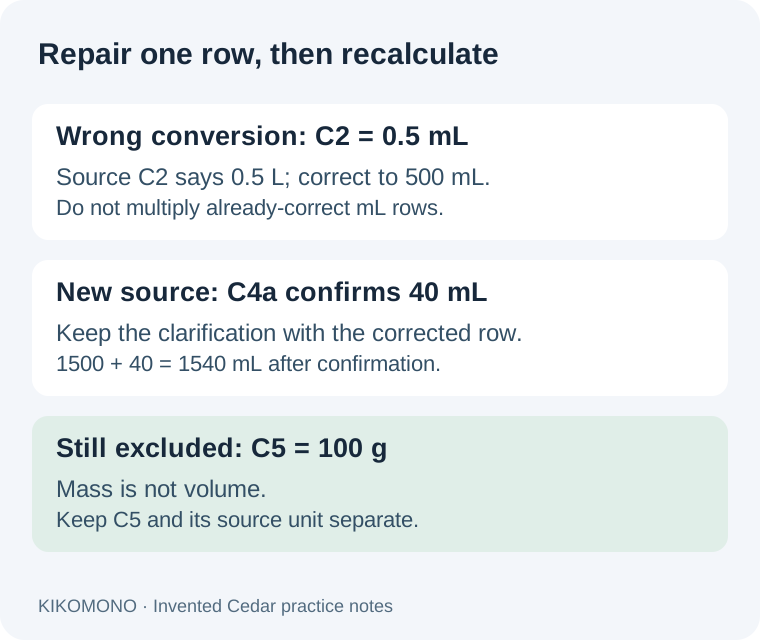
Suppose an answer shows C2 as 0.5 mL. This is an invented failure example. Compare it with C2's source: 0.5 L. Record the fault as “unit changed without scaling the value,” set volume_ml to 500, and retain 0.5 L in the source columns. Leave C1 and C3 alone; multiplying the entire column would corrupt their already-correct values.
Now suppose a later source note, C4a, confirms “C4 varnish: 40 mL.” Save that clarification separately and note which row it resolves. C4 can then hold volume_ml 40, a checked status and a reference to C4a. The revised subtotal is 250 + 500 + 750 + 40 = 1540 mL. C5 still stays outside the volume subtotal.
Keep the earlier 1500 mL version and its unresolved status. This lets someone distinguish a new fact from a calculation repair. If the clarification says a different unit, use that actual unit and a verified conversion rather than assuming this worked revision applies.
Check what survived saving
Compare the file you reopened, not only the response in the chat. If your tool cannot export CSV, copy the table into your editor and record that manual step. Use these checks before passing the file to someone else.
For a second check, sort by item name and verify that C2's value moves with C2, rather than remaining beside another row. If the destination strips leading IDs, converts an empty field to zero or loses the status column, repair that saved version and repeat the comparison. Our answer key gives you a known reference for these actions.
Questions about mixed units
Can I replace a missing unit with the column heading?
Only if the source explicitly establishes that heading for that value. C4's practice note does not. Keep it unresolved and ask for the unit; surrounding rows are not confirmation.
Can I add grams and milliliters if they describe the same product?
They measure different quantities. A mass-to-volume calculation would need additional applicable information, such as a specified density and its conditions. This exercise supplies none, so keep the mass row separate.
Is a correct subtotal enough to pass the table?
No. Check each source row too. Two wrong conversions can offset one another while producing the expected total. The original number, unit and source ID let you inspect the individual calculation.
Check the file's export and editing route · Keep missing values separate from zero · Ask for one missing detail
Reviewed 2026-10-11. Cedar notes, worked revisions, checks and diagrams are our original practice material. Official references establish units and function behavior.