 KIKOMONO
Choose a task with a clear finish
Try reorganising your own notes, outlining an article or drafting a routine message. Write down what a useful result looks like before opening a tool. Work on a copy and remove private identifiers. For a first exercise, avoid payments, account changes and decisions you cannot independently verify.
Give a brief, not just a topic
Specify the audience, input, output and limits. Ask the assistant to identify missing information rather than invent facts.
Turn the notes below into a short project update for a colleague. Use only facts in the notes. Separate completed work, blockers and next steps. If a date or owner is missing, mark it unknown. Do not send the message.
Use the prompt as a starting point and replace the notes with your own.
Check the draft against the input
- Compare names, dates, numbers and promises with your original notes.
- Remove unsupported additions. Open cited sources and check that they support the claims.
- Request one specific correction, such as separating a proposed deadline from an agreed deadline.
- Review the final version yourself before sending or publishing it.
Resolve one missing detail before using the draft
Open your original notes and check the field that blocks your next step. If the value is already there, restore it in the draft. If it is absent, keep UNKNOWN and ask someone who can provide it. A suggestion is not an agreed deadline, and an assigned person is not permission to send.
Try these invented notes: “Sam coordinates volunteers. Reminder sender not assigned. Venue approval pending.” A draft saying “Sam will send reminders tomorrow” adds an owner and a date without evidence. Correct both fields to UNKNOWN and leave the reminder unsent.
Sam, who should send the reminders? The notes leave the sender unassigned. Please name the person or leave it unassigned. Venue approval is still pending, so this question does not authorize sending.
If the reply names a sender but gives no time, update only the sender. Save the question, reply and changed field beside the draft. Do not silently fill in tomorrow as the deadline.
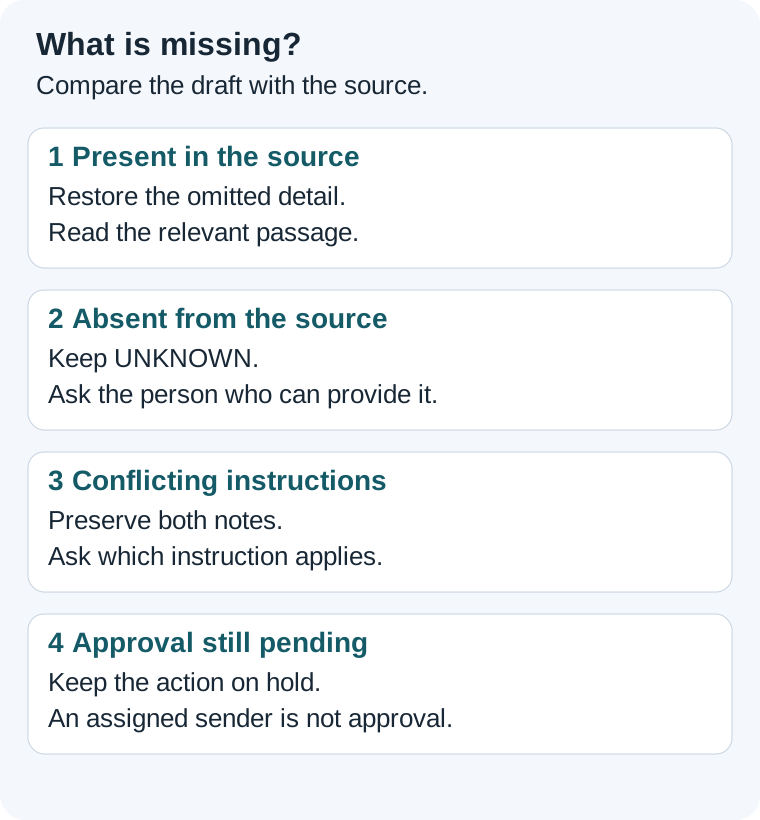
Try the full missing-details exercise and answer key.
Save the file and try an edit
Do not stop at the chat preview. Save a small sample in your intended editor, reopen it independently and change one value. Save and reopen again to confirm the change persisted. For a table, compare each value with its row label; for a message, check names, dates and missing details.
For practice, use an invented refund of -3.50 USD and an owner marked UNKNOWN. Check that the saved file keeps the minus sign and leaves the owner unknown. Correct any change and keep the original notes beside the file.
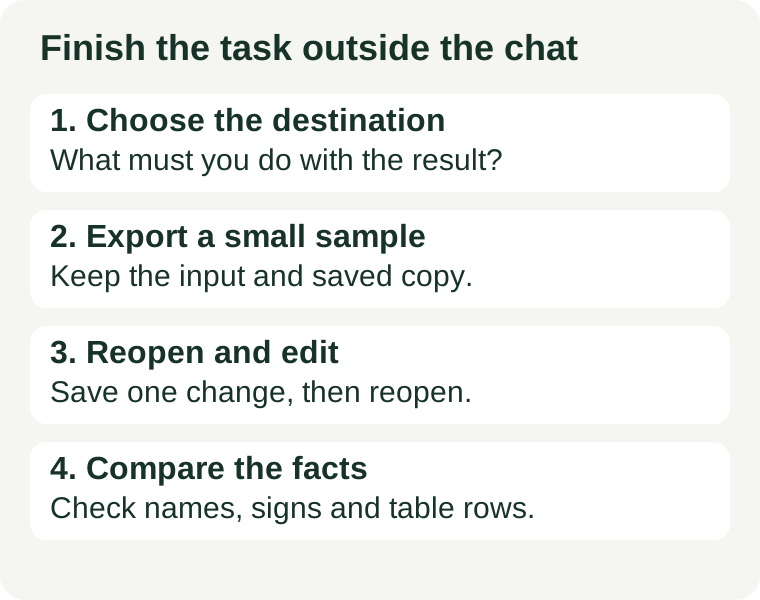
Try the full export exercise and checklist.
Keep actions under your control
A chatbot drafts text; an agent may also use tools and change files or accounts. Check the permissions, which destination receives your data, and whether an action can be undone. Approve concrete actions after reviewing the result. Never include passwords or identity documents in a public example.
Decide whether you need a paid plan
Test a free entry point on representative work first. Record which limit blocks completion: input size, usage, export or integration. Evaluate a paid plan when it solves that specific limit. Paying does not remove the need to check the output.
Keep a practice record
Record the task, non-sensitive input, tool and version if shown, corrections and final result. Include failures and manual work. That record will help you spot the same problem next time.
Free entry points · Muse beginner guide · Verify a meeting summary
The prompts and practice notes are examples, not results from a product test.