 KIKOMONO
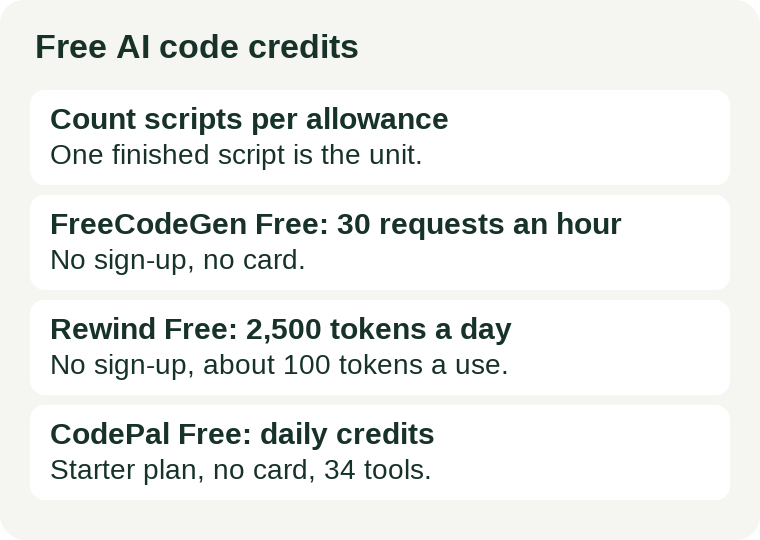
Count scripts per allowance, not requests per month
Every generation is a spend, but only the finished script counts as output. A script job is not one request. It is a first draft in plain English, then a fix because the first version threw an error, then another try because the fix broke something else, then a final run with the real file names filled in — three or four spends for one finished script. Budgeting by “requests per month” hides that multiplier; budgeting by requests per finished script exposes it.
The arithmetic is simple, and it has only two inputs:
Finished scripts per allowance = allowance ÷ requests per finished script.
Requests per finished script comes from you: it is whatever your last real script actually took. The allowance comes from the tool — and code generators add a twist the other media do not. Only two of the four tools below publish an exact free number. The rest promise “start free” without saying how much free is, or sell the generation through a credit balance whose free count is not on the page. When the count is not published, the real cost of a free script is not the number. It is the fix cycle (one error is one more request), the scope (a single function and a full app are different jobs), and the account (a free account is a small cost until the tool asks for a card). Count those three before you paste your task in.
One boundary first: this guide is about generating code from a description — a script, a function, a query. A coding assistant that lives inside your editor and completes code as you type is a different job with different free tiers, covered in our coding assistant checklist.
What the official pages say — checked 2026-11-23
Four free plans, two ways of counting. The difference matters more than the headline allowance.
FreeCodeGen: the countable one — 30 requests an hour, no sign-up
FreeCodeGen’s page states the deal in one line: “Free · no signup · no credit card · 30 requests/hour per IP”. Its limits page puts the allowance in plain numbers: 30 requests an hour per IP address, a 2,000-character maximum input, and a site-wide capacity of 20,000 requests over a rolling 24 hours. All attempts count, including failures, and at the cap you wait an hour and try again. It writes in 9+ languages — Python, JavaScript, TypeScript, SQL, Bash, regex, HTML/CSS, Go and Java — and every result comes with a short note explaining what the code does and how to run it. Official code generator page.
This is the only free plan of the four where the free tier has an exact hourly number attached to it. Thirty requests an hour is seven finished scripts at four requests each, every hour, with no account to create — and the count is visible on the tool, so you always know where you stand. Two honest gaps travel with it. First, the limit is per IP address, so a shared network shares the budget. Second, the page is candid about what it stores: your description, the generated output and a hashed IP address are saved, and eligible prompts and results may appear publicly by default, so never enter names, client data or anything confidential. And it cannot run, test or deploy the code for you — you test it in your own environment before using it on real data.
Rewind: the token-counted one — 2,500 free tokens a day, no sign-up
Rewind’s free coding page answers the price question directly: “Yes — no card and no trial period. Anonymous visitors get 2,500 free tokens a day, a free account gets 5,000 plus 10,000 once on signup, and the daily pool resets every 24 hours.” No sign-up is needed to start, and the page estimates “~100 tokens per use”, which turns the token pool into a use count: about 25 uses a day anonymous, about 50 a day with a free account. It runs on Qwen3 Coder 30B by default, an open-source coding model the free pool covers, and supports 20 languages. Official free coding page.
Rewind is the only one of the four whose free tier covers five jobs, not one: generate code from a description, debug and fix pasted code, explain code line by line, convert it between languages, and review it for bugs, security issues and performance, each finding carrying a severity. The catch is the token math. A short function costs about 100 tokens, but a long file to debug or a conversion between two languages costs more, so “25 uses a day” is an estimate, not a promise. What the page does settle in writing is commercial use — “in most cases, yes”, following its Terms and the licence of the model — and privacy: your input is sent to the model for that one request, and “we don’t sell it and we don’t use it to train models”. If the job is “write it, fix it, explain it” in one place, Rewind is the right free tier. If the job is “exactly forty scripts by Friday”, the token estimate is the risk.
CodePal: the tool-counted one — 34 free tools on the Starter plan
CodePal’s FAQ states the model plainly: “CodePal has a free Starter plan, and you do not need a credit card to begin building.” Its 34 single-purpose web tools cover everyday coding tasks — generating code, SQL queries, regular expressions and unit tests, explaining code and error messages, detecting bugs, reviewing and refactoring code, and writing Dockerfiles, Kubernetes manifests, Terraform and CI/CD pipelines — and “every tool runs on the free Starter plan within its daily credit limit, and no credit card is required”. The Code Generator alone offers 60+ language, framework and format options. Official FAQ page.
Two honest gaps travel with CodePal. First, the daily credit limit is never given as a number on the page, so the number of free generations is not something the page lets you budget in advance — what it does promise is the breadth: 34 tools, each answering one coding task at a time. Second, the free plan’s other conditions shape the job: projects on the free Starter plan are public by default, and publishing an app requires a paid plan. CodePal is the right free tier when the task varies — a regex today, a Dockerfile tomorrow, a unit test the day after — because one free plan covers all 34 tools. It is the wrong one for counting scripts per day, because the page gives you no daily number to count with.
Codia Code: the project-counted one — start free, no card
Codia Code’s FAQ answers the price question directly: “Yes. You can start with Codia Code for free, without a credit card. Larger projects use Studio credits; see pricing for plans.” It is the only one of the four that starts from something other than words: describe the app, upload up to five screenshots, or paste a Figma frame, and it writes React, Vue or plain HTML — plus native iOS, Android and Flutter output — checks the result in a real browser, and hands you code you can publish, push to GitHub or download as the full source. Official code generator page.
Codia is the only one of the four where the free tier’s size is not on the page at all — not even as “daily credits”. What the page does give you is the ownership line: “Yes. Download the full source at any time and use it however you like”. That makes Codia the right free tier when the starting point is a design rather than a sentence: a screenshot or a Figma frame becomes working code in the stack you choose. It is the wrong one for counting scripts per day, because the page gives you no free number to count with — and because a full app is not a script: the moment the job grows from one function to a whole project, you are spending Studio credits, not free tries.
Measure it on your first real script
Do not estimate requests per finished script. Measure it, once, on a script you actually need:
- Pick the job first — a rename script, a SQL query, a regex — and run it on the tool with the counted allowance, FreeCodeGen, so every try is visible against the 30-an-hour budget.
- Count every request until you have a script that runs on your real data: the first draft, the fix for the error, the second fix, the final run, all of them.
- That tally is your requests per finished script. For example, one script might take four requests on FreeCodeGen, which is seven finished scripts an hour on the no-sign-up tier.
- Compare the tally with the allowance — remembering whether the allowance is a published hourly number, a daily token pool, an uncounted daily limit, or a free amount the page never states.
If the result does not fit the allowance, that is a tool-fit signal, not a coding failure. Either the script needs a tool with a counted allowance, or it needs fewer fix cycles — which is a prompt fix, covered below. Do not solve a script shortage by re-rolling harder; re-rolling is what caused it.
Four ways to spend fewer requests
- Describe the edges before the first request. Name the inputs, the output you expect and the edge cases that matter — Rewind’s own advice. A vague prompt buys you a fix cycle; a precise one often lands on the first draft.
- Test on the counted tier, finish on the wide tier. FreeCodeGen’s 30 requests an hour tell you exactly what a script costs. Rewind’s five modes are where you spend the requests once you know the shape works.
- Fix in the same tool that wrote it. Rewind’s debug mode returns the corrected code with a note on what went wrong. Pasting the error back into a fresh generator starts the job over and spends the first draft again.
- Read the code before you run it. Generated code can contain errors and, worse, can leak a secret you pasted in. Our secrets check covers what never to paste, and our licence check covers whether the finished script is yours to ship.
When free stops being enough
Two signs, and only two, mean the free tier is the wrong tier rather than a tight one. First, the same real need fails twice for the allowance, not for quality — the script does not finish inside the 30 hourly requests however you split the fixes, or the token pool runs out before the second script. Second, the free tier’s other conditions block the job: the project must stay private, the code must be published, or the tool needs an account you do not want to create. A paid plan fixes the first problem; it is the only fix for the second that also changes the terms.