 KIKOMONO
The short answer
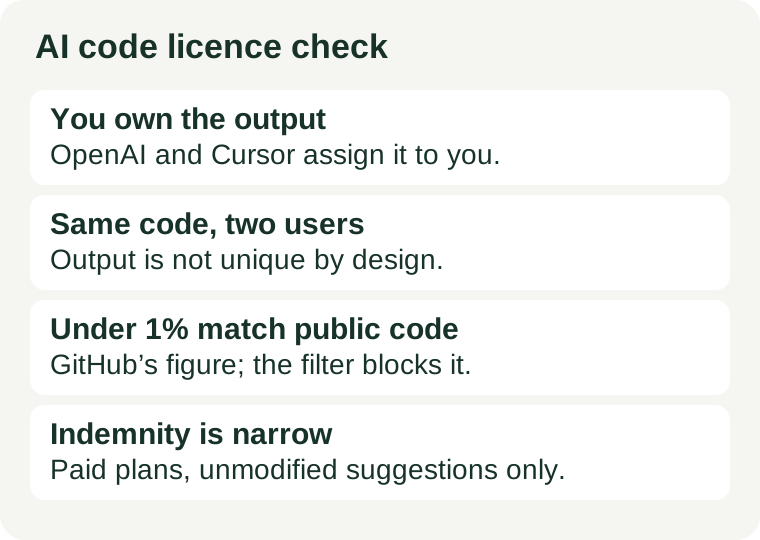
Three facts decide whether generated code is safe to ship, and they answer three different questions. Ownership says the code is yours to use: both OpenAI and Cursor assign the output to you in their terms. Uniqueness says it may not be only yours: both warn that another user can receive the same or similar output. Indemnity says who pays if someone claims the code copies theirs: only some paid plans offer it, and only for suggestions you ship unmodified. A licence check is not a verdict on any single tool — it is a five-minute routine you run on the tool and plan you actually use, on the day you ship. This guide is a checking method, not legal advice.
1. Who owns the generated code — checked 2026-11-16
OpenAI’s Terms of Use, effective 1 January 2026, state it directly: “you own the Output. We hereby assign to you all our right, title, and interest, if any, in and to Output.” That covers code you generate with ChatGPT or Codex on an individual plan. OpenAI Terms of Use.
Cursor’s Terms of Service say the same in different words: “You retain all of your right, title, and interest that you have in Inputs, and Anysphere hereby assigns to you all of our right, title, and interest if any in and to any Suggestions.” Cursor calls generated code “Suggestions”, and its forum summary of the same terms is blunter: you own all code generated through Cursor. Cursor Terms of Service.
For GitHub Copilot, first find which document governs your plan, because there are two. GitHub’s own terms page says Copilot Business and Enterprise users who buy direct from GitHub are governed by the GitHub Generative AI Services Terms, while all other Copilot users are governed by Section J (AI Features) of the GitHub Terms of Service. Do not quote the Business terms at a Free-plan problem, or the other way round. GitHub Terms for Additional Products and Features.
One more split to watch: the tool is not always the model. Cursor routes your request to a model from Anthropic, OpenAI, Google or another provider, and that provider’s terms also apply to the output. If you bring your own API key, you are in a direct relationship with the model provider as well. Check the terms of the tool you pay and the model that generates — the ownership sentence you need may live in either one.
2. The same suggestion can reach two people
Ownership is not exclusivity, and both sets of terms say so in plain language. OpenAI’s terms warn that “output may not be unique and other users may receive similar output”, and that its assignment to you “does not extend to other users’ output or any Third Party Output”. Cursor’s terms say Suggestions “may be similar to or the same as Suggestions provided to other customers, and no rights to any Suggestions generated, provided, or returned by the Service for or to other customers are granted to you”.
The practical consequence is simple: two developers can ship near-identical code and both “own” their copy. That does not stop you selling or shipping what you generated, but it does stop you treating generated code as exclusive intellectual property. If exclusivity matters — a patentable algorithm, a trade-secret implementation, a core differentiator — write that part yourself, or add substantial human authorship of your own on top of the suggestion. And never assume a suggestion is original just because it compiles and looks unfamiliar; the model’s idea of unfamiliar is not a licence check.
3. When a suggestion matches public code
GitHub is the only one of the three that publishes a number for this. Its Copilot FAQ says that in rare instances — less than 1% based on GitHub’s research — a suggestion may match an example of code used to train the model. Rare is not never, and the risk concentrates exactly where it hurts: a long, distinctive block that looks like a known library function, not a five-line loop.
GitHub’s mitigation is the duplication detection filter, also called “suggestions matching public code”. With it on, Copilot checks suggestions against public code on GitHub and blocks matches of about 65 lexemes — roughly 150 characters — or more, so the suggestion is never shown to you. On an organisation plan an administrator sets it; on an individual plan, check your own settings and confirm it is on before you rely on it. GitHub Copilot.
The filter is a screen, not a guarantee. Near-matches below the threshold pass through, and a suggestion can resemble a licensed project without matching it character for character. Before a distinctive block ships, search for it: paste a long string into a code search, check whether it resembles a project you know, and if it does, rewrite the logic in your own structure or check that project’s licence before keeping it. Ordinary boilerplate — standard loops, common API call patterns, framework setup — is the low-risk end; a distinctive algorithm reproduced verbatim is the case that matters.
4. Indemnity: the backstop, and its edges
Indemnity is the promise that the vendor defends you if a third party claims the generated code infringes their rights. GitHub’s Business and Enterprise Copilot plans include it; Free and Pro plans do not. That alone makes the plan you are on part of the licence answer, not just a billing detail.
The coverage is narrower than the word “indemnity” sounds. The product terms cover unmodified suggestions: the suggestion as generated, not as edited. Editing a suggestion is the normal workflow — you refactor it, combine it with your code, rewrite the variable names — and each edit moves the shipped code further from the exact output the indemnity covers. Keep a record of what was generated and what you changed, so you can show which parts were the suggestion and which parts are yours.
One more thing to check, because the guides are out of date on it: older write-ups say the indemnity only applies when the duplicate-detection filter is switched on. Microsoft’s Customer Copyright Commitment page removed the duplicate-detection filter as a required mitigation for GitHub offerings on 3 April 2026. So a guide written before that date states a condition that no longer applies — read the current product terms for your plan instead of trusting a 2025 checklist. The unmodified-output condition is the one that still bites.
5. The five-minute check before you ship
- Find the terms that govern your plan. Open your account page and write down the plan name and the date. Copilot: Section J of the GitHub Terms of Service, or the Generative AI Services Terms for Business and Enterprise. Cursor: the Terms of Service. ChatGPT or Codex: OpenAI’s Terms of Use. If you bring your own model key, add that provider’s terms too.
- Confirm the ownership sentence. Search the terms for “own” and read the full sentence. You are looking for an assignment of the output to you. If the terms do not say it, do not assume it.
- Check the filter and the indemnity together. Turn the public-code filter on where your plan offers it, and check whether your plan includes IP indemnity at all. Free and individual plans generally do not — on those, you bear the risk yourself, and the filter is your only screen.
- Scan the diff for long verbatim-looking blocks. Before merge, look for the distinctive parts: an unusual algorithm, a long helper function, a block that reads like library code. Search any suspicious block and rewrite it in your own structure if it matches something.
- Record the evidence. Keep the plan name, the terms link, the date, and the filter setting next to the repository, so a later terms change does not leave you guessing what you relied on. If any step comes back unclear, the cheap move is to keep the generated code out of the shipped product until it is clear — regenerate it under a plan with an explicit grant, or write the contested part yourself.
Licence is one of three checks before generated code ships. The other two are in this series: check generated code for secrets before running it, and check whether your plan lets you sell the output at all. Our Cursor versus GitHub Copilot free plans comparison covers which free tier gives you the filter and the terms discussed here.