 KIKOMONO
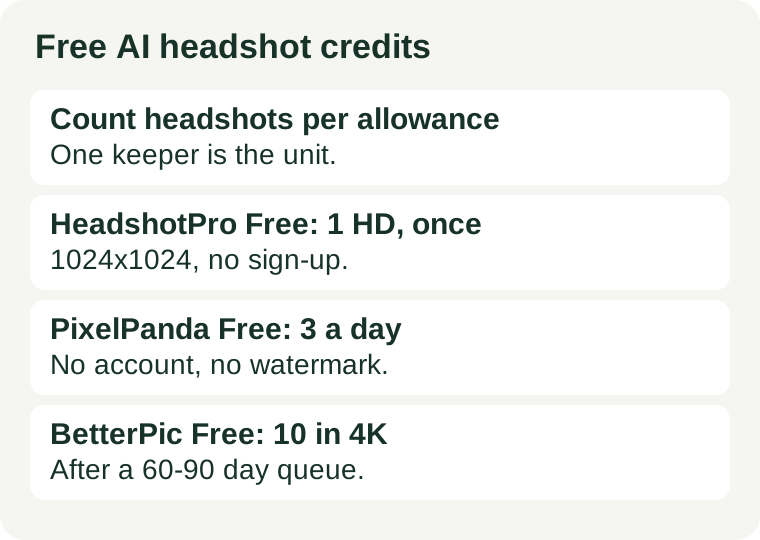
Count headshots per allowance, not headshots per month
Every click on Generate is a spend, but only the keeper counts as output. A headshot job is not one generation. It is a first try, then a fix for the expression, then a different background, then a second style for comparison — three or four spends for one finished headshot. Budgeting by “headshots per month” hides that multiplier; budgeting by generations per finished headshot exposes it.
The arithmetic is simple, and it has only two inputs:
Finished headshots per allowance = allowance ÷ generations per finished headshot.
Generations per finished headshot comes from you: it is whatever your last real job actually took. The allowance comes from the tool — and headshots add a twist the other media do not. Most free headshot tiers are counted in headshots, not credits, so the allowance is the headshot count: one, once, or three a day. When the count is that small, the real cost of a free headshot is not the number. It is the time (a 60-to-90-day queue), the resolution (1024×1024 is fine for LinkedIn, not for print), and the rights (personal use only is fine for your own profile, not for a company page). Count those three before you upload your selfie.
What the official pages say — checked 2026-11-21
Five free plans, four different ways of counting. The difference matters more than the headline allowance.
HeadshotPro Free: the countable one — 1 HD headshot, once
HeadshotPro’s free tool takes one selfie and returns a set of headshots in different outfits and styles in 5–10 minutes. You download one in HD, at 1024×1024 pixels, free. The rest stay as previews until you pay. No sign-up, no email, no card. The paid unlock is $29 on first view, or $39 by default. Official free tool page.
This is the only free plan of the five where the free file’s size is printed on the page, and the privacy terms are the clearest too: uploads are deleted within 24 hours, never used to train AI models, never shared with third parties, and the headshots are yours to use however you like. One headshot, once, with nothing held back except the other styles.
PixelPanda Free: the daily one — 3 a day
PixelPanda’s headshot tool takes one selfie, offers 12 professional styles, and returns a headshot in roughly 20–40 seconds. The free tier gives 3 headshots a day, with no account, no card and no watermark on the download. Free output is standard web resolution; 4K comes with the paid plans, from $7 a month for 100 credits. Official headshot page.
Three a day is the only free allowance here you can plan a habit around: test three styles today, three more tomorrow, and keep the best. One caution on rights: its page states commercial usage rights for paid generations, and an independent check of its terms reports full rights retained on free images too. If the headshot goes on a company page rather than your own profile, read the terms line yourself before publishing.
Magic Hour Free: 3 a day, no watermark, personal use only
Magic Hour’s FAQ says its headshot generator is free with no sign-up: 3 free headshots a day from one photo, no account needed. Its pages also say image outputs have no watermark, including for free users. The free resolution is not published. Official FAQ.
The catch is the licence, not the count. Its FAQ says paid subscriptions and credit-pack purchases include commercial-use rights, which means the free output does not. And its terms, as quoted by independent checks, say uploads may be used to develop and improve its products. Three free headshots a day for your own profile is a real offer; three free headshots a day for a client is not, on either count.
Aragon Free: 1 headshot, account required, waitlist
Aragon’s free headshot generator takes a few selfies from different angles, needs a free account, and needs no card. The free headshot is standard resolution; paid packs start at $35 for 40 headshots and go up to 1792×2176 pixels on the Executive pack. Processing time varies with demand, and you get an email when it is ready. Official free headshot page.
Read the fine print before you count on it: “Free headshots are offered on a limited basis through our waitlist, which may be paused or delayed depending on demand.” One free headshot is real, but the waitlist decides when — or whether — it arrives. Do not plan a Monday application around it.
BetterPic Free: 10 in 4K, after a 60-to-90-day queue
BetterPic’s free generator gives up to 10 headshots in 4K resolution, with up to 5 outfits and backgrounds, 5 AI Studio credits for basic edits, and a full commercial licence. No card is required. The catch is time: free jobs wait 60 to 90 days in a shared queue, and its own blog puts the current average wait at around 1–3 months. Official blog.
Two more conditions from its own pages, both worth reading before you upload 8 to 12 selfies: the free flow asks you to sign in with Google or an email code, and its comparison table says free photos may be used for marketing and AI training. Ten free 4K headshots with a commercial licence is the most generous free output in this guide — and the slowest. It is a plan for a someday refresh, not for this week’s application.
Two more, counted differently: GoStudio gives 10 credits when you sign up, enough for 2 full-quality headshots (independent check, 29 August 2026), and Canva’s ProfilePhoto app gives 2 free credits, then more after 24 hours (independent check, 16 November 2026). Both need an account; neither needs a card.
Measure it on your first real headshot
Do not estimate generations per finished headshot. Measure it, once, on a headshot you actually need:
- Upload your best selfie first — front-facing, even light, plain background, no heavy filter. The selfie shapes the result more than the prompt does.
- Generate, then tally every regeneration until you have a keeper you would actually publish: expression fixes, background changes, style comparisons, all of them.
- That tally is your generations per finished headshot. For example, a LinkedIn refresh might take four: one draft, one expression fix, one background change, one style comparison.
- Compare the tally with the allowance — remembering whether the allowance is once, daily, or queued for months.
If the result does not fit the allowance, that is a tool-fit signal, not a selfie failure. Either the job needs a tool with a daily allowance, or it needs fewer generations — which is a workflow fix, covered below. Do not solve a headshot shortage by re-rolling harder; re-rolling is what caused it.
Four ways to spend fewer generations
- Upload your best selfie first. HeadshotPro’s own tips say the same: face a window, use a plain wall, wear solid colours, keep a neutral or slight smile. A clean selfie needs fewer fixes than a dark one, and every fix is a generation.
- Test styles on a daily allowance, spend the one-time grant on the keeper. PixelPanda and Magic Hour give you 3 tries a day with no account. Learn which style suits you there, then spend HeadshotPro’s single HD download on the look you already know works.
- Pick the keeper at LinkedIn size before worrying about print. A 1024×1024 file is fine for a profile photo, a resume and a team page. Only BetterPic’s 4K queue serves print — and only if you can wait months for it.
- Read the licence line before the headshot goes on a company page. Personal-use-only free output (Magic Hour) and photos the vendor may use for marketing (BetterPic free) are fine for your own profile and wrong for a client. Our commercial-use check covers that question in full, and our privacy check before uploading covers what happens to your selfie after you send it.
When free stops being enough
Two signs, and only two, mean the free tier is the wrong tier rather than a tight one. First, the same real need fails twice for the allowance, not for quality — you need a second headshot for a second profile and the one-time grant is already spent, or the daily three run out before you find a keeper. Second, the free tier’s other conditions block the job: the resolution is too low for print, the licence is personal use only for a company page, or the queue is months long for a Monday deadline. A paid pack fixes the first problem; it is the only fix for the second that also changes the terms.