 KIKOMONO
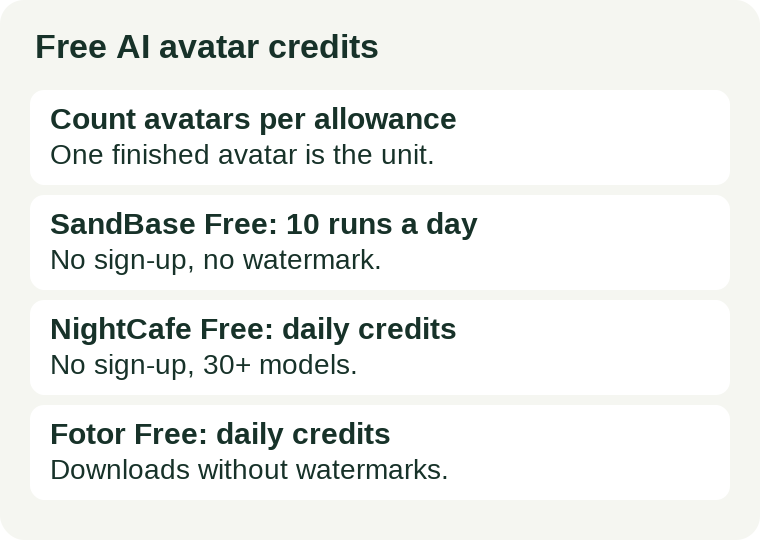
Count avatars per allowance, not runs per month
Every generation is a spend, but only the finished avatar counts as output. An avatar job is not one run. It is a first try in one style, then a re-roll because the face came out wrong, then another style because the first one did not suit a gaming profile, then a final run at the size you need — three or four spends for one finished avatar. Budgeting by “runs per month” hides that multiplier; budgeting by runs per finished avatar exposes it.
The arithmetic is simple, and it has only two inputs:
Finished avatars per allowance = allowance ÷ runs per finished avatar.
Runs per finished avatar comes from you: it is whatever your last real avatar actually took. The allowance comes from the tool — and avatar generators add a twist the other media do not. Only one of the four tools below publishes an exact daily number. The rest promise “free daily credits” without saying how many, or sell the avatar through a credit balance whose free count is not on the page. When the count is not published, the real cost of a free avatar is not the number. It is the style (a 3D look and an anime look are different runs), the re-rolls (one bad face is one more run), and the account (a free account is a small cost until the tool asks for a card). Count those three before you upload your photo.
One boundary first: this guide is about stylised avatars — 3D, anime, cartoon and gaming profile pictures. A realistic professional headshot for LinkedIn is a different job with different free tiers, covered in our headshot credits guide.
What the official pages say — checked 2026-11-23
Four free plans, two ways of counting. The difference matters more than the headline allowance.
SandBase: the countable one — 10 runs a day, no sign-up
SandBase’s avatar generator is, in its own words, “100% free”, with “No sign-up” and “No watermark”. Its FAQ puts the allowance in plain numbers: “10 runs a day without signing in and 30 with a free SandBase account”, shared across all its AI image tools, resetting at midnight UTC. One run takes about 20 seconds and gives you a square JPG of about 1024 px, in styles including 3D animated, anime, cartoon, pixel, watercolor and cyberpunk. Official avatar generator page.
This is the only free plan of the four where the free tier has an exact daily number attached to it. Ten runs a day is three finished avatars at three runs each, or one avatar with seven re-rolls to spare — and the count is visible on the tool, so you always know where you stand. The catch is scope, not size. The tool fixes the settings for you: one photo in, one square JPG out, at about 1024 px. If the job is “one stylised profile picture, today”, the free tier is the whole tool. If the job is “ten avatars in ten styles for a team page”, ten runs is the budget, and the second day is the refill.
NightCafe: the model-counted one — free daily credits, 30+ models
NightCafe’s avatar generator FAQ answers the price question directly: “Yes. NightCafe gives you free daily credits to generate avatars without entering a payment method.” No sign-up is required to start generating; creating an account lets you save your creations and share them with the community. The generator offers 30+ AI image models, including Nano Banana, GPT Image, Flux and Seedream, and lets you upload a selfie and shift it into illustration, fantasy or any other style while keeping your features recognisable. Official avatar generator page.
NightCafe is the only one of the four whose free tier also settles the commercial question in writing: “Yes, including on the free plan. NightCafe transfers copyright of the generated image to you as the creator, so you can use your avatar on products, social profiles, or commercial projects.” The catch is the missing number. The page says “free daily credits” and never says how many, so you cannot budget avatars per day in advance — you find out by generating. What you can budget is variety: thirty models means the re-rolls are not the same picture again, and the style that fails in one model may land in the next. If the job is “try five styles and keep the best one”, NightCafe is the right free tier. If the job is “exactly six avatars by Friday”, the uncounted allowance is the risk.
Fotor: the watermark-free one — daily credits, no count published
Fotor’s avatar generator page promises the finished file plainly: “Download your high-quality AI-generated avatar images without watermarks.” Styles include realistic, anime, cyberpunk, watercolor and sketch, and the flow asks you to pick a style, upload a single front-facing portrait, and generate. Fotor’s image-generator page says the tool is free to try without signing up, with free daily credits, and its help center prices AI image generation from 1 credit per image. Official avatar generator page.
Two honest gaps travel with Fotor. First, the avatar page itself publishes no free credit count, so the number of free avatars is not something the page lets you budget in advance — what it does promise is the watermark-free download. Second, the avatar flow starts by asking you to choose “Individual” or “Team”, which is a setup step the no-sign-up tools do not have. Fotor is the right free tier when the download matters more than the count: a clean file with no watermark, in a realistic style the other free tools do not all offer. It is the wrong one when you need to know, before you start, how many avatars the free tier covers.
Picsart Flow: the credit-based one — every plan includes credits
Picsart’s profile picture maker lives in Picsart Flow, and its page states the model plainly: “The profile picture maker in Picsart Flow is credit-based. Every Picsart plan includes credits you can use to make profile pictures, and Flow shows the estimated cost before each run. Opening and browsing the profile picture templates costs nothing.” One selfie becomes headshots, avatars or cartoon styles, with ready-made workflows for 3D cartoon headshots, 2D cartoon characters and eight anime portrait styles. Official profile picture maker page.
Picsart is the only one of the four where the free tier’s credit count is not on the page at all — not even as “daily credits”. What the page does give you is the price before you spend: Flow shows the estimated cost of each run, so the surprise is removed even if the budget is not published. That makes Picsart the right free tier for browsing first and spending second: open the templates, find the style, read the estimated cost, and only then decide whether the run is worth it. It is the wrong one for counting avatars per day, because the page gives you no daily number to count with.
Measure it on your first real avatar
Do not estimate runs per finished avatar. Measure it, once, on an avatar you actually need:
- Pick the style first — 3D, anime, cartoon or realistic — and run it on the tool with the counted allowance, SandBase, so every try is visible against the 10-a-day budget.
- Count every run until you have an avatar you would actually use as a profile picture: the first try, the re-rolls for a wrong face, the second style, the final run, all of them.
- That tally is your runs per finished avatar. For example, one avatar might take three runs on SandBase, which is three finished avatars a day on the no-sign-up tier, or ten a day with a free account.
- Compare the tally with the allowance — remembering whether the allowance is a published daily number, an uncounted daily promise, or a credit balance whose free count is not on the page.
If the result does not fit the allowance, that is a tool-fit signal, not a taste failure. Either the avatar needs a tool with a counted daily number, or it needs fewer re-rolls — which is a workflow fix, covered below. Do not solve an avatar shortage by re-rolling harder; re-rolling is what caused it.
Four ways to spend fewer runs
- Pick the style before the first run. A 3D look for a gaming profile and an anime look for Discord are different jobs. Deciding first means the runs go to refining one style, not sampling four.
- Test on the counted tier, finish on the wide tier. SandBase’s 10 runs a day tell you exactly what an avatar costs. NightCafe’s 30+ models are where you spend the runs once you know the style works.
- Browse before you spend on the credit-based tier. Picsart Flow shows the estimated cost before each run and charges nothing to browse the templates. Find the style free, then pay the run once.
- Read the privacy line before the selfie goes in. An avatar starts from your face, and the photo you upload is processed under the vendor’s policy, not on your device. Our privacy check covers that question, and our commercial-use check covers whether the finished avatar is yours to publish.
When free stops being enough
Two signs, and only two, mean the free tier is the wrong tier rather than a tight one. First, the same real need fails twice for the allowance, not for quality — the avatar does not finish inside the 10 daily runs however you split the styles, or the uncounted credits run out before the second profile picture. Second, the free tier’s other conditions block the job: the download carries a watermark, the style you need is not in the free set, or the tool needs an account you do not want to create. A paid plan fixes the first problem; it is the only fix for the second that also changes the terms.