 KIKOMONO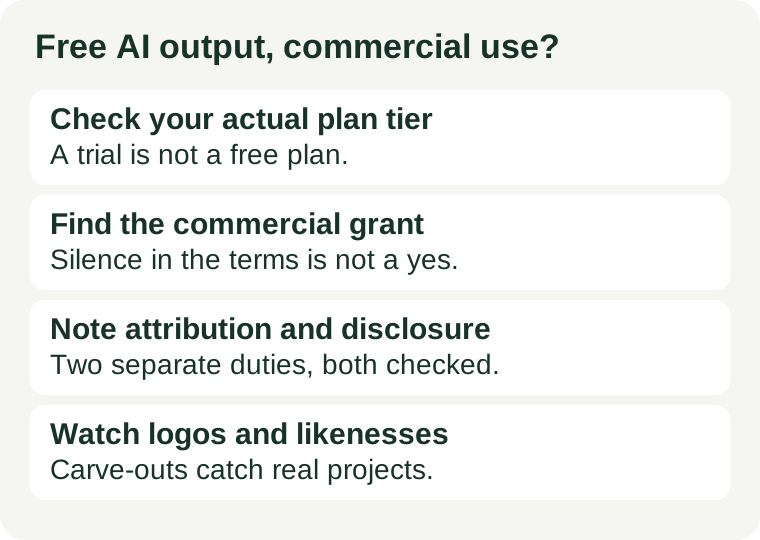
The short answer
No — not automatically. "Free to generate" and "free to sell" are different permissions. Some tools grant commercial use on every tier, some grant it only on paid tiers, and some grant it with conditions such as attribution, a ban on resale as merchandise, or a ban on trademark use. The only reliable answer is the one in the terms for your plan, on the day you publish. This guide is a checking method, not legal advice and not a verdict on any single tool: if the terms are unclear, treat the output as not cleared for commercial use until you have a clear answer.
Check 1: which plan are you actually on?
Start with your account page, not the pricing page. Pricing pages advertise the best version of a plan; your account page says which tier you hold, whether it is a trial, and whether a promotion has changed it. A free trial of a paid plan is not a free plan, and its commercial permission may end when the trial ends. Write down the plan name and the date you checked it — terms change, and a note made today is your evidence if the terms move tomorrow.
Ask: am I on the free tier, a trial, or a paid tier? If the answer is "a trial", check what happens to outputs you made during the trial after it expires. Some tools keep the permission; others do not say. If the terms do not say, do not assume the permission survives.
Check 2: does this tier grant commercial use?
Open the tool's terms of service and search for "commercial". Read the whole sentence around each hit, not just the word. You are looking for one of three answers: an explicit grant ("you may use outputs for commercial purposes"), an explicit restriction ("free tier outputs are for personal, non-commercial use only"), or silence. Silence is not a grant. If the terms say nothing about commercial use on your tier, treat the output as uncleared.
Watch for two common traps. First, the grant may sit in a different document from the one you opened — the terms, the licence, or a fair-use-style policy page can each carry part of the answer, so check the document the terms point to as well. Second, a model licence and a tool's terms are different things: an open-weights model may be downloadable for free while its licence still forbids commercial use, and a tool that runs a model does not transfer rights the model's licence withholds. For open models, check the model card's licence separately — our guide to "open weights" versus "open source" explains why a download is not a licence.
Check 3: attribution and disclosure — two separate duties
Attribution and disclosure answer different questions, and passing one does not pass the other. Attribution is owed to the tool: some free tiers require you to credit the tool or keep a notice on the output. If the terms require it, add the credit before publishing, in the place the terms specify, not buried where nobody sees it. Disclosure is owed to the platform and the audience: video and social platforms commonly require realistic AI-generated content to be labelled, and that duty applies whether or not the tool licensed you to monetise the output. You can be fully licensed and still in breach for not disclosing, and you can disclose perfectly and still be using an asset you were never licensed to monetise. Check both, every time.
Check 4: the carve-outs that catch real projects
Even a clear commercial grant usually has edges. Read the carve-outs before the output goes somewhere expensive to fix — packaging, paid ads, merchandise or a client handover. The usual ones are:
- Logos and trademarks. A grant to use an image commercially is not a grant to trademark it, and it does not protect you if the output resembles an existing brand. If the output will become a logo, run a basic originality and trademark check first; an AI logo you cannot protect is a weak asset however pretty it looks.
- Real-person likeness. Generating a face that resembles a real person, or using a real person's photo or voice as input, raises rights that no tool licence can sign away for you. Do not put such output in an ad or product without the person's consent.
- Mixed-in stock elements. Design tools often mix AI output with stock photos, icons or fonts, and those elements carry their own licences — free elements versus premium ones, regular use versus merchandise. The AI output may be cleared while a stock element inside it is not.
- Resale and redistribution. Some grants cover using the output in your own project but not reselling it as a standalone product, offering it as a template, or letting a client resell it onward. If the client will resell it, the client's use needs clearing too, not just yours.
Licence is not copyright — and that matters for protection
A tool's licence gives you permission to use the output; copyright decides whether you can stop someone else from copying it. Purely machine-generated output has weak or no copyright protection in most jurisdictions, because copyright generally requires human authorship. That means you can often sell AI output you cannot fully own: your permission comes from the licence, while your protection against copycats comes mainly from your own additions — your edits, your brand, your product, your trademarks. If exclusive control matters (a logo, a hero product image), add substantial human authorship of your own, and keep the working files that show it.
A five-minute routine, and what to record
- Confirm your plan on your account page and note the plan name and date.
- Search the terms for "commercial" and read the full sentence. Grant, restriction or silence — write down which one, with the link.
- Check attribution and disclosure separately. Add any required credit, and label AI content where the publishing platform requires it.
- Scan the carve-outs for your exact use: logo, ad, merchandise, client resale, real-person likeness.
- Save the evidence. Keep the terms excerpt, the plan name and the date next to the project file, so a later terms change does not leave you guessing what you relied on.
If any step comes back unclear, the safe move is boring and cheap: do not publish commercially yet. Either upgrade to a tier with an explicit grant, pick a tool whose free tier grants it clearly, or keep the output for personal use. And before the output leaves your hands, run the neighbouring checks in this series: export it and confirm it stays editable, and save your source notes and draft before a free limit stops you. A licence check protects the right to publish; those two protect the work itself. If the output will carry personal or client material into the tool in the first place, check the tool's data and training terms too — our guide to what "no login" really means is the starting point for that question.
Questions people ask
Does paying for one month clear everything I made while free? Not necessarily. Check whether the grant applies to outputs by tier at the time of generation, or to your account going forward. If the terms do not say, ask the provider or regenerate under the paid tier.
Can I use free AI output on a monetised channel? Only if your tier grants commercial use and the channel's disclosure rules are met. A monetised video is commercial use even if the tool never charges you.
What if the tool's terms change after I publish? That is why step 5 matters: the excerpt and date you saved show what you relied on. A later change may still affect future use, so re-check before reusing an old asset in a new campaign.
Is this legal advice? No. This is a practical checking routine for everyday publishing decisions. For a high-value asset — a brand mark, a product line, a client contract — get advice on your specific facts.
Sources and review scope
This is a method guide, checked 2026-10-27: it states no per-tool commercial-use verdict and no price, because tool terms change frequently and the terms page on the day you publish is authoritative. Its structure follows the standard four-point check described by independent licensing guides: confirm the plan tier, find the commercial grant in the terms, separate attribution from disclosure, and read the carve-outs for logos, likeness, mixed stock elements and resale. This article contains no affiliate links.
← All AI tools · Check a free AI export · Save free AI progress · How we verify offers