 KIKOMONO
The short answer
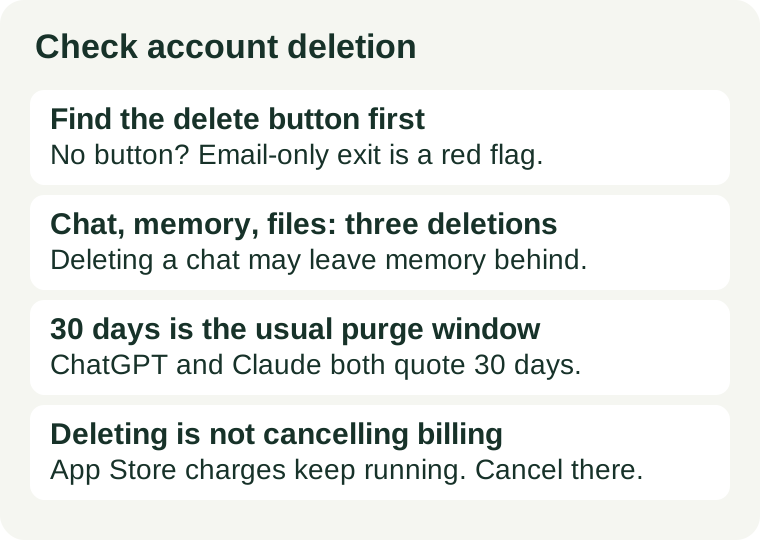
Check three things before you create the account: a delete button you can find in settings without emailing anyone, a written retention window that says how long your data survives after deletion, and a billing rule that says whether deleting the account stops the charges — or tells you exactly where to cancel instead. ChatGPT, Claude and Gemini all publish these answers on their own help pages, and all three put the purge window at 30 days. A tool that publishes none of them has not earned your email address yet.
1. Find the delete button before you need it
You cannot test the exit from inside an account you do not have yet, so read the provider's own help page first. Search it for “delete account” before you sign up. A real exit looks like a named settings path: ChatGPT lists Settings, then Account, then Delete account on the web; Claude lists your initials, then Settings, then Account, then Delete account. If the help page names the path, the exit is self-serve and you can use it the day you want out.
If the help page has no deletion article at all, or the only route is “email support to request deletion”, note that down before you sign up. Email-only deletion is not automatically a refusal — some small tools answer within 30 days — but it is slower, it depends on a human replying, and you cannot prove what was deleted or when. A tool with no delete button and no deletion page is asking you to trust a promise it has not written down. Our no-sign-up check covers the entry side of the same deal: an easy entry with no visible exit is the combination to watch for.
2. Deleting a chat is not deleting everything
The most common mistake is treating four different deletions as one. A chat, a saved memory, an uploaded file and the account itself each have their own control, and clearing one does not clear the others:
- Chat. Deleting a conversation removes it from your history. In ChatGPT and Claude the copy is purged from back-end storage within 30 days; it does not vanish the second you click delete.
- Memory. What the tool remembered about you is stored separately from the chat it learned it from. In ChatGPT, saved memories live under Settings, then Personalization, then Memory — deleting the chat that created a memory does not remove the memory. Clear both places.
- Files. Uploaded documents can live in a separate library from the chat that used them. Check the library or files area as its own step, and delete the upload there as well as the conversation.
- Account. Deleting the whole account is the only step that takes everything at once — chats, projects, files and settings — and it is permanent. There is no undo, and no grace period to change your mind.
Gemini adds a fifth wrinkle worth knowing before you sign up: deleting your activity does not delete chats that human reviewers already looked at. Google says those reviewed chats are kept for up to three years even after you delete your activity. And Gemini has no separate account to delete — the exit is the activity control, or the whole Google account. Read the retention sentence before you decide what the tool may keep, not after. Our privacy check before uploading covers the same four questions for the upload itself.
3. What the three big vendors promise — checked 2026-11-13
Three vendors, three written positions, all read on their own help pages on 2026-11-13. The pattern is the same in each case: deletion is permanent, the purge takes up to 30 days, and billing is a separate step.
ChatGPT (OpenAI)
On the web: Settings, then Account, then Delete account, then type your email address and DELETE to confirm. In the iOS app: Data Controls, then Delete account. In the Android app: Data Controls, then Delete OpenAI account. OpenAI says it deletes the account's data within 30 days, except for a limited set of data it must keep for legal or security reasons, and deleted chats are removed from its systems within the same 30 days. Two limits matter. First, deleting your account does not cancel a subscription bought through the Apple App Store. Second, self-service deletion is not available in ChatGPT Business, Enterprise, Edu or ChatGPT for Healthcare workspaces — those accounts are managed by the organisation. A deleted account cannot be reactivated, but you can create a new account with the same email address after 30 days.
Claude (Anthropic)
On the web: your initials, then Settings, then Account, then Delete account. In the iOS app: Settings, then Profile, then Delete account. In Android: Profile, then Account Actions, then Delete Account. Anthropic's order for paid users is cancel first, wait until the current subscription period ends, and only then delete — on a paid plan the deletion row tells you to cancel the subscription first. Export before you delete: Settings, then Privacy, then Export data, on the web or desktop app, and Anthropic emails a download link. Deleting is permanent with no grace period, and you lose conversations, projects and saved data. Deleted conversations leave your history immediately and are purged from back-end storage within 30 days. Re-registering with the same email address may be blocked for up to 30 days, and a subscription bought through the App Store or Google Play must be cancelled in the store.
Gemini (Google)
Gemini has no separate account to delete, so the exit is the activity control. Keep Activity is on by default for users aged 18 and over, and activity is auto-deleted after 18 months — you can change that to 3 or 36 months, or switch it off. Turning Keep Activity off does not erase what is already saved; future chats are still kept with your account for up to 72 hours. Chats picked for human review are retained for up to three years even after you delete your activity, and deleting Gemini activity does not delete data in other Google services. On a work or school account, an administrator controls Gemini Apps Activity and you cannot delete chats yourself. The full exit from Gemini is the full exit from the Google account, so check the activity settings before the first sensitive prompt, not after the fiftieth.
4. The billing trap: deleting is not cancelling
Deleting an account feels like ending the relationship, and for direct billing it is: OpenAI says deleting the account cancels a subscription billed directly through ChatGPT. But a subscription bought through the Apple App Store or Google Play lives in the store, not in the AI account, and deleting the account does not touch it. The charges keep coming, and you can no longer sign in to check. The safe order is cancel first, let the paid period run out, then export, then delete. Claude enforces the first half of that order for you — it will not let a paid account delete until the subscription is cancelled and the period has ended. If you signed up through an app store, cancel in the store's subscription settings before you delete anything. Our renewal-price check covers the other half of this trap: knowing the price and the cancel deadline before the trial clock runs out.
5. The five-minute exit check
Run this once per tool, before the first real prompt goes in:
- Search the help centre for “delete account”. A named settings path is a pass. No article, or email-only deletion, is a finding to write down — not a pass.
- Read the retention sentence. Look for a number of days, not a phrase like “as long as needed”. Thirty days is the usual window at the big vendors; a page with no number is unanswered.
- Separate the four deletions. Chat, memory, files, account — find the control for each one you will actually use. If the tool has a memory or files area, confirm its delete step exists too.
- Check the billing rule. Direct billing or app-store billing? If the store bills you, the cancel step lives in the store, and deleting the account will not stop it.
- Confirm the export exists. An export needs a working account, so it has to happen before deletion. If there is no export, anything you make in the tool only exists there — and our export check shows how to test whether the exported copy is actually usable.
If any step has no answer, that is not a maybe — it is a no for anything you would want back. Use the tool only with material you can afford to lose until the answer exists in writing. And once you do sign up, keep a one-line note of what you checked: the delete path, the retention window, and where billing lives. That note is what lets you leave in five minutes later, instead of spending an evening searching for an exit you never mapped. For keeping what you make along the way, see how to save free AI progress before a limit or a logout takes it.
Red flags to note before you sign up
- No deletion page at all. A help centre with no “delete account” article has not documented the exit. Treat that as unanswered, not as safe.
- Archive dressed up as delete. Archiving hides a chat; it does not remove it. If the only option you can find is archive or hide, the data is still there.
- Email-only deletion with no stated window. A request you cannot track, with no promised completion time, is a weak exit. Note the risk before you upload anything personal.
- No export option. If you cannot take your work out, deletion is the only way to leave — and it destroys the work too. Check the export before you build anything that matters in the tool.
- A managed account with no self-service. Work and school accounts route deletion through an admin. That is normal, but it means the exit is a conversation with your admin, not a button you control.