 KIKOMONO
The short answer
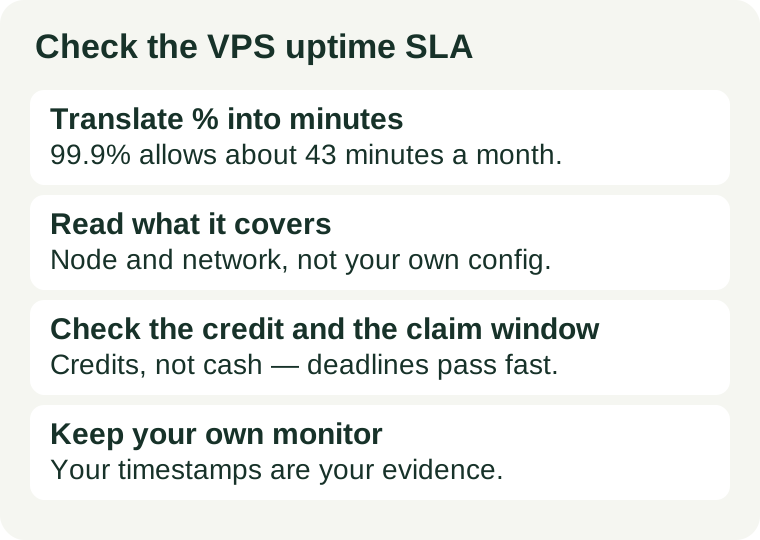
Check five things, in this order: what the percentage means in minutes per month, what the guarantee actually covers, what the credit is worth and how it is capped, how long you have to claim it, and how you will prove an outage happened. The sales page headline is not the answer; the SLA or terms page for the exact plan is. If the provider publishes no SLA at all, that is itself a signal — an uptime promise with no written remedy is a marketing line, not a commitment.
1. Translate the percentage into minutes
Uptime percentages hide how much downtime they allow, because the numbers look almost identical. In a 30-day month of 43,200 minutes, the common guarantees work out as:
- 99%: about 7 hours 12 minutes of downtime allowed per month.
- 99.9%: about 43 minutes allowed per month.
- 99.95%: about 22 minutes allowed per month.
- 99.99%: about 4 minutes allowed per month.
Each extra nine cuts the allowance roughly tenfold, so the gap between 99.9% and 99.99% is not a rounding difference — it is the difference between a 43-minute outage budget and a 4-minute one. Before you compare two providers' numbers, convert both to minutes; that is the only scale on which they can be compared honestly.
2. Find what the guarantee actually covers
An SLA rarely covers "your server is up". Read the scope section for these four points, and note which ones apply to the plan you are buying:
- The measurement point. Many guarantees cover the host node and the network, not your individual VPS. A VPS you powered off, misconfigured or overloaded yourself does not count as provider downtime.
- Scheduled maintenance. Planned maintenance windows are almost always excluded from the count, and emergency maintenance usually is too. The percentage therefore applies to unplanned downtime only.
- Your own configuration. Downtime caused by your code, your firewall rules or a terms violation is excluded. Our firewall check is worth doing early for exactly this reason — a rule you set yourself can look like an outage.
- What counts as down. Some SLAs define downtime as the network being unreachable; others count the hypervisor. A server that answers ping but serves errors may or may not qualify, so read the definition, not just the number.
If the scope section is missing or vague, ask support in writing before you pay, and keep the answer. A guarantee whose scope you cannot read is a guarantee you cannot claim against.
3. Read the credit, not the headline
The remedy for a missed SLA is almost never cash. Check three facts about the credit before you buy:
- Credits, not cash. Providers pay in service credits against future hosting fees. The credit only helps if you stay with the same provider — which is exactly what a bad outage may make you reconsider.
- The credit table and the cap. Many SLAs pay a rising share of the monthly fee as uptime falls — for example 10% at one band, 25% at the next, up to a cap that is often 50% or 100% of the monthly fee. A two-hour outage on a small plan may therefore earn only a few dollars of credit. As published examples checked 2026-11-08: DigitalOcean's SLA states 99.99% per Droplet with a service credit on the affected Droplet's charges, and KnownHost's published terms state 99.9% network uptime with a credit table rising to 100% of the monthly renewal price. Terms change, so verify the live SLA page at checkout rather than relying on any quoted figure.
- Automatic or on request. Some providers apply credits automatically; most require you to file a claim. A credit you have to ask for is a credit you can forget to ask for — which is why the claim window in the next section matters.
Price the SLA for what it is: a small rebate and a signal that the provider measures its own uptime, not compensation for lost sales. If the real risk is a launch-day outage, the remedy is a second server or a different plan, not a higher percentage.
4. Check the claim window and the evidence you need
Claim windows are short, and they vary widely. Published examples checked 2026-11-08 range from about five days after the incident to 30 days, and some providers allow up to two billing cycles — but the window for your plan is whatever your provider's SLA states, and it starts from the incident, not from when you notice the bill. Before you buy, write down three things:
- The deadline. How many days after the incident must the claim be filed, and through which channel — a billing ticket, an email address, or a support form?
- What the claim must include. Most SLAs ask for the incident's dates and times and a ticket or reference number. Keep the outage ticket number from the incident itself; it is often required to link the claim to the event.
- Whose measurement counts. Providers calculate credits from their own monitoring. Your own monitor's timestamps do not override theirs, but a dated record supports the ticket and helps when the two disagree.
Put the deadline in your incident runbook next to the refund window. Our refund window guide covers the same discipline for the first weeks of a plan: a deadline you never wrote down is a deadline you will miss.
5. Verify the promise after you buy
The SLA is the remedy, not the measurement. Once the server is live, check the promise with your own data:
- Run an external monitor. Place a monitor outside the provider's network, checking at least every minute, and keep its history. One monitor in one location can be fooled by a network path problem; two monitors in different networks are far harder to argue with.
- Read the status page history. A provider that publishes a public incident history is showing you its real record. A status page with no history at all is not evidence of perfect uptime; it is evidence of no published history.
- Compare, don't assume. At the end of the first month, compare your monitor's measured uptime with the SLA figure. If your number is worse, open a ticket with the timestamps while the claim window is still open — not at renewal time.
If the provider's own numbers and yours disagree persistently, that disagreement is itself a finding: either the measurement point differs from what you assumed, or the service is less reliable than the headline. Either way, you now have evidence instead of a feeling.
When an SLA is not the right safety net
Two cases deserve a different plan rather than a higher percentage. First, if the risk is the first week rather than the first outage — a server that is slow, misconfigured or the wrong size — no SLA fixes it; that decision belongs to the refund window, made before the window closes. Second, if the risk is a single point of failure taking the site down during a launch, no credit after the fact restores the lost traffic; that risk belongs to redundancy, not to a guarantee. The SLA protects you against a provider that misses its own standard. It does not protect you against a plan that was wrong from the start. Use each safety net for the risk it actually covers — and if support quality matters as much as uptime to you, run our support response check alongside this one.