 KIKOMONO
The short answer
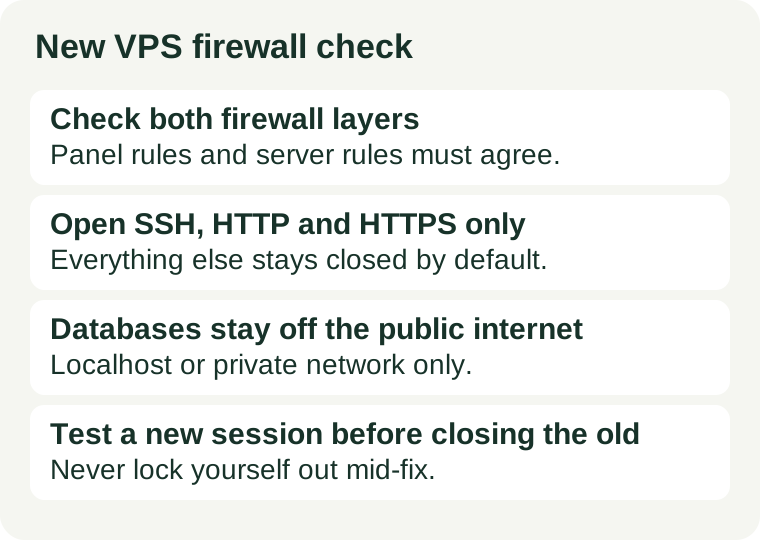
A firewall rule decides whether a port answers the internet. Most new servers have two of them in front of every port: the provider's cloud firewall, set in the hosting panel, and the firewall running on the server itself, such as UFW, firewalld, or iptables rules. A port is reachable only when both layers allow it — so a port the panel shows as closed can still be open if the other layer allows it, and a port the server allows can still be closed by the panel. Checking one layer and assuming the other matches is the most common way this check fails.
Do not assume a fresh server ships closed. Defaults differ between providers and images: one image may start with only SSH open, another may leave a control panel or a database reachable. The check below takes minutes, costs nothing, and belongs in the same first-week routine as our IP blocklist check and backup restore test — cheap before launch, expensive after, because an open port found by a scanner is found by everyone.
1. List what is actually listening
Start on the server, not in the panel. The listening list is the truth about which services are waiting for connections, whether or not anyone wrote a firewall rule for them:
- List listening TCP ports on the server. The usual command is
ss -tlnp, which shows each listening port and the program behind it. Read it as a list of claims: every line is a service saying "I am ready to talk to someone." - Match each line to a service you recognise. SSH, a web server, and any application you installed should be there. A line you cannot explain — a database, a cache, a panel you did not mean to expose — is the finding, not a detail to skip.
- Note which address each service listens on. A service bound to localhost (127.0.0.1) is not reachable from the internet even with no firewall rule; a service bound to all addresses (0.0.0.0) is reachable unless a firewall layer blocks it. That distinction decides whether a port needs a firewall rule at all, or a configuration change instead.
Do this before installing extra software, so the baseline is clean, and again after each install. A panel or an application installed later can add a listening service you never asked the firewall about.
2. Decide the shortlist: what stays open
For a typical small site, the open list is short. Everything not on it should be closed or bound to localhost:
| Port | Service | Public or not |
|---|---|---|
| 22 (SSH) | Server administration | Open, but limited to your addresses if the panel allows it |
| 80 (HTTP) | Web traffic, and redirects to HTTPS | Open |
| 443 (HTTPS) | Encrypted web traffic | Open |
| Database ports | MySQL, PostgreSQL, Redis and similar | Never public — localhost or private network only |
| Control panel port | Hosting panel, if you use one | Only from your own address, never from everywhere |
| Everything else | Anything you did not deliberately publish | Closed |
Two entries deserve emphasis. A database port open to the internet invites automated password guessing against your data, and a guessed database password costs you the data, not just a defaced page. And a control panel reachable from everywhere is a login page offered to the whole internet; if you use one, restrict it to your own address in the provider's firewall, even if the panel itself also asks for a password.
Mail ports are the exception that proves the rule: only open them if this server actually sends or receives mail, and only the ones your mail setup uses. Our blocklist guide covers the reputation side of that decision; this check covers only whether the port should answer at all.
3. Check both layers, then test from outside
With the listening list in hand, check each layer in turn:
- Provider cloud firewall. In the hosting panel, read the firewall or security-group rules attached to this server, not just the account defaults. Confirm that only the shortlist is allowed in, and that any panel or database rule is restricted to your address. A rule attached to a different server, or an account-level default you assumed applied, does not protect this one.
- Server firewall. Check the on-server firewall's active rules with the tool your image uses — UFW, firewalld, or iptables — and confirm they match the same shortlist. If the server has no firewall running at all, the provider layer is your only layer, and that is a fact to fix rather than assume away.
- Test from outside. From your own machine, try to reach each port that should be closed and each port that should be open. A closed port should not answer; an open port should answer only for the services on the shortlist. Test only a server you own or are authorised to test — never scan someone else's server to practise.
If the inside list and the outside test disagree — a port listens but does not answer, or answers though you thought it closed — believe the outside test for reachability and the inside list for the cause. A listening service behind a closed firewall is safe but still worth knowing about; a service you thought closed that answers from outside is the fix to make now.
4. Close it without locking yourself out
The one way this check hurts you is a firewall change that cuts off your own SSH session with no way back. Avoid it with a fixed order:
- Keep your current SSH session open. Do not close it while you edit rules. It is your way back in if a new rule is wrong.
- Add the allow rule for SSH before you add any deny rule. The allow for your administration access goes in first, and only then the rules that close the rest.
- Open a second, new SSH session and confirm it connects. Only when the new session works is the change proven safe.
- Then close the old session. If the new session fails, the old one is still there to fix the rule — that is the whole point of the order.
If you do lock yourself out, the recovery route is the provider's console access — the browser-based terminal in the hosting panel, which does not go through the firewall. Know where that console is before you need it; finding it during a lockout, while stressed, is the wrong time to learn the panel. And note the refund-window angle: if a provider image ships with ports exposed that you did not ask for, that is worth raising with support inside the window our refund window guide explains how to find, before the server accumulates data that makes a rebuild painful.
5. Recheck after every change
A firewall is a snapshot, not a permanent state. Recheck — inside list plus outside test — after every install, every panel added, every application deployed, and every rule edited by hand. A single recheck after a change costs minutes; a port opened by an install and left open for months costs whatever the first scanner to find it decides to try.
Keep the record short: the date, the listening list, and the outside result. When something later goes wrong — a service unreachable, a login attempt from an odd address — that record tells you what changed since the last known-good state, instead of leaving you to guess from a panel you have not looked at since launch day.
What not to do
Do not move SSH to an unusual port and call the server secured, and do not scan servers you do not own. A moved SSH port only quiets the log noise; key-only login and a restricted firewall rule are the actual protection. And a port scan is a probe: run it only against your own server, where the outside test belongs.
Do not leave a database or a panel open "temporarily" while you set things up and plan to close it later. Temporary openings are the ones that get forgotten, and a scanner does not know your intentions — it only knows the port answered. Open a port when the service that needs it is ready, not before, and close it the day that service stops needing it.
Checked 2026-11-04. Firewall tools, panel layouts, and provider defaults differ and change; confirm the rule locations on your own provider's and image's documentation before you act on a result.