 KIKOMONO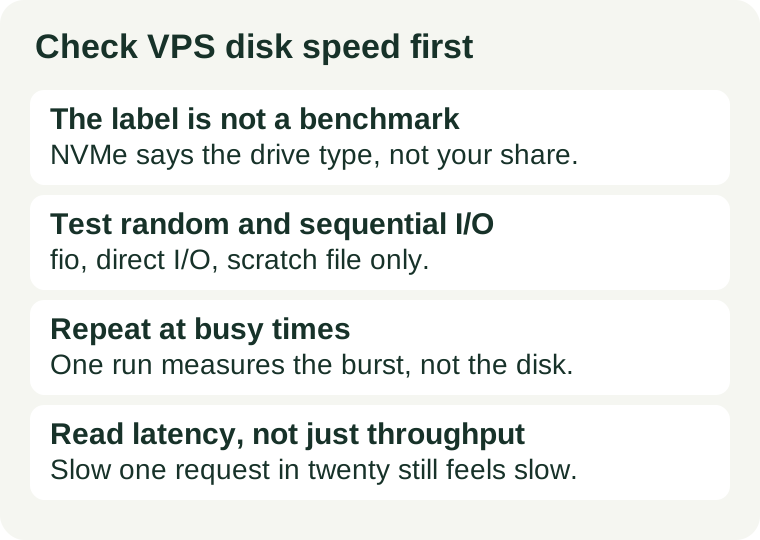
The short answer
On a shared VPS, the drive in the sales page is not the drive you get. You get a slice of it, shared with neighbours, possibly throttled, and possibly fast only while a burst allowance lasts. The check is fio, the standard Linux disk benchmark: one random-read test with small blocks, one sequential test with large blocks, both with direct I/O so the page cache cannot flatter the result. Run each test at least twice, at different times of day, on a scratch file you delete afterwards. Compare the runs with each other before you compare them with anything else — a disk that is fast at 3 a.m. and slow at 8 p.m. is telling you about the host, not about your workload.
Do this during the trial or money-back window, on a test server or a fresh install, not on a live database. The write test writes real data, and a benchmark run on a production volume is a risk, not a measurement.
What disk speed decides — and what it does not
Disk speed decides how fast the server reads and writes when the work is actually waiting on the disk: database queries that miss the cache, image uploads, backups, log writes, and the first load of pages nothing has cached yet. It does not decide everything that feels slow. A page that waits on a slow database query, an overloaded CPU, or a far-away visitor will stay slow on the fastest drive in the world. That is why this check belongs next to the other buying checks, not instead of them: our NVMe verification guide confirms what kind of drive you were given, and our steal-time check shows whether the CPU is being lent to a neighbour. Disk speed is the third leg of the same stool.
Three numbers come out of a disk test, and they answer three different questions:
- Throughput (MB/s) — how much data moves per second. This is the number that matters for backups, uploads, and large sequential reads.
- IOPS — how many small operations complete per second. This is the number that matters for databases and busy sites, where the work is thousands of small reads and writes, not one big file.
- Latency (ms) — how long a single operation waits. High latency with decent throughput means requests queue up: pages feel sluggish even though the totals look fine.
A sales page that quotes only one of these is hiding the other two. A small VPS can show a fine sequential throughput while its random IOPS collapse under a database load, and that is exactly the workload a growing site runs.
The test: two fio runs, direct I/O, scratch file only
fio is the usual tool for this, and it is in most distributions' repositories. If it is not installed, install it on the test server only — never on a live site just for a benchmark. Run both tests in an empty directory with plenty of free space, and delete the test files when you are done.
Test 1: random reads, 4K blocks — the database test
fio --name=randread --rw=randread --bs=4k --size=1G --numjobs=1 --runtime=60 --time_based --direct=1 --group_reporting
Random 4K reads are the closest simple stand-in for database and small-file work. The --direct=1 flag is the important one: without it, Linux serves much of the test from RAM cache, and you end up benchmarking your memory, not your disk. The --size=1G file must fit comfortably in free space — on a small disk, shrink it rather than filling the volume.
Test 2: sequential writes, 1M blocks — the backup test
fio --name=seqwrite --rw=write --bs=1M --size=1G --numjobs=1 --runtime=60 --time_based --direct=1 --group_reporting
Sequential writes are the backup-and-upload test: big, orderly, and the easiest number for a drive to look good on. That is the point of running it. If even the easy test is slow, the disk is slow. If the easy test is fast and the random test is not, the disk is fine for files and weak for databases — and you now know which kind of site it suits.
After both runs, remove the test files (rm -f randread.* seqwrite.* in the test directory, or the filenames fio reports) and confirm the space is back with df -h. A benchmark that leaves a gigabyte behind on a 25 GB disk has already changed the server it measured.
Why one run lies: cache, neighbours, and burst allowances
Three effects make a single benchmark untrustworthy, and each has a different fix:
- Cache. Without direct I/O, reads come from RAM and look impossibly fast. Fix: always use
--direct=1, and distrust any result that beats what the drive could plausibly do. - Neighbours. On a shared host, another customer's backup or build can halve your numbers for an hour. Fix: repeat the tests at different times of day, including a busy evening hour, and keep the timestamps with the results.
- Burst allowances. Some plans let a disk run fast until a credit balance empties, then throttle it. A short test inside the burst window measures the burst, not the sustained speed. Fix: run the longer test (60 seconds at least), repeat it on a second day, and watch for a sharp drop between the first and second run.
If the numbers move a lot between runs, that movement is the finding. A disk whose random-read IOPS halve every evening is not a disk you plan a growing site on, whatever its best run says.
Reading the output without a threshold table
You will not find a published "minimum acceptable IOPS" for a shared VPS plan, because providers do not promise one — and any article that prints a pass/fail line is inventing a specification nobody signed. Read the output comparatively instead:
- Compare runs with each other. The same server, same test, different hours. Stable numbers mean a stable share; wild swings mean contention.
- Compare the two tests with each other. Sequential far above random is normal; random close to zero while sequential flies is a warning for database work.
- Read latency alongside throughput. In
fio's output, thelatsection shows average and percentile latency. A run with respectable throughput but a 95th-percentile latency in the tens of milliseconds will feel slow to visitors, because one request in twenty waits that long. - Compare with your workload, not with another server's headline. A static site that serves cached pages barely touches the disk; a WooCommerce or forum database touches it on nearly every request. The same numbers can be plenty for the first and a bottleneck for the second.
Keep the raw output with dates and times. It is the evidence a support ticket needs ("random-read IOPS fall by half every evening, here are three days of runs"), and it is the baseline you re-run after any move, upgrade, or complaint that the server "got slower".
When the numbers say move, upgrade, or accept
Three decisions, and only three, come out of this check:
- Accept when the numbers are stable across days and hours and the latency stays low under your real workload. A stable mediocre disk beats a fast-then-throttled one.
- Move node or provider when the numbers swing wildly with the time of day, or when latency spikes while throughput holds up. That pattern points at the shared host, not at your configuration, and no setting inside your server fixes it. Our backup-restore test is the companion check before any move: a fast disk you cannot restore from is not an upgrade.
- Upgrade the disk tier, not the whole server, when the numbers are stable but consistently below what your workload needs. More CPU will not fix a disk bottleneck, and paying for a bigger server to escape a slow disk is the most expensive way to buy storage speed.
If the numbers are bad only during the trial's first hour, say so in your notes and re-test before deciding — a fresh server doing its first updates is not a fair sample. But if the pattern holds across days, trust the pattern over the sales page. The label says NVMe; the benchmark says what your share of it actually does.