 KIKOMONO
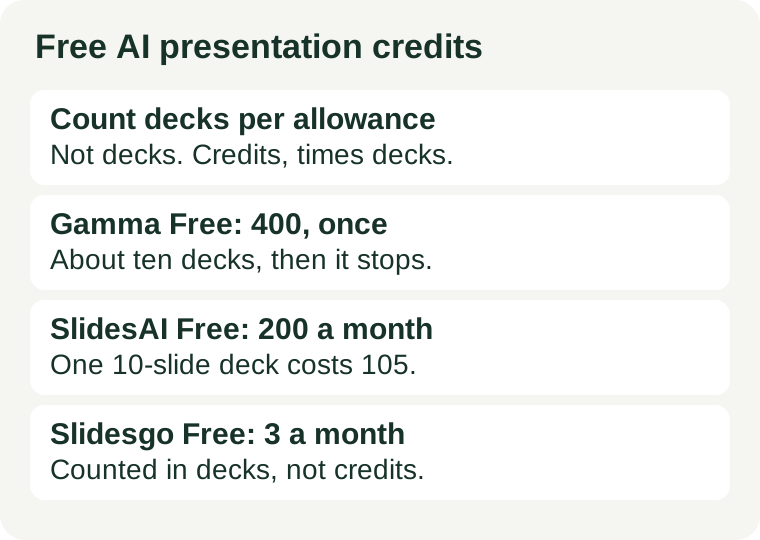
Count decks per allowance, not decks per month
Every click on Generate is a spend, but only the deck you actually present counts as output. A class deck is not one generation. It is a draft, then a fix for the slide that reads wrong, then a layout change, then a shorter version for the handout — four or five spends for one finished deck. Budgeting by “decks per month” hides that multiplier; budgeting by credits per finished deck exposes it.
The arithmetic is simple, and it has only two inputs:
Finished decks per allowance = allowance ÷ credits per finished deck.
Credits per finished deck comes from the tool: some publish a per-deck price table, some publish only the allowance and leave the per-deck cost to be measured. The second input comes from you: how many generations your last real deck actually took. Measure it once, and the allowance stops being a mystery. The one extra question presentations add, which pictures do not, is whether the allowance refills: a monthly 200 is a habit, a one-time 400 is a single look.
What the official pages say — checked November 2026
Five free plans, four different ways of counting. The difference matters more than the headline allowance.
Gamma Free: the countable one — 400 credits, once
Gamma’s pricing page gives free accounts 400 credits at signup, and in Gamma’s own words they “do not refill”. No card is required, a prompt makes up to 10 slides, and free exports include PDF, PowerPoint, PNG and Google Slides — with a “Made with Gamma” badge on them. Independent checks of the pricing page put a full deck at roughly 40 credits, which would make 400 credits about eight to ten decks; Gamma itself publishes no fixed credits-per-deck figure, so treat that as a rough guide, not a promise. Official pricing.
This is the most generous one-time grant in this guide, and the most final: when the 400 are gone, generation stops until you pay or earn referral credits. It is a trial you can stretch across a term, not a tier you can live on.
SlidesAI Basic: the only one with a published price table — 200 credits a month
SlidesAI’s help centre publishes the exact cost of a deck. On Balanced, the default quality, a 1–5 slide deck costs 70 credits and a 6–10 slide deck costs 105; on Lite, the cheaper quality, the same decks cost 36 and 53. The free Basic plan gives 200 credits a month, and unused free credits expire at the end of the month. AI images cost extra — 1 credit for Quick, 2 for Standard, 5 for Sharp — while stock images from the web are free. The free plan caps a presentation at 10 slides and each message at 2,500 characters. Official help centre.
Do the division before you start: 200 credits buys one finished 10-slide deck at Balanced quality (105) with room for edits, or up to three short decks at Lite (53 each). A single slide change costs 5 credits on Balanced, so fixing wording after the fact is cheap — regenerating the whole deck is not.
Pitch Free: 100 credits, once — and no PowerPoint export
Pitch’s pricing page lists the Free plan at $0 for up to 5 members, with unlimited presentations, 2 external guests, and 100 one-time AI credits that do not renew. Independent checks put a generated deck at roughly 100 credits, so the free allowance is about one deck. The harder limit is the export: free accounts export branded PDF only, and PowerPoint export starts on the paid plans. Official pricing.
Pitch Free is a look at the editor and the collaboration, not a way to make decks for free. If the finished file must be a PPTX, the free tier cannot produce it at any credit price.
Slidesgo Free: counted in decks, not credits — 3 a month
Slidesgo is the only plan here that answers the question directly: its AI page says a free account can create up to 3 AI presentations a month, and the pricing page lists 3 template downloads a month alongside it. The download is an editable PPTX, compatible with PowerPoint and Google Slides. Free output requires attribution to Slidesgo, and the free tier shows ads. An account is required to generate and download. Official AI presentation maker page.
No credit arithmetic is needed, which is the point: three decks a month, every month, is a small but real recurring allowance. It is the only free plan in this guide you can plan a monthly habit around without doing division.
Canva Magic Design: 10 free uses, then done
Canva’s AI presentation page puts the free allowance for Magic Design at up to 10 uses for free across all its versions, including presentations. One use is one generation, so ten generations is the whole allowance, and Canva’s pricing page gives the free plan no credit number to refill. If you already design in Canva, those ten uses are a genuine free trial of the AI draft; if you need an eleventh deck, the free tier has nothing left to give.
Beautiful.ai: a trial, not a free plan
Beautiful.ai’s presentation page offers a 14-day free trial, and the trial requires a card. After fourteen days the free access ends. Treat it as a way to test the guided-layout editor before a deadline, not as an answer to “free forever”.
Measure it on your first real deck
Do not estimate credits per finished deck. Measure it, once, on a deck you actually need:
- Write the full outline before the first generation — topic, audience, and the point of each slide.
- Generate, then tally every regeneration until you have a deck you would present: wording fixes, layout changes, shorter versions, all of them.
- That tally is your generations per finished deck. For example, a ten-slide class deck might take five: one draft, two wording fixes, one layout change, one shorter version.
- Multiply by the credits per generation from the price table, and compare with the allowance — remembering whether the allowance refills.
If the result does not fit the allowance, that is a tool-fit signal, not a prompt failure. Either the job needs a tool with a monthly allowance, or it needs fewer generations — which is a workflow fix, covered below. Do not solve a credit shortage by re-rolling harder; re-rolling is what caused it.
Four ways to spend fewer credits
- Write the whole outline before the first run. Every “make it better” re-roll is a spend. Decide the slides and their points first, then generate once.
- Start on the cheaper quality. On SlidesAI, Lite costs half of Balanced for the same deck — 53 credits instead of 105 for ten slides. Draft on Lite, and spend the higher quality only on the keeper.
- Use stock images instead of AI images. SlidesAI charges 1–10 credits per AI image and nothing for stock images from the web. A deck with six Standard AI images pays 12 credits for pictures alone; the same six as stock images pay nothing.
- Fix wording in the editor instead of regenerating. A one-slide change on SlidesAI Balanced costs 5 credits; a full ten-slide deck costs 105. Editing the sentence yourself is twenty times cheaper than asking the model to rewrite the deck.
When free stops being enough
Two signs, and only two, mean the free tier is the wrong tier rather than a tight one. First, the same real task fails twice in a month for credits, not for quality — the allowance, not your prompting, is the bottleneck. Second, the free tier’s other conditions block the job: Pitch’s free tier cannot export a PPTX at all, Gamma’s free exports carry its badge, and Slidesgo’s free output requires attribution. Our commercial-use check covers the licence side of that second question in full. A paid plan fixes the first problem; it is the only fix for the second that also changes the terms.