 KIKOMONO
What upscaling can — and cannot — do
Upscaling does not recover detail. It invents it. A neural network trained on millions of high- and low-resolution pairs looks at your small image, recognises patterns, textures and edges, and predicts what the missing pixels should look like. The result is a larger image that looks sharper — and, for faces, hands and small text, sometimes looks confidently wrong.
That is why the check matters more than the tool. A 2x upscale of a clean 800-pixel photo usually looks good. The same 2x on a heavily compressed screenshot usually looks like a cleaner version of the same mess, with the compression artefacts enlarged along with everything else. The tool did not fail; the input was never going to survive. Three questions decide the outcome before you click anything: is the file small enough to be accepted, is the output large enough for the job, and does the file stay on your machine or travel to a server?
Three free starting points — checked 2026-11-18
Each claim below was read on the vendor's own page on 2026-11-18. Where a vendor publishes no number, this guide says so instead of guessing.
You want the file to stay on your machine: Upscayl
Upscayl is a free and open-source desktop app for Linux, macOS and Windows, and its own site says you download it once and it is yours. It upscales by up to 16x, offers several models for different kinds of images, and can batch-process several images in one go. Because the desktop app runs on your own computer, a private photo never has to be uploaded to a server — that is the reason to pick it for family photos, client work, or anything you would not post publicly. Official site.
The trade-off is the install: you download an app and your machine does the work, so a very old computer will be slow on large batches. For a handful of images that is a fair price for keeping the files local.
You want a free web tool with published limits: waifu2x
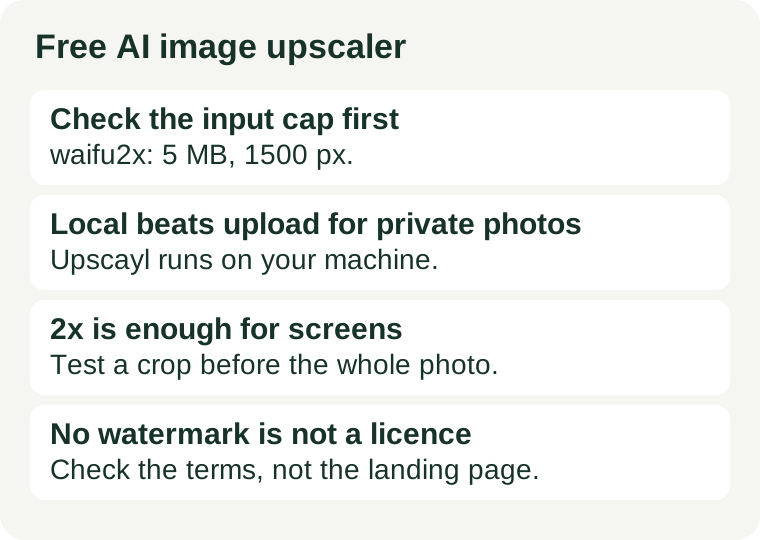
waifu2x is a free web upscaler, built for anime-style art and also supporting photos, that needs no account at all. Its limits are published on its front page, which is rare enough to be worth noting: files up to 5 MB, noise reduction up to 3000 by 3000 pixels, and upscaling up to 1500 by 1500 pixels, at 1.6x or 2x. A 4x option exists on its unlimited sub-site. Output is PNG or WebP. Official site.
Read the cap before you start: if your image is already larger than 1500 pixels on a side, the free tier cannot upscale it further, and no amount of re-trying changes that. The noise-reduction setting is the other control that matters — the site itself warns to use it only when the image actually has noise, because it can make a clean image worse.
You want a quick web upscale with no sign-up: Upscale.media
Upscale.media is a free online upscaler that works in the browser with no registration and no software to install. Its own page says you can upscale by 2x, 4x or 8x, that it supports PNG, JPG, JPEG, WEBP and HEIC, that the maximum file size is 25 MB, and that the free tier adds no watermark. It also says signed-in users can reach a higher maximum resolution than guests, without publishing the exact pixel cap in plain text on that page. Its pricing page does publish the free allowance: one image a day without an account, and 3 free credits plus 3 free downloads a month once you sign up (checked 2026-11-18). Bulk processing and commercial use go through its sister product PixelBin.io, which sells credits. Official site.
No registration is convenient and also the privacy trade: the image is processed on their servers, so it leaves your machine. For a product photo or a social post that is fine; for a private photo it is a reason to use the local tool instead.
The five-minute check before you upload
Run this on the file you will actually upscale, not on a thumbnail of it:
- Measure the input. Check the file's dimensions and size first, then compare with the tool's published cap: waifu2x takes 5 MB and 1500 pixels for upscaling, Upscale.media takes 25 MB. A file over the cap will be rejected or silently downscaled — either way, the tool is not the problem.
- Decide the output you need. For screens, 2x is usually enough: an 800-pixel image becomes 1600 pixels, which already looks sharp on most displays. Go to 4x or 8x only for print, where the output size in centimetres decides the number. Bigger is not better; it is just bigger, slower, and more invented detail.
- Test a crop first. Upscale a small crop containing a face, some text, or a busy edge — the parts where invention shows — before you run the whole image. If the crop looks clean, run the full image; if it looks waxy or the text turns to mush, try another model or another tool instead of re-running the same one.
- Zoom to 100% and read everything. View the result at full size and check faces, hands, and any text letter by letter. An upscaled image that looks fine as a thumbnail can fall apart at full size, and the thumbnail is not what you will publish.
- Check where the file goes — and what you may do with the result. Local tools keep the file on your machine; web tools upload it. And upscaling does not create a new copyright in the image, nor does it change the source image's licence. Our privacy check before uploading and our commercial-use check cover those two questions in full.
When free stops being enough
Three signs, and only three, mean the free tier is the wrong tier rather than a tight one. First, the same real task fails twice for the cap, not for quality — your images are already larger than the free limit, or you need a batch the free tier will not run. Second, the job is private and the only tool that fits is a web uploader; that is a privacy mismatch, not a price problem, and the fix is the local tool. Third, the licence blocks the use: a personal-use tool, or a source image you do not own, does not become commercial because the output looks professional. A paid plan fixes the first problem; it is the only fix for the second that also changes the terms. For the credit arithmetic behind the rest of your image workflow, see Free AI image credits: what one finished picture actually costs, and for picking the generator in the first place, Free AI tools for images.