 KIKOMONO
The short answer
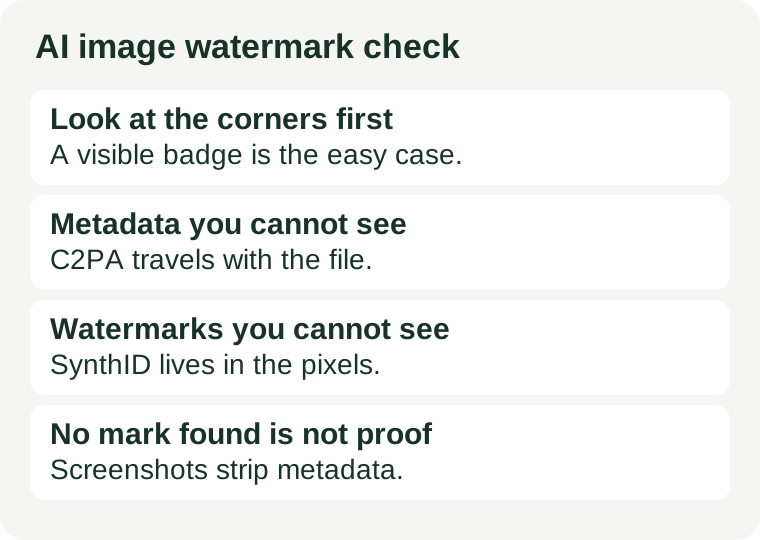
Three different marks can travel with a free AI image, and they answer three different questions. A visible badge says “AI-made” to anyone looking at the picture. C2PA Content Credentials are signed metadata attached to the file: they record the issuer, the tool and the date, and a reader can verify them. An invisible watermark such as SynthID is embedded in the pixels themselves, so it can survive a screenshot that strips the metadata. Most free tools attach at least one of the invisible two and none of the visible one — so “I cannot see a watermark” is not a finding. It is the absence of a check.
1. Three marks, three different jobs
Learn the three before you check any single image, because each one fails in a different way.
A visible badge or label is the only mark a reader sees without a tool. Some tools add one, most do not, and a prompt can usually add one on request. It is a disclosure, not a proof: anyone can crop it off, and its absence proves nothing about how the image was made.
C2PA Content Credentials are signed metadata that travel with the file. They can record who issued the image, which app or tool made it, when it was made, and what was done to it — and because they are cryptographically signed, tampering with them is detectable. Their weakness is the file itself: edit it, convert it, upload it to a platform that strips metadata, or screenshot it, and the credentials may not survive the trip.
An invisible watermark such as Google DeepMind's SynthID is embedded in the pixels, not attached to the file. It is meant to survive the handling that kills metadata. It is still not a guarantee: heavy cropping, compression or noise can degrade it, and a check that finds nothing is not proof the image was never AI-generated — it is proof that this check, on this copy, found nothing.
The practical rule follows from the three weaknesses: check the original downloaded file, check it with the vendor's own reader, and treat any single negative result as inconclusive.
2. What the four free tools actually attach — checked 2026-11-14
Each claim below was read on the vendor's own page on 2026-11-14. Where a vendor publishes no watermark statement for its free tier, this guide says so instead of guessing.
ChatGPT: C2PA metadata plus an invisible SynthID watermark
OpenAI's provenance page says images generated through ChatGPT, Codex or the OpenAI API include both C2PA Content Credentials and SynthID watermarks. C2PA metadata has been attached since the DALL·E 3 era; SynthID was added for images through a partnership with Google DeepMind. OpenAI also says the signals can be lost through everyday actions such as taking a screenshot or converting a file, and that heavy cropping or compression can make the watermark undetectable. Anyone can check a file at openai.com/verify, and the same check is available through OpenAI's Content Provenance API. A “not detected” result does not conclude the image was not generated with OpenAI tools. OpenAI's provenance page.
Microsoft Designer: C2PA content credentials on AI images
Microsoft's Designer FAQ says that for all images created with Designer's editing features, content credentials based on the C2PA standard are implemented to help people identify whether images were edited or generated with AI, and that the provenance metadata can be viewed on the Content Credentials site. The same FAQ says all images generated using AI features in Designer have metadata attached to identify the source. Check a Designer image at contentcredentials.org. Two other facts from the same page matter for publishing: Designer is free to use, and it is licensed for personal, non-commercial use. Microsoft's Designer FAQ.
Adobe Firefly: Content Credentials applied automatically
Adobe's Content Credentials page says Adobe automatically applies Content Credentials to assets where 100 percent of the pixels are generated using Adobe Firefly, such as Text to Image. The credentials record the issuer (Adobe Inc.), the date, the app or device used, the AI tool used and the actions taken, and a copy may be stored in Adobe's Content Credentials cloud so it can be recovered. Check a Firefly image with Adobe's Content Authenticity Inspect tool. Adobe's own credits FAQ says the number of credits in a free plan is subject to change, so pair this check with our credits-per-finished-picture check before building a workflow on the free tier. Adobe's Content Credentials page.
Gemini: SynthID plus C2PA, verifiable in the app
Google DeepMind's Gemini Omni page says content created or edited with Omni in the Gemini app, Google Flow or YouTube includes Google's imperceptible SynthID digital watermark and C2PA Content Credentials, and that you can verify content through the Gemini app. SynthID embeds the signal in the pixels; C2PA carries the signed record with the file. If the tool you use publishes no watermark statement at all — Ideogram's documentation, for example, describes free generations as public but makes no watermark claim we verified — do not assume the image is unmarked. Check the file itself with a reader, and treat an unreadable result as unproven, not as clean. Google DeepMind's Gemini Omni page.
3. The five-minute check before you publish
Run this on the file you will actually publish, not on a preview inside the chat:
- Look at the picture at full size. Zoom to 100% and check the corners and edges for a badge, label or logo. Read any text in the image letter by letter — a visible mark is the easy case, and a misspelled headline is the failure you will notice too late. If you find a badge, decide now whether it stays: cropping it off to hide the AI origin is a disclosure decision, not a cleanup step.
- Check the file with the vendor's reader. Open the original downloaded file — not a screenshot, not a copy re-saved by a messaging app — in the reader for the tool that made it: openai.com/verify for ChatGPT, contentcredentials.org for Designer, Adobe's Inspect tool for Firefly, the Gemini app for Google images. Record what the reader says: detected, not detected, or unreadable.
- Check the file again after any edit. Cropping, resizing, converting formats or running the image through another editor can strip C2PA metadata and degrade a watermark. If you edited the image after downloading it, the check you ran on the download no longer describes the file you are about to publish. Re-check the final file.
- Keep the original download. Save the file exactly as the tool delivered it, with its original filename and format, before any edit. If a client or a platform ever asks how the image was made, the original is the only copy whose marks you can still demonstrate. A re-export proves nothing about the first version.
- Write the result down with the file. One line is enough: tool, plan, date, reader used, and what it found. When the same image is reused months later, that line is what stops you guessing whether it was checked. If the reader found nothing, write “no signal detected on this copy” — not “no watermark”.
Before the image leaves your computer, also confirm the licence allows the use you have in mind. A mark says how the image was made; the plan's terms say what you may do with it. Our commercial-use check walks through that question, and our free image tools guide matches each of these tools to the job it fits.
4. When a mark changes your decision
Three situations turn a mark from background detail into a decision:
Client work. If a client is paying for the image, disclose the AI use and the mark in writing before delivery, and keep the original file and the check result with the invoice. Some clients and platforms have their own AI rules; the provider's terms are only half the picture, and a client who discovers the mark after delivery will assume you hid it.
Platform labelling. Social platforms and stock libraries increasingly detect or require AI labels, and they may apply their own label when they find a signal you missed. Publishing an image whose metadata says “AI-generated” while your caption says nothing is the fastest way to look deceptive. Check first, label in your own words, and let the platform's label agree with yours.
Personal-use licences. A mark does not change the licence, but the licence decides whether the image can leave your personal projects at all. Designer is licensed for personal, non-commercial use: a poster for your own wall is fine, a client's flyer is not, whatever the metadata says. Check the use clause on the terms page, not the landing-page headline.
5. What a missing mark does — and does not — prove
A check that finds no signal proves one thing: this copy, checked by this reader, today, shows no supported signal. It does not prove the image was made by a human, was made by a different AI tool, or was ever unmarked. Metadata is stripped by ordinary handling — screenshots, format conversions, messaging apps, social uploads — and watermarks degrade under cropping and compression. OpenAI says so explicitly for its own signals, and the same handling applies to everyone else's.
So never use a negative result to claim an image is not AI-generated, and never use a positive result as a licence check. The mark answers “how was this made”; the terms answer “what may I do with it”; the client or platform answers “what must I disclose”. Three different questions, three different checks, all before publishing — because after publishing, the file is no longer yours to check.
Red flags to note before you publish
- A visible badge you only noticed after export. If the badge appears in the download but not in the preview, your preview was not the file. Check the download, not the chat window.
- Metadata that vanishes after one edit. If the credentials were present on the download and gone after a crop, your editor stripped them. Re-check the final file and keep the original.
- “No watermark” as a selling point. A tool that advertises no watermark is usually describing the visible badge only. The invisible marks may still be there — check the file.
- A “not detected” result quoted as proof. A reader that finds nothing has not cleared the image. Quote the exact result, with the reader and the file, and do not upgrade it to a clean bill of health.
- A personal-use tool on a commercial job. The mark will not save a licence violation. Designer is personal-use only; check the terms before the image reaches a client.