 KIKOMONO
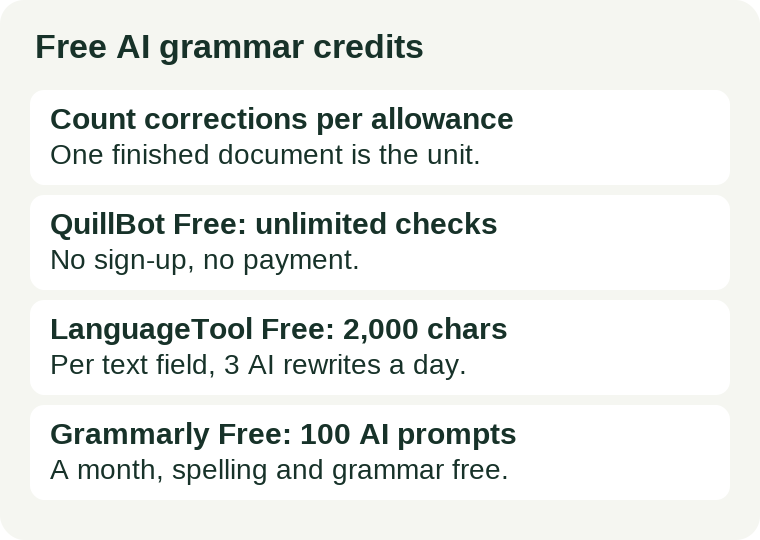
Count corrections per allowance, not checks per month
Every paste into a checker is a spend, but only the finished document counts as output. A grammar job is not one check. It is a first pass, then a fix for the sentences the tool flagged wrongly, then a second pass after you rewrite a paragraph, then a final read — three or four spends for one finished document. Budgeting by “checks per month” hides that multiplier; budgeting by checks per finished document exposes it.
The arithmetic is simple, and it has only two inputs:
Finished documents per allowance = allowance ÷ checks per finished document.
Checks per finished document comes from you: it is whatever your last real document actually took. The allowance comes from the tool — and grammar checkers add a twist the other media do not. Most free grammar tiers are not counted in checks at all. They are counted in characters per field, or in AI prompts per month, while the basic correction itself is unlimited. When the count is not the limit, the real cost of a free correction is not the number. It is the length (a 2,000-character field holds roughly 300 words), the rewrites (100 AI prompts a month is a month of light use, not a week of heavy use), and the account (a free account is a small cost until the tool asks for a card). Count those three before you paste your essay.
What the official pages say — checked 2026-11-22
Four free plans, two ways of counting. The difference matters more than the headline allowance.
QuillBot Grammar Checker: the countable one — unlimited checks, no sign-up
QuillBot’s Grammar Checker is, in its own words, “100% free: run unlimited grammar checks at no cost”, and its FAQ answers the question directly: “Yes! Our Grammar Checker is completely free to use. No signup or payment is required.” It checks grammar, spelling and punctuation, explains each suggestion so you can learn from it, and works in 6+ languages. Official grammar checker page.
This is the only free plan of the four where the free tier has no number attached to it at all: no character cap, no daily count, no account. The catch is scope, not size. The free checker corrects and explains; the AI rewrites, tone changes and paraphrasing live in the paid tools around it. If the job is “find my mistakes”, the free tier is the whole tool. If the job is “rewrite my sentences”, the free tier is the front door, not the room.
LanguageTool Basic: the measured one — 2,000 characters per field
LanguageTool’s pricing table puts the free tier’s limit in plain numbers: a 2,000-character limit per text field, and 3 AI sentence rephrasings a day. Premium raises the field to 150,000 characters. The same page says you can use LanguageTool without a user account in all common browsers and word processors, and it works in 30+ languages. Official pricing page.
Two thousand characters is roughly 300 words — a short email, not an essay. A 1,500-word essay is about 9,000 characters, which is five fields on the free tier: paste, check, copy, repeat. That is workable, but it is not one pass, and every split is a chance to lose your place. Three AI rephrasings a day is the tighter cap for anyone who leans on rewrites: spend them on the three sentences that matter and correct the rest by hand. LanguageTool is the right free tier for short, frequent documents in many languages, and the wrong one for a single long document on a deadline.
Grammarly Free: the prompt-counted one — 100 AI prompts a month
Grammarly’s Free plan costs $0 and covers spelling and grammar corrections (“Write without spelling and grammar mistakes”) plus tone visibility. The counted part is generative AI: 100 AI prompts a month. Pro costs $12 a month and raises that to 2,000 AI prompts per member a month, adding full-sentence rewrites, tone adjustment, plagiarism detection and AI-generated-text detection. Official plans page.
One hundred prompts a month is about three a day — enough to rewrite a few awkward sentences in each email, not enough to draft and redraft a report with AI. The free plan needs a free account, and its strength is where you write rather than what you paste: the browser extension and apps check as you type, so the correction happens before the document exists. If the job is “keep my everyday writing clean”, the free tier does it. If the job is “rewrite this draft”, the 100 prompts are the budget, and they run out in the first heavy week.
Scribbr Free: the no-sign-up one — long essays, powered by QuillBot
Scribbr’s free grammar checker needs no registration — “Start instantly—no registration or sign-up required” — and its page pitches it for anything from quick paragraphs to long essays, with no ads. Its own FAQ says the checker is powered by the QuillBot service, and that both are Learneo services, so inputs are processed under Learneo’s privacy policy. It supports US, UK, Canadian and Australian English. Official grammar checker page.
Scribbr is the same engine as QuillBot’s checker with a different front door: no account, no ads, and a page built for students checking essays rather than professionals checking email. Pick whichever door you prefer; the corrections come from the same place. One caution travels with it: the text you paste is processed under the vendor’s privacy policy, not on your device. Our privacy check before uploading covers what that means for a draft you would not want shared.
Measure it on your first real document
Do not estimate checks per finished document. Measure it, once, on a document you actually need:
- Take the longest document you check in a normal week — an essay, a report, a long email — and count its characters. Past it into the free tier and see whether it fits in one field, or how many fields it takes.
- Check it, then tally every re-check until you have a version you would actually send: fixes the tool flagged wrongly, re-checks after you rewrite a paragraph, the final read, all of them.
- That tally is your checks per finished document, and the field count is your length per document. For example, a 1,500-word essay might take four checks and five 2,000-character fields on LanguageTool, or one paste on QuillBot.
- Compare the tally with the allowance — remembering whether the allowance is unlimited checks, characters per field, or prompts per month.
If the result does not fit the allowance, that is a tool-fit signal, not a writing failure. Either the document needs a tool with no length cap, or it needs fewer re-checks — which is a workflow fix, covered below. Do not solve a grammar shortage by re-pasting harder; re-pasting is what caused it.
Four ways to spend fewer checks
- Draft in the tool that checks as you type. Grammarly’s free extension catches mistakes while you write, so the document arrives at the checker already mostly clean. A first draft that was checked live needs one final pass, not four.
- Check short documents on the capped tier, long ones on the unlimited tier. LanguageTool’s 2,000-character fields are fine for emails and short replies. Send the essay to QuillBot or Scribbr, where the same check costs no allowance at all.
- Spend AI rewrites only on the sentences that matter. Grammarly’s 100 prompts and LanguageTool’s 3 rephrasings a day are the scarcest free allowances in this guide. Use them on the opening paragraph and the sentences a reader will quote, and correct the rest by hand.
- Read the privacy line before the document goes in. A draft with names, prices or unpublished work deserves a tool whose policy you have read. Our privacy check covers that question, and our commercial-use check covers whether the corrected text is yours to publish.
When free stops being enough
Two signs, and only two, mean the free tier is the wrong tier rather than a tight one. First, the same real need fails twice for the allowance, not for quality — the essay does not fit in the free fields however you split it, or the 100 prompts run out before the report is rewritten. Second, the free tier’s other conditions block the job: the checker only works where you paste, not where you write, or the rephrasing cap leaves the sentences that matter unrewritten. A paid plan fixes the first problem; it is the only fix for the second that also changes the terms.