 KIKOMONO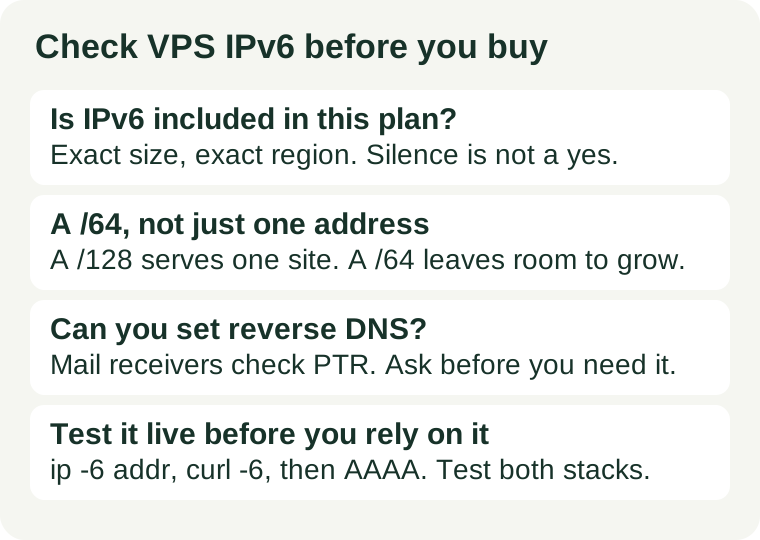
The short answer
Check four things, in this order: whether the exact plan includes IPv6, how large the address block is, whether you control reverse DNS, and whether you can test it before you commit. IPv6 is the newer internet address system, running alongside the older IPv4 system; a dual-stack server speaks both. If the plan's IPv6 does not fit your use — no IPv6 at all, a single address where you need several, or no reverse DNS control for a mail server — that is a reason to pick a different plan, not a detail to fix after launch.
1. First, decide whether IPv6 matters for this server
Not every server needs IPv6 on day one, and buying it for its own sake is not the point. It matters in three common cases:
- You run a public website. A growing share of visitors arrives over IPv6, and some networks and mobile carriers use it by default. A site reachable only over IPv4 still loads for them — their network translates — but a dual-stack site removes one layer of translation from the path.
- You send mail from the server. Mail receivers check the sending address more strictly than web browsers do, and reverse DNS is part of that check. If the IPv6 address cannot carry a PTR record pointing at your hostname, mail sent over IPv6 can be treated with suspicion.
- You expect the server to live a long time. IPv4 addresses are scarce and that scarcity is not going away. A plan with proper IPv6 today is one less migration later, when a new service or a new visitor network assumes IPv6 is available.
If none of these applies — a private tool, a short-lived test server, an internal service — IPv6 is a nice-to-have, and the rest of this guide still takes only minutes. Our first VPS guide covers the wider buying decision, of which IPv6 is one item among several.
2. Check whether the exact plan includes IPv6
The plan family page is not the answer; the exact size in the exact region is. Providers commonly differ in three ways:
- By size. The smallest plan may omit IPv6 while larger sizes include it, or IPv6 may be an add-on that must be ticked at checkout.
- By region. A plan that includes IPv6 in one data centre may not include it in another, because address availability differs by location.
- By wording. A page that says nothing about IPv6 has not promised it. Silence is not a no, but it is not a yes either — and it is the case where asking support, in writing, is worth the minute it takes.
Ask one precise question, and keep the answer: "Does this plan, in this region, include a global IPv6 address at no extra charge, and if not, what does it cost?" A vague reply — "we support IPv6" — answers a different question from the one you asked. Our promo terms guide covers how to pin this kind of answer down without importing conditions from a different product.
3. Check the size of the block: a /64, not just one address
IPv6 addresses come in blocks, and the block size decides what you can do later. Two sizes are common on a VPS:
| Block | What you get | Enough for |
|---|---|---|
| /64 | A large block of addresses, the usual server allocation | One site, several services on separate addresses, a mail server alongside the site |
| /128 | A single address | One website or one service, and nothing else that needs its own address |
For a single website, one address is enough, and a /128 is not a defect. It becomes a constraint only when you later want a second service on its own address — a mail server, a staging copy, a separate application — and discover there is no second address to give it. If the plan page does not state the block size, ask. A provider that will not say is telling you something too.
4. Check reverse DNS before you need it for mail
Reverse DNS, the PTR record, maps an IP address back to a hostname. Web visitors never see it, but mail receivers do: a mail server whose IPv6 address has no PTR record, or a PTR record pointing at an unrelated hostname, looks less trustworthy to the receiving side. Three questions settle it:
- Can you set the PTR record yourself in the hosting panel, or must you open a support ticket for every change?
- Does the PTR record cover the IPv6 address, or only the IPv4 one? Some panels offer reverse DNS for IPv4 and quietly omit it for IPv6.
- Can you change it later if the hostname changes? A PTR record set once by support and never editable is a small trap for a server that will be renamed.
If you never intend to send mail from this server, this check is optional — but it costs nothing to ask while you are already talking to support, and it is expensive to discover after the first bounced newsletter.
5. Test it live in five minutes after provisioning
An address in the panel is a promise; traffic is proof. Once the server exists, run these checks before you point a domain at it:
- Is there a global address? Run
ip -6 addr. A global address starts with2xxx:or3xxx:. An address starting withfe80:is link-local only — it talks to the local network, not to the internet, and it means IPv6 is not actually configured. - Is there a route out? Run
ip -6 routeand look for a default route. Without one, the server can hold an address and still reach nobody. - Does outbound traffic work? Run
curl -6 https://example.comorping -6against an IPv6-capable host. If this fails while IPv4 works, the problem is in the IPv6 path specifically, not in the server as a whole. - Does the site itself answer over IPv6? Publish an AAAA record for the domain, then test the site from a connection that has IPv6 — and test IPv4 and IPv6 separately, with
curl -4andcurl -6. A working IPv4 path happily hides a broken IPv6 one, and the first visitor to notice will not be you. - Is the firewall dual-stack too? A firewall configured for IPv4 only does not filter IPv6 traffic. Check that the IPv6 firewall rules exist and match the IPv4 ones, before the site goes live rather than after the first scan finds an open port.
If any step fails, the fix is usually in the provider's panel or in the server's network configuration — the gateway, the prefix length, or a missing route — and it is far cheaper to fix before launch than after visitors arrive. Our backup restore guide makes the same point for a different check: the time to discover a broken safety net is before you need it, not during the incident.
6. When the answer is no
Two outcomes are worth acting on. First, if the plan has no IPv6 and you need it — a public site you expect to run for years, or any mail sending — pick a different plan or provider now; adding IPv6 to a live server later means renumbering, DNS changes and a second round of testing. Second, if the plan has IPv6 but the block is a single address or reverse DNS is unavailable, weigh that against your actual use: for one website, both limits may never bite, and the plan can still be the right buy. The mistake is not buying a limited plan; it is buying one without knowing the limits. That is also why this check sits next to our bandwidth and transfer guide: both are cases where the sales page shows the attractive number and the terms carry the constraint.