 KIKOMONO
The short answer
An acceptable use policy (AUP) is the document that decides what you may run on a server you rent. It sits beside the Terms of Service and the refund terms, and it is the document a provider points to when it suspends an account. The sales page will not warn you about it: a plan page can advertise a fast CPU and generous bandwidth while the AUP quietly bans the workload you bought the server for.
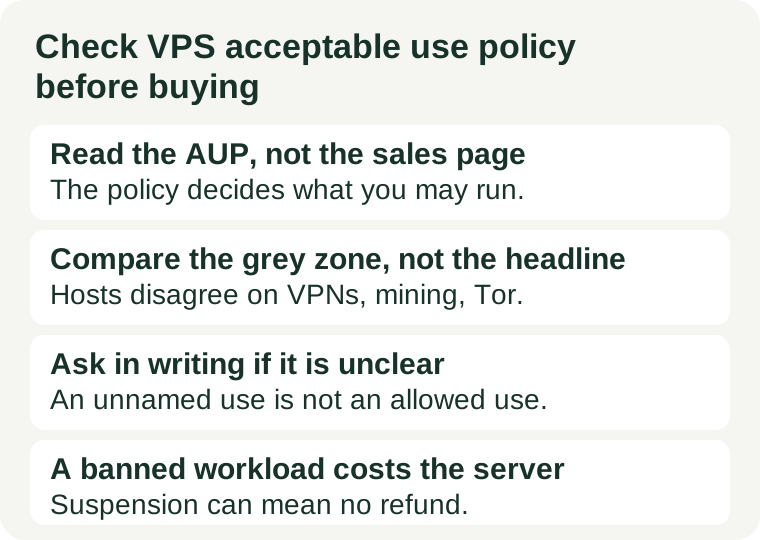
So the check has a fixed order: write down what the server must run, find the provider's AUP, compare your workload against it line by line, and ask in writing about anything unclear — before paying. A host that bans your workload is not a bad host. It is a bad purchase, made avoidable by ten minutes of reading.
1. What an acceptable use policy is, and where to find it
An AUP is a provider's list of prohibited and restricted uses for its network and servers. It exists for a practical reason: one customer's abuse — spam, attacks, piracy, mining — can get a whole block of IP addresses blocklisted or a whole node throttled, and every other customer on that hardware pays for it. Providers enforce the policy to protect the shared infrastructure, and enforcement is usually suspension first, discussion later.
Find the policy before you look at prices. It is usually a page called Acceptable Use Policy, Acceptable Usage Policy, or AUP, linked from the Terms of Service or the legal pages in the site footer, or published in the help centre. If you cannot find one at all, that is itself a signal: either the rules live inside a long Terms of Service document you have not read, or the provider has not written them down, and in both cases you are buying blind. Read the document for the exact product you are buying — a policy for shared hosting may not be the policy for a VPS — and note its last-updated date, because policies change and an old copy is not the current deal.
2. The banned list most providers share
Policies differ in detail, but a core list appears almost everywhere, because the same abuses threaten every network. If your workload is anywhere near one of these, stop and read the exact wording before going further:
- Spam and phishing. Sending unsolicited bulk mail, running a spam operation, or hosting pages that impersonate a bank, exchange, or other service. This is the most common suspension trigger, and it is why our port 25 guide treats the provider's mail policy as a separate check.
- Malware and attacks. Hosting or distributing malware, running command-and-control infrastructure, launching denial-of-service attacks, or scanning and probing other people's systems without authorisation.
- Illegal content and piracy. Content that breaks the law of the hosting country, copyrighted material distributed without permission, and services built to share it.
- Open relays and proxies. A public proxy, an open mail relay, or an open DNS resolver that anyone on the internet can use — these are abused within hours of appearing, and providers ban them outright.
- Cryptocurrency mining on shared hardware. Proof-of-work mining on a shared VPS is banned by many providers, because a miner running at full CPU degrades every neighbour on the same node. Staking or running a validator node is a different workload and is treated differently — see the next section.
None of this is surprising, and that is the point: the banned list is not where purchases go wrong. Purchases go wrong in the grey zone, where providers disagree.
3. The grey zone: where providers disagree
The grey zone is the set of lawful workloads that one provider welcomes and another bans. This is where comparing policies actually earns its time, because the sales pages of two hosts can look identical while their AUPs give opposite answers for your workload:
| Workload | What varies between providers | What to check |
|---|---|---|
| Personal VPN | Almost always allowed for your own use; a commercial VPN sold to others is often banned | Whether the policy distinguishes personal from commercial use |
| Game server | Allowed by many hosts, banned by some, and restricted by others to certain plans | Whether game servers are named at all, and on which products |
| Mail server | Allowed with conditions by some, effectively blocked by port policy at others | Both the AUP and the port 25 policy, plus reverse DNS rules |
| Torrent and file sharing | Banned outright by some, allowed in some locations by others, allowed only for lawful content by a few | Whether the rule depends on location, and what counts as lawful use there |
| Crypto staking and validators | Often allowed where mining is banned, but not everywhere | Whether the policy separates mining from staking by name |
| Adult content | Banned by many, allowed by some where lawful in the hosting jurisdiction | Whether the rule depends on the hosting country's law |
| Tor | Relays, bridges, and exit nodes are treated as three different cases | Which of the three the policy names, and in which locations |
Two traps hide in this table. First, the same provider can give different answers by location: a use allowed in one data centre may be banned in another, because the law and the abuse history differ. Second, a policy can permit a workload in words and forbid it in practice through a resource rule — a host that allows a game server but caps sustained CPU use can still make that server unusable. Read the resource-use section of the policy alongside the banned list, and cross-check it with our CPU steal time guide if the workload runs hot for hours at a time.
4. What enforcement actually costs you
Enforcement is where a skipped AUP read turns into a real loss, and the loss is larger than the price of one month. Most policies allow the provider to suspend or terminate a service for a breach, and many state that a suspension for abuse carries no refund. Our refund window guide covers the money-back rules for ordinary cancellations; a policy suspension is usually outside them, so the refund window does not rescue a banned workload.
The secondary costs are worse. A suspension can lock you out of your data, so a server you can no longer reach may mean rebuilding from your own backups — if you have them. Abuse originating from your server can also get its IP address blocklisted, which is why the address's history is worth checking before launch even when your own use is clean. And a termination for abuse can close the account itself, so the domain, the backups, and the next server all have to move at once, under pressure.
None of this requires bad intent. A compromised script sending spam, a misconfigured open relay, or a workload that drifted into a banned category will trigger the same enforcement as a deliberate abuse. That is why the AUP check is not a one-time read for careful buyers: re-read it when the workload changes, not only when the provider changes.
5. Ten-minute pre-purchase worksheet
Copy these lines into a note and fill each one from the provider's own AUP and Terms of Service. Any line you cannot fill is a reason to pause, not to assume the favourable answer:
- Your workload in one sentence: exactly what the server will run, and for whom.
- Where the AUP lives, its last-updated date, and whether it covers the exact product you are buying.
- Whether each item of your workload is named as allowed, named as banned, or not named at all.
- Whether the rule changes by data-centre location, and which location your order uses.
- What the resource-use section says about sustained CPU, bandwidth, and disk use for your workload.
- What enforcement looks like: warning first, or suspension without notice, and whether a suspension forfeits the refund.
- Any written answer from the provider for an unclear item, saved with the order.
If an item is not named in the policy, do not guess. Ask the provider in writing before you pay — a pre-sales question costs minutes, a post-suspension appeal costs the server — and keep the answer with the order. The written answer is also your evidence if the policy later changes: a provider can update its AUP, and the version in force when you bought the server is not necessarily the version in force a year later.
What not to do
Do not buy first and read the policy after the server is running your workload, and do not assume one provider's rules describe another's. The first mistake turns a ten-minute read into a suspension and a rebuild; the second turns a workload that was fine on your last host into a banned one on the new host. Write the workload down, read the exact provider's exact policy, and get the grey zone answered in writing.
Checked 2026-11-15. Acceptable use policies differ by provider, product, and location, and they change; confirm the current policy on the provider's own pages before you buy or move a workload to a server. This guide has no affiliate links — if a link ever earns anything, we will say so in the sentence that carries it.