 KIKOMONO
The short answer
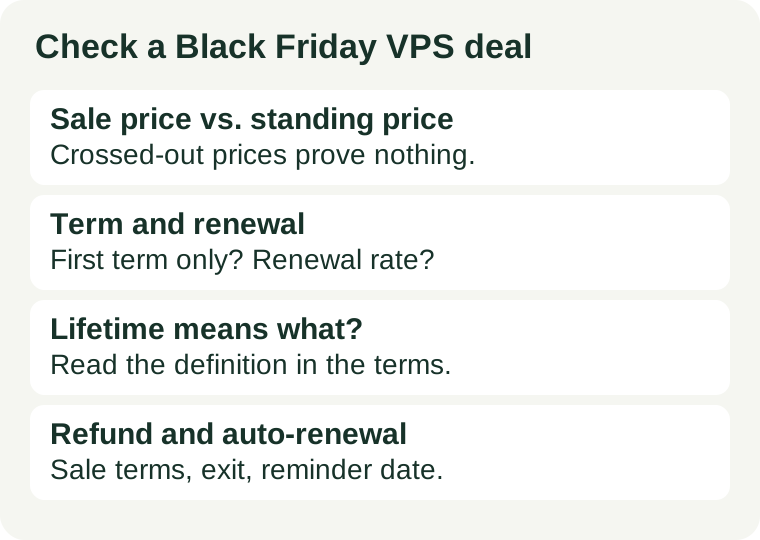
Check six things, in this order: the standing price behind the sale price, the term the sale locks and what renews at, what absolute words like lifetime actually mean in the terms, who the deal is for and what it excludes, how refunds work for sale purchases, and whether auto-renewal is on. Every answer must come from the terms and the checkout summary for the exact plan — not from the deal banner, not from last year's sale, and not from another provider's page.
1. Compare against the standing price, not the crossed-out price
A crossed-out price proves nothing on its own. It may be the provider's own standing price, a price for a different configuration, or a price that was never charged for this plan. Before treating a discount as a saving, find the provider's own current price for the same plan outside the sale — on its regular pricing page or in a dated record you kept yourself. If the sale price matches the standing price, the sale is a label, not a saving, and the plan should be judged on its own merits.
Deal roundups are a second source of the same trap: a roundup can only repeat what a sales page showed on the day it was read. Prices move during a sale, and a roundup's date is not your checkout's date. Use a roundup to find candidates, then verify each candidate on the provider's own page at the moment you buy.
2. Find what the sale price actually covers: term and renewal
A sale event and a sale term are different lengths. An event can run for weeks while the deal you buy locks a term of one, two or four years, and the renewal price applies when that term ends. Write down four facts from the contract summary before paying:
- The sale price and its term. How many months does the sale rate cover, and is payment upfront for the whole term?
- The renewal price. What does the same plan cost when the term ends, and is that rate fixed or variable?
- The total commitment. Multiply the sale rate by its months, then add the renewal rate for the period you actually plan to stay. A cheap first term on a long commitment is not a cheap plan.
- What changes at renewal. Some renewals reprice the plan, drop included extras, or move the plan to a different product. The renewal line, not the banner, states this.
Our renewal price guide works through the same arithmetic for regular pricing; a Black Friday purchase deserves the same worksheet, because the gap between sale and renewal is usually wider than on a normal order.
3. Read absolute words literally: lifetime, unlimited, never again
Sale pages love absolute words, and terms pages define them narrowly. Three words deserve a literal reading:
- Lifetime. Lifetime of what — the product, the account, or the company? Check what happens to the plan and the price if the product is discontinued, renamed or replaced. A lifetime price on a discontinued product is a dead end, not a bargain.
- Unlimited. Unlimited usually arrives with an acceptable-use policy, a fair-use threshold, or excluded uses. Read the policy for the exact plan before assuming unlimited means unmetered.
- Never again / lowest ever. A claim about history is only checkable against the provider's own past prices. If you cannot verify it, treat it as advertising and judge the deal on the current price and renewal alone.
If a word has no definition in the terms, that is itself an answer: you are buying an undefined promise. Price the order as if the narrowest reading applies.
4. Check who the deal is for: accounts, regions, plans and add-ons
Sale eligibility is narrower than the banner suggests. Check each of these against your own order:
- New accounts only. Many sale prices apply to a first order, not to an existing account adding a server. An existing customer buying at the banner price may be charged the standing rate at checkout.
- Region and currency. A deal shown in one currency or region may not exist in yours, and tax treatment can differ. The checkout summary for your account and region is the authority.
- Plan exclusions. A sale may cover one configuration and not the next size up, or exclude the plan you actually need. Check the exact plan, not the product family.
- Add-ons at full price. Backups, extra storage, dedicated IP addresses, control-panel licences and support tiers are often excluded from the discount and billed at the standing rate. Add them to the total before comparing.
If any item on your order is excluded from the sale, price the order with that item at full rate. The sale then covers the rest, and the comparison stays honest.
5. Check the refund treatment for sale purchases
A refund window that applies to a regular order does not automatically apply unchanged to a sale order. Sale terms sometimes shorten the window, exclude sale purchases, or mark them as final sale. Before paying, find the refund clause that covers the exact sale plan, and note:
- Whether the guarantee applies to this sale purchase at all, and for how many days.
- Whether the window starts on the order date or the provisioning date.
- What is excluded: domains, setup fees, add-ons and usage overages are the usual exclusions.
- Whether a refund returns to the original payment method or only as account credit.
Our refund window guide covers the same discipline in full; during a sale it matters more, because the pressure to buy fast is exactly what makes the refund clause easy to skip.
6. Check auto-renewal and set your own reminder
Sale checkouts usually leave auto-renewal on, and the renewal that follows is at the full rate, not the sale rate. Before paying, confirm whether auto-renewal is on, whether you can switch it off without losing the sale price, and what notice period cancellation requires. Then set your own reminder a month before the term ends — not on the renewal date. Support queues, time zones and panel outages all eat into the final day, and a reminder you set yourself does not depend on the provider sending one.
Ten-minute pre-checkout worksheet
Copy these lines into a note and fill each one from the provider's own terms and checkout summary. Any line you cannot fill is a reason to pause, not to assume the favourable answer:
- Standing price for the same plan outside the sale, and where you saw it.
- Sale price, sale term in months, and whether payment is upfront.
- Renewal price, renewal date, and what changes at renewal.
- Definition of lifetime, unlimited, or any other absolute word on the page.
- Eligibility: new account, region, plan, and which add-ons are excluded.
- Refund clause for this sale purchase: window length, start date, exclusions, refund method.
- Auto-renewal state, cancellation notice period, and your own reminder date.
A worksheet with an empty line is more useful than a banner with a percentage. The percentage advertises; the worksheet decides.
For the wider checkout discipline, use the promo terms guide for the full charge worksheet and the first VPS guide for workload fit before assuming a sale server is the right server at all.
Where the facts in this guide come from
This guide states no provider's sale price, renewal price or terms as fact, because those differ by provider and plan and change during a sale. Every check above tells you where to find the answer for your own order: the provider's own pricing page, the contract summary at checkout, and the terms page for the exact plan. This guide has no affiliate links — if a link ever earns anything, we will say so in the sentence that carries it. Terms checked against provider pages on 2026-11-02; recheck at checkout, because sale terms change without notice.