 KIKOMONO
Count finished logos per allowance, not logos per month
Every click on Generate is a spend, but only the logo you actually put on your site counts as output. A real logo is not one generation. It is a draft, then a fix for the icon that reads wrong, then a different color, then a version with the tagline removed — four or five spends for one finished logo. Budgeting by “logos per month” hides that multiplier; budgeting by generations per finished logo exposes it.
The arithmetic is simple, and it has only two inputs:
Finished logos per allowance = allowance ÷ generations per finished logo.
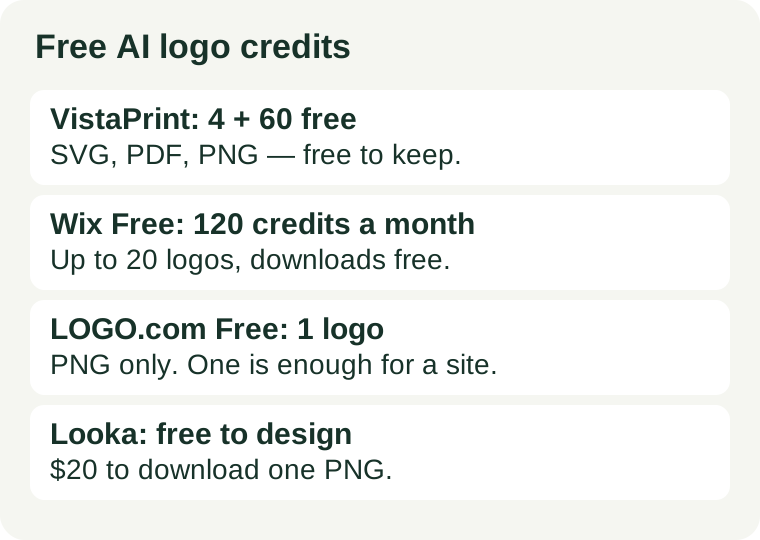
Generations per finished logo comes from you: how many tries your last real logo actually took. The allowance comes from the tool, and it comes in two shapes that must not be confused. Some tools count generations — Wix gives 120 AI credits a month, VistaPrint gives 4 free generations plus 60 more on signup. Others count downloads — LOGO.com gives exactly one free logo, and Looka gives unlimited generations but charges $20 to download a single PNG. A tool can be generous on one count and empty on the other, and the download is the count that decides whether you have a logo at all.
What the official pages say — checked November 2026
Seven free plans, two different kinds of free. The difference matters more than the headline allowance.
VistaPrint AI Logomaker: the genuinely free one — 4 generations, then 60 more on signup
VistaPrint’s own page says its AI Logomaker is “100% free to create, customize and download your logo”. You start with 4 free logo generations, then unlock 60 more when you sign up or sign in with a VistaPrint account. The download is the generous part: three colored-background logo files and three transparent-background files, in PNG, SVG and PDF, at 4000×4000 pixels, with no watermark. Official logo maker page.
Sixty-four generations is more than enough for one finished logo, even at five generations per attempt. This is the only plan here where the free tier answers both questions at once: enough generations to iterate, and the finished file — including the vector SVG a printer wants — free to keep.
Wix Logo Maker (Wixel): the countable one — 120 credits a month, up to 20 logos
Wix’s pricing page gives the free plan 120 AI credits a month, capped at 30 a day, which Wix puts at up to 20 logos. Its support page adds the detail that matters for budgeting: credits apply to generation and to AI edits, but manual changes to layout, colors and fonts are free. Its logo maker page says the free plan lets you design, customize and download your logo without any cost, with high-resolution PNG or JPG downloads. Official pricing.
Twenty logos a month is a real recurring allowance, not a one-time look — but only if you spend the credits on generations. Every AI edit is a spend; every manual tweak is not. Draft with the AI, finish by hand, and the allowance stretches.
LOGO.com: one free logo, PNG only
LOGO.com’s help centre is blunt: “As a free user, you can create, download, and use up to 1 logo absolutely free! (limited to only .png downloads)”. One logo, one format. Official help centre.
One PNG is a thin allowance and a complete answer at the same time. If the job is one logo for one website header, and a PNG is all the site needs, the free tier finishes the job with nothing left to pay. If the job is a logo plus a print version, the PNG-only limit is the wall, and the fix is a different tool, not a paid plan.
Adobe Express: free plan, generative credits, transparent PNG
Adobe Express has a free plan, and its logo page says you generate logo options “using generative credits”, refine in the editor, and download your logo as a PNG file with a transparent background. The page publishes no credit number for the free plan, so there is no allowance to divide — treat it as a free logo maker with an unpublished cap, not as a counted allowance. Official logo generator page.
Canva Free: up to 200 Standard or 20 Premium AI uses a month, shared with everything else
Canva’s free plan gives up to 200 Standard or 20 Premium AI uses a month, shared across every Canva AI tool — not just logos — and the allowance resets on the 1st of each month. Independent checks of Canva’s AI pages in October–November 2026 agree on those numbers. Logo downloads in PNG, JPG or PDF are free; SVG export is a paid-plan feature according to the same checks. The use count here comes from those dated checks rather than a same-day fetch of Canva’s own pages.
The catch is the sharing: twenty Premium uses is the whole month’s AI budget for logos, images, writing and everything else. A logo that takes five Premium generations has spent a quarter of the month. If you already design in Canva, those uses are a genuine free trial of the AI draft; if the logo is the only job, a logo-only tool spends nothing on anything else.
Looka: free to design, $20 to download one PNG
Looka’s own pages say it plainly: “It’s totally free to make logos. Only pay when you’re happy!” You can generate and edit as many logos as you like for free. The download is where the money is: the Basic package is $20 one-time for one PNG logo file, and the Premium package is $65 one-time for PNG, EPS, SVG and PDF files. A Brand Kit subscription starts at $96 a year. Official pricing.
Looka is the clearest example of the two-count trap. Generations are unlimited and free, so the “finished logos per allowance” arithmetic never binds — the binding number is the download price. It is a free design studio and a $20 logo, not a free logo.
LogoAI: free preview only, $10 trial to download
LogoAI lets you generate and preview logos for free, but the previews may carry a watermark and unrestricted downloads need paid access. Independent checks of its pricing page in November 2026 put the entry point at a $10 7-day trial that renews at Pro, $20 a month with 500 AI credits. The page no longer lists a one-time purchase option, so the only way to a usable file is the trial or the subscription. Treat the $10 trial as the real price of one finished logo here — and cancel before day seven if the logo was a one-off.
Measure it on your first real logo
Do not estimate generations per finished logo. Measure it, once, on a logo you actually need:
- Write the full brief before the first generation — business name, industry, style, colors, and whether the logo needs a tagline.
- Generate, then tally every regeneration until you have a logo you would put on your site: icon fixes, color changes, tagline removals, all of them.
- That tally is your generations per finished logo. For example, a shop logo might take five: one draft, two icon fixes, one color change, one version without the tagline.
- Divide the allowance by that tally, and compare with the download: a tool that gives you 64 generations but charges $20 for the file still costs $20.
If the result does not fit the allowance, that is a tool-fit signal, not a prompt failure. Either the job needs a tool with a monthly allowance, or it needs fewer generations — which is a workflow fix, covered below. Do not solve a generation shortage by re-rolling harder; re-rolling is what caused it.
Four ways to spend fewer generations
- Write the whole brief before the first run. Every “make it better” re-roll is a spend. Decide the name, industry, style and colors first, then generate once.
- Finish by hand, not by re-prompting. On Wix, manual edits to layout, colors and fonts cost no credits; on VistaPrint you can tweak icons, layouts, fonts and colors without spending a generation. Editing the icon yourself is free; asking the model to redraw it is not.
- Pick the tool by the file you need. Need an SVG for print? VistaPrint gives it free, Canva keeps it behind the paid plan, and Looka charges $65 for it. Need only a PNG for a website header? LOGO.com’s one free logo finishes the job.
- Preview free, pay once for the keeper. On Looka and LogoAI, generations cost nothing and the file costs money. Compare as many directions as you like, then pay exactly once, for the one logo you keep.
When free stops being enough
Two signs, and only two, mean the free tier is the wrong tier rather than a tight one. First, the same real task fails twice in a month for generations, not for quality — the allowance, not your prompting, is the bottleneck. Second, the free tier’s other conditions block the job: LOGO.com’s free logo is PNG only, Canva’s free plan cannot export an SVG, and VistaPrint itself warns that AI-generated content may not meet the legal requirements for copyright protection in many jurisdictions. Our commercial-use check covers the licence side of that second question in full. A paid plan fixes the first problem; only a handcrafted logo from a professional designer fixes a trademark problem.