 KIKOMONO
Two different limits, and they need different fixes
Every free chat plan has two limits that look like one, and confusing them wastes the fix. A usage limit caps how much you can use the service over time — five hours, a week — across all your conversations. A length limit caps how long one conversation can get: the context window, the working memory of a single chat. Anthropic’s own support article draws exactly this line, and OpenAI’s FAQ does the same in different words.
When you hit a usage limit, you wait for the reset, switch to a lighter model, or pay. When you hit a length limit, you start a new chat — for free, right away — and the account limit never enters into it. If the message says “context window full” or “chat memory full”, it is a length limit: copy the passage you are working on into a fresh chat and keep going. If it names a reset time, it is a usage limit, and only waiting, credits or an upgrade moves it.
What the official pages say — checked 2026-11-08
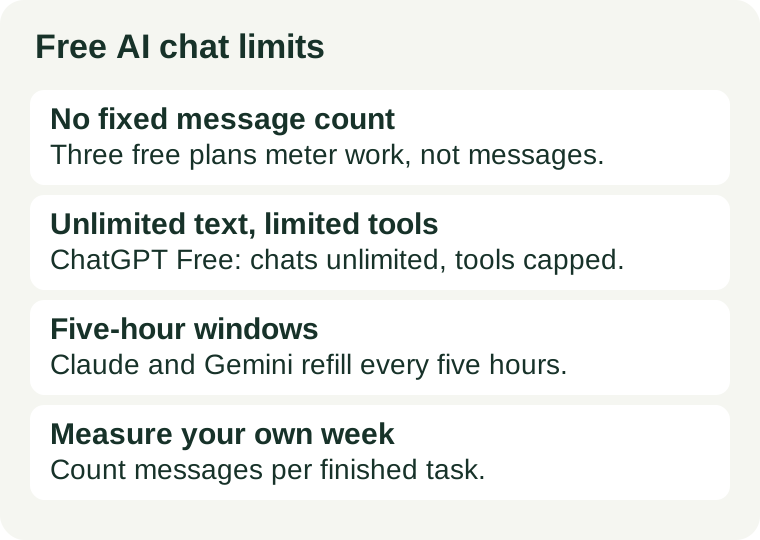
Three free plans, three different answers to the same question. The difference matters more than any headline number — because two of the three publish no number at all.
ChatGPT Free: unlimited text chats, limited everything else
OpenAI’s Free tier FAQ says free users have unlimited everyday text chats, subject to abuse-prevention safeguards, and that the free model is GPT-5.6 Luna. File uploads, image generation, voice, data analysis and other tools have separate usage limits, and ChatGPT tells you when you reach one. GPT access follows the current free-tier model limit: when you reach it, GPT access pauses until the limit resets, and ChatGPT shows the reset timing in the product. Upgrading to Plus, Pro or Business resets the rate limits at once. Official FAQ.
This is the only one of the three where the text chat itself is unmetered. What runs out is everything around the chat: the uploads, the images, the voice minutes, the analysis runs. Budget those, not the messages.
Claude Free: no fixed count, five-hour sessions
Anthropic’s support article says usage limits control how much you can interact with Claude over a time period, and that paid plans have two kinds: a session limit that resets every five hours and weekly limits that reset once a week. The five-hour period starts when you send your first message and resets in full five hours later. Usage depends on the length and complexity of your conversations, the features you use, which model you are chatting with, and the effort level you selected. Anthropic publishes no fixed message count, and its pricing page gives the difference as a multiple instead: Pro gives at least five times Free’s usage per session. Settings > Usage shows where you stand. Official support article.
No published number means no division to do in advance. On Claude you budget backwards: count your own messages per finished task, and notice how much of a five-hour window one real job actually takes.
Gemini Free: compute-based, five hours to a weekly cap
Google’s Gemini Apps help page says the limits are compute-based: they factor in the complexity of your prompt, the models and features you use, and the length of your chat. Your limit refreshes every five hours until you reach your weekly limit. The free plan — listed as “without an AI plan” — gets standard limits with a 32,000-token context window; Google AI Plus gets twice the standard limits, AI Pro four times, and AI Ultra five or twenty times Pro’s. Google publishes no prompt count for any personal plan, warns that limits may change without notice including for capacity reasons, and says free users may be limited before paying users when demand spikes. Settings > Usage limits shows your own position. Official help page.
The practical consequence is the same as Claude’s: a short question costs almost nothing, a long chat with Deep Research and image generation costs a lot, and no fixed number on any page will tell you where your week ends.
Measure your own week
Do not estimate messages per finished task. Measure it, once, on work you actually need:
- Pick one real task — a draft, a summary, a set of practice questions — and do it in one chat, from first message to finished output.
- Tally every message you sent, including the follow-ups: the clarification, the “shorter”, the “try again with an example”. All of them count.
- That tally is your messages per finished task. A short email might take three; a lesson plan with revisions might take fifteen.
- Repeat for two or three different tasks. The range, not the average, is your budget: the heaviest task is the one that empties a window.
On ChatGPT Free the tally tells you how much of the tool limits you use, since the text itself is unlimited. On Claude and Gemini it tells you how many finished tasks fit in a five-hour window. Either way, one measured week beats any number copied from a roundup — because the providers do not publish one.
Four ways to make the free allowance last
- Start a new chat for each new task. A long thread re-sends the whole conversation with every message, so each reply costs more than the last. A fresh chat for a fresh task is the cheapest message you will ever send.
- Write the full request before the first message. Subject, format, length, and the exact passage to work on, in message one. Every “now make it shorter” is a message you could have saved by deciding first.
- Keep heavy features for the step that needs them. Uploads, image generation, deep research and long-file analysis drain the allowance fastest on all three plans. Draft in plain text, then spend the heavy feature once, on the finished draft.
- Check the meter before the deadline, not after. Claude’s Settings > Usage and Gemini’s Settings > Usage limits show the window and the reset time. Look before the last hour of a task, when switching tools is still free.
When free stops being enough
Two signs, and only two, mean the free tier is the wrong tier rather than a tight one. First, the same real task fails twice in a week for allowance, not for quality — the window, not your prompting, is the bottleneck. Second, the free tier’s other conditions block the job: a context window too small for the document you must process in one chat, or a feature that is capped before the work is done. Our free writing tools guide covers which tool fits which writing job, and the commercial-use check covers whether free output can go to a client at all. A paid plan fixes the first problem; it is the only fix for the second that also changes the terms.