 KIKOMONO
What is Cursor Pro?
Cursor is a coding editor with AI assistance; Pro is a paid plan with extended Agent limits and additional access beyond Hobby. A Pro subscription does not make every model unlimited. If you are new to coding, begin with a small project you can inspect rather than upgrading just because an offer exists.
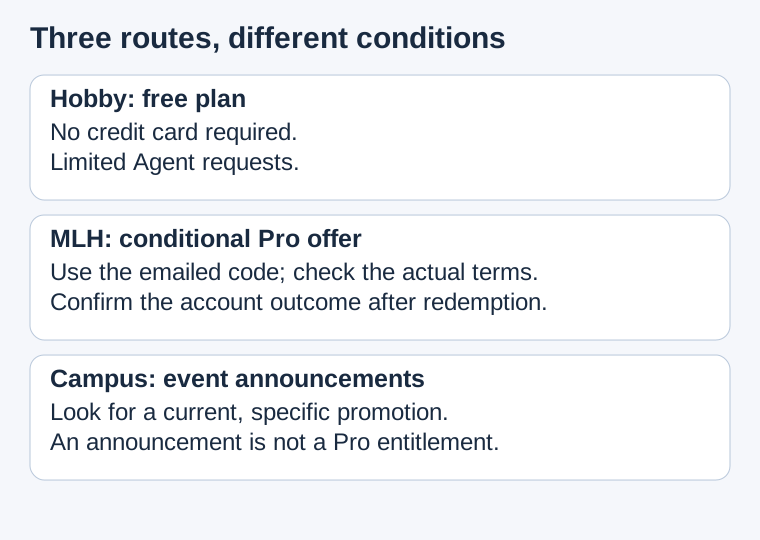
The official routes we could verify
| Route | Verified | Still check |
|---|---|---|
| Cursor Hobby | Free; no credit card required; limited Agent requests | Your account's available features and limits |
| MLH event promotion | A challenge directs participants to redeem an MLH-emailed Pro code | Eligibility, duration, allowance, charges and renewal |
| Campus and online events | Cursor's student page directs readers to event promotions | A specific current offer and eligibility; no fixed free-Pro duration is promised there |
Sources: Cursor pricing, the MLH challenge and Cursor students. Reviewed October 11, 2026. We have not received or redeemed a code.
Start with Hobby when you just want to learn
- Open Cursor's official pricing page and choose the free starting route.
- Download from Cursor and sign in to your own account.
- Try one small task and check your available usage. A limit does not mean you must subscribe immediately.
Here is a task we designed for a beginner: make a local HTML page with a heading, a paragraph and a list of three books. Work in a new folder and ask for only one HTML file, with no external packages, accounts or network requests. Open the file locally and check that all three titles match your input. Change one title yourself, save and reopen it.
The acceptance checks are visible: one file, three matching titles, no unexpected dependencies, and your manual change survives reopening. If the assistant adds a backend or asks for a secret, stop and restate the one-file scope. We have not run this task in Cursor; it is a suggested exercise for deciding whether the free route covers your first job.
MLH Global Hack Week: the limited Pro route
Limited event: scheduled to end October 15, 2026 at 17:00 UTC / October 16 at 01:00 Beijing time. Code availability and individual eligibility need confirmation.
The event runs October 9–15, 2026. The registration page's scheduled end is October 15, 1:00 p.m. EDT: October 15, 17:00 UTC, or October 16, 01:00 Beijing time (UTC+8). This is the event end, not a verified expiry time for every code. The challenge does not establish that every registrant will receive one.
- Use MLH's official Global Hack Week short link to find the event and register with your own details. Participation is free and welcomes beginners; offer eligibility is a separate check. Review the registration terms and optional communications choices.
- If MLH emails you a code, read that email and redeem it through your own Cursor account. The challenge says to manually upgrade to Pro in Billing & Invoices to use the credits. Check the amount due, duration and renewal terms before confirming.
- Confirm the dashboard shows the redeemed Pro benefit, then return to the challenge and submit the requested screenshot. Crop out private email addresses, payment details and the code; keep the evidence of redemption visible.
No email? Search your registration inbox and spam folder, then use MLH's official contact route if necessary. The challenge describes redemption followed by screenshot submission; it does not say to upload a screenshot first to earn a code.
The MLH short link is an organizer link, not our affiliate link. We supply no reusable code. Duration, credit amount, existing-subscriber eligibility, payment-method requirements and code expiry are not specified in the public challenge we read. Check your actual offer and checkout.
What about a student pack?
- Open Cursor's current student page.
- Look for a specific campus or online promotion with published conditions.
- Check eligibility and claim instructions before planning around it.
The current page does not promise every student a year of free Pro. A student email or membership in another developer pack is not evidence of a Cursor entitlement. We could not verify another generally available free-Pro route from these sources, so we do not list one.
Write down the offer before upgrading
Use this worksheet for your actual email and account. Keeping UNKNOWN visible is more useful than assuming a promotion behaves like the last one you saw. Store it privately; do not publish an unredeemed code.
Source: official event page and email sender
Account: the account I intend to upgrade
Eligibility: what the offer actually says
Benefit: Pro access / credits / other, as stated
Duration: stated start and end, or UNKNOWN
Allowance: stated amount and units, or UNKNOWN
Due now: exact checkout amount and currency
Renewal: date, price and cancellation route, or UNKNOWN
After redemption: dashboard status and expiry
Evidence saved: terms and a redacted confirmation
Unresolved question: whom I need to ask
Read the checkout beside the email. If the email says free but the screen shows an amount due, do not assume the charge will disappear. Check whether you entered the code in the correct field and selected the correct account. If the discrepancy remains, stop and ask the provider. Avoid testing the offer by paying first.
Record a zero amount only when the actual screen shows it. A zero amount due today still leaves a separate renewal question. If a date or allowance is absent, write UNKNOWN and keep the offer. Do not convert credits into one month without an explicit term.
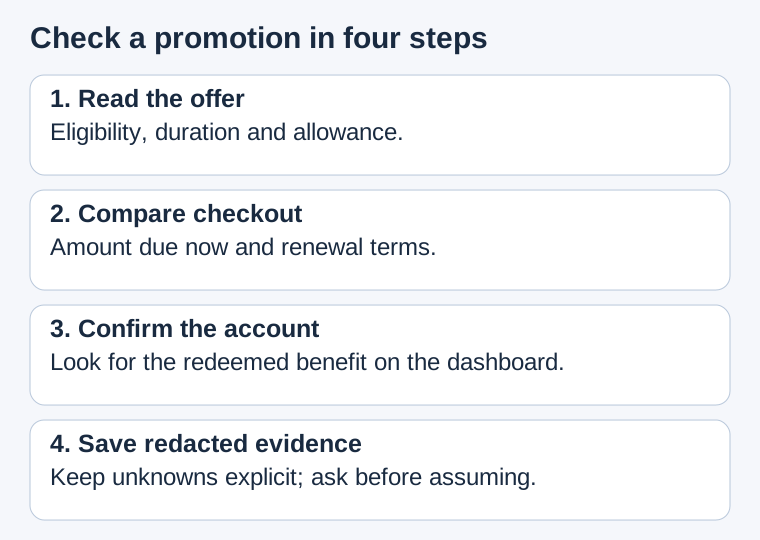
A worked decision: an email is not an activated plan
This is an invented example, not a code we received. Sam registers for an event and receives a message describing a Pro benefit, without a duration or allowance. Sam's account still says Hobby. The accurate record is: offer received; benefit not activated; duration and allowance unknown. It would be wrong to announce a month of free Pro or submit successful-redemption evidence.
Suppose the redemption screen displays an amount due. Sam checks the code instructions and account choice. If that amount cannot be reconciled with the offer, Sam stops before confirmation and asks the provider. The event end date does not resolve a billing discrepancy.
Alternatively, suppose the screen clearly shows the benefit and no charge due now. Sam still reads the renewal terms, then checks the account dashboard after redemption. The record changes to benefit activated only when that outcome is visible. Missing terms stay unknown: a plan-name screenshot cannot supply an expiry date that is not shown.
Six checks before calling the offer usable
Download a plain-text checklist for a private record.
These are our checking criteria, not extra MLH eligibility rules. Six checked boxes cannot guarantee a code. If a check is unresolved, name the missing fact rather than turning it into a guessed benefit.
Questions beginners ask
Is free Cursor the same as free Cursor Pro?
No. Hobby is the free plan. A Pro promotion must state the different access and limits it grants.
How long does the MLH benefit last?
The public challenge does not state duration or allowance. Check your email and redemption screen; do not assume a month, a year or permanent access.
Does registration activate Pro automatically?
No activation is promised by registration. The instructions say to use the emailed code and manually upgrade in Billing & Invoices, then submit redemption evidence.
Does the event end date tell me when my code expires?
No. The schedule and the code redemption deadline are separate facts. Use the actual offer's terms for code expiry.
What if no code arrives or I already pay for Pro?
Check the registration inbox and spam folder. Ask MLH about missing email, and check the received offer or Cursor support for existing-account eligibility. Do not create extra accounts to assume eligibility.
Cursor product guide · Save work before a free limit stops you · Choose a task before a paid plan
Sources and disclosure
- Cursor pricing: Hobby and paid-plan distinctions.
- Cursor students: current event promotion guidance.
- MLH registration: event dates and registration.
- MLH challenge: emailed code, manual upgrade and screenshot.
Reviewed October 11, 2026. This guide's links are not affiliate links. We have not received a code, redeemed Pro or tested the exercise in Cursor. The worksheet, decision example, checklist and diagrams are our original material.