 KIKOMONO
The short answer
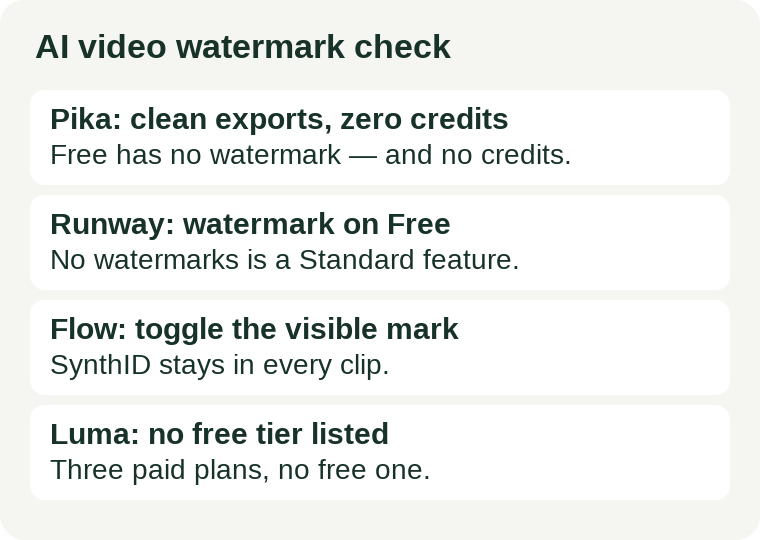
Free video plans fall into three shapes, and the shape decides whether the clip you publish is clean. Watermarked free: the free tier generates, but the export carries the tool’s mark — Runway is the example here. Clean free, but empty: the export carries no mark, but the free tier hands you nothing to generate with — Pika’s free plan lists zero monthly credits. Toggleable visible, permanent invisible: you can switch the visible badge off, but an invisible mark stays in every file whatever you do — Google Flow is the example. A fourth case is the plan that quietly disappeared: Luma’s pricing page no longer lists a free tier at all, so a workflow built on “free Luma” has nothing to stand on. Find which shape your tool is before you spend credits, because the mark is decided by the plan, not by the prompt.
1. Three marks, three different jobs
Video carries the same three kinds of mark as a still image, and they answer three different questions. Learn them before you check any single clip, because each one fails in a different way.
A visible badge or label is the only mark a viewer sees without a tool: a logo or a “Made with” line burned into a corner of the frame. Some tools add one on free exports, most paid plans remove it, and a setting can sometimes switch it off. It is a disclosure, not a proof: anyone can crop it off, and its absence proves nothing about how the clip was made.
C2PA Content Credentials are signed metadata that travel with the file. They record the issuer, the tool and the date, and a reader can verify them. Their weakness is the file itself: re-encode the video, run it through another editor, or upload it to a platform that strips metadata, and the credentials may not survive the trip.
An invisible watermark such as Google DeepMind’s SynthID is embedded in the pixels and frames, not attached to the file. It is meant to survive the handling that kills metadata. It is still not a guarantee: heavy cropping, compression or re-encoding can degrade it, and a check that finds nothing is not proof the clip was never AI-generated — it is proof that this check, on this copy, found nothing.
The practical rule follows from the three weaknesses: check the plan’s watermark row before you generate, check the exported file after you generate, and treat any single negative result as inconclusive.
2. What the free plans actually do — checked 2026-11-25
Each claim below was read on the vendor’s own page on 2026-11-25. Where a vendor publishes no watermark statement for its free tier, this guide says so instead of guessing.
Pika: no watermark on Free — and no credits either
Pika’s pricing page is the clearest of the four. Its comparison table has a “No watermark” row marked Yes on every plan, including Free, and its FAQ answers the question directly: “Does Pika’s Free plan have a watermark? No. Free plan exports have no watermark.” The catch is on the row above it: the Free plan’s monthly credits are “0 · credit packs only”. A free account gets access to all models and can run 2 video generations in parallel — but it generates nothing until credits are bought as a one-off top-up, which does not start a subscription and carries over for 365 days. The per-generation table prices a 5-second 720p clip at 122 credits on Seedance 2.5 and 33 on Wan 3.0. And the commercial-licence row matters before you publish: it reads No on Free and Yes on Starter and above, so client or monetised work is not a free-tier job on Pika, watermark or not. Pika’s pricing page.
Runway: “No watermarks” is a Standard feature, not a Free one
Runway’s pricing page gives the Free plan 125 credits as a one-time deposit that does not expire, for a selection of generative models, with 5GB of asset storage. Its FAQ confirms the rate: Gen-4.5 uses 12 credits per second, so a 5-second clip costs 60 credits and the 125 buy two clips, with 5 credits left over — and then the free tier is done, because the deposit never refills. On the watermark question, the page lists “No watermarks” under the Standard plan ($15 a month, $12 billed annually, for 625 credits a month) and carries no such line under Free. Read it as it stands: a clean export is a paid feature on Runway, not a free-tier promise. Do not generate a clip you need clean on the free plan and discover the mark in the export. Runway’s pricing page.
Google Flow: visible mark is a toggle, SynthID is not
Google Flow is the only one of the four where the visible mark is a setting rather than a plan feature. With no subscription, Flow gives basic video generation and 50 Google Flow credits a day. Its help page says all outputs generated in Flow using Veo, Omni or Nano Banana include invisible SynthID watermarks, and that a visible watermark “can be added to generated images and videos”, controlled by the “Visible watermarking” toggle in the drop-down menu under your profile picture. One exception is automatic: a visible watermark is applied for users in India, South Korea and Vietnam who are not on the Google One AI Ultra 20x plan. So outside those three countries, a free Flow clip can export with a clean corner — but the file still carries SynthID in every output, on every plan, and the toggle does not touch it. Google’s Flow help page.
Luma: no free tier on the pricing page
Luma’s pricing page, read on 2026-11-25, lists three paid plans and no free tier: Plus at $30 a month for 10,000 credits, Pro at $90 for 40,000, and Ultra at $300 for 150,000. Its own FAQ confirms the same three plans. Older guides describe a watermarked Dream Machine free plan, and Luma’s help centre still documents legacy tiers for existing users — but a new account has no free tier to sign up for on the page that sells the product. Do not build a “free Luma clip” workflow on a plan the pricing page no longer lists, and do not quote an old guide’s watermark claim for a tier you cannot buy or join. Luma’s pricing page.
3. The five-minute check before you publish
Run this on the clip you will actually publish, not on a preview inside the generator:
- Read the pricing table’s watermark row. Open the vendor’s pricing page and find the row that says “watermark” or “no watermark”. If the row exists, the answer is the cell under your plan. If the row does not exist, the page has not promised you anything — assume the export is marked until a generated clip proves otherwise. The landing-page headline never carries this row; the comparison table does.
- Check the toggle before you generate. On Flow, open your profile menu and confirm the “Visible watermarking” toggle is off before the first generation. The toggle applies to clips generated after you flip it, not to ones already in your library. If you are in India, South Korea or Vietnam, check whether the toggle is even available to you.
- Watch the exported clip at full screen. Download the file, play it at full size, and check all four corners and the edges for a badge, label or logo. A preview inside the tool is not the file: the mark appears in the download, and a five-second clip takes seconds to check.
- Keep the original download. Save the file exactly as the tool delivered it, with its original filename and format, before any edit. If a client or a platform ever asks how the clip was made, the original is the only copy whose marks you can still demonstrate. A re-export proves nothing about the first version.
- Write the result down with the file. One line is enough: tool, plan, date, and what you found. When the same clip is reused months later, that line is what stops you guessing whether it was checked. If you found no visible mark, write “no visible mark on this export” — not “no watermark”.
Before the clip leaves your computer, also confirm the licence allows the use you have in mind. A mark says how the clip was made; the plan’s terms say what you may do with it. Pika’s Free plan, for example, gives clean exports with no commercial licence attached. Our commercial-use check walks through that question, and our credits-per-finished-clip guide covers the allowance side of the same free plans.
4. When a mark changes your decision
Three situations turn a mark from background detail into a decision:
Client work. If a client is paying for the clip, disclose the AI use and the mark in writing before delivery, and keep the original file and the check result with the invoice. Some clients and platforms have their own AI rules; the provider’s terms are only half the picture, and a client who discovers the mark after delivery will assume you hid it.
Platform labelling. Social platforms increasingly detect or require AI labels, and they may apply their own label when they find a signal you missed. Publishing a clip whose file says “AI-generated” while your caption says nothing is the fastest way to look deceptive. Check first, label in your own words, and let the platform’s label agree with yours.
Personal-use licences. A mark does not change the licence, but the licence decides whether the clip can leave your personal projects at all. A clean export from Pika’s Free plan is still non-commercial: the table marks the commercial licence as not included. Check the use clause on the terms page, not the landing-page headline.
5. What a missing mark does — and does not — prove
A check that finds no visible mark proves one thing: this export, watched at full size, today, shows no badge in the frame. It does not prove the clip was made by a human, was made by a different AI tool, or was ever unmarked. Invisible marks survive the handling that removes visible ones: Flow’s SynthID is embedded in the pixels of every output, and Omni content also carries C2PA Content Credentials. Cropping the corner off a Runway clip removes the badge and nothing else; the file’s provenance, where the tool records it, is a separate question.
So never use a clean corner to claim a clip is not AI-generated, and never use a watermark as a licence check. The mark answers “how was this made”; the terms answer “what may I do with it”; the client or platform answers “what must I disclose”. Three different questions, three different checks, all before publishing — because after publishing, the file is no longer yours to check.
Red flags to note before you publish
- A visible badge you only noticed after export. If the badge appears in the download but not in the preview, your preview was not the file. Check the download, not the generator window.
- “No watermark” as a selling point. A tool that advertises no watermark is usually describing the visible badge only. The invisible marks may still be there — check the plan’s watermark row and the file.
- A clean free tier with no credits. Pika’s free exports are watermark-free, but the free plan gives zero monthly credits. A clean export you cannot generate is not a free workflow.
- A free plan that vanished from the pricing page. Luma’s current page lists three paid plans and no free tier. An old guide’s free-plan claim is not a plan you can sign up for.
- A toggle that only works in some countries. Flow’s visible-watermark toggle does not help in India, South Korea or Vietnam without the Ultra 20x plan. Check your own profile menu before you promise a client a clean clip.