 KIKOMONO
The account decides the rules, not the tool name
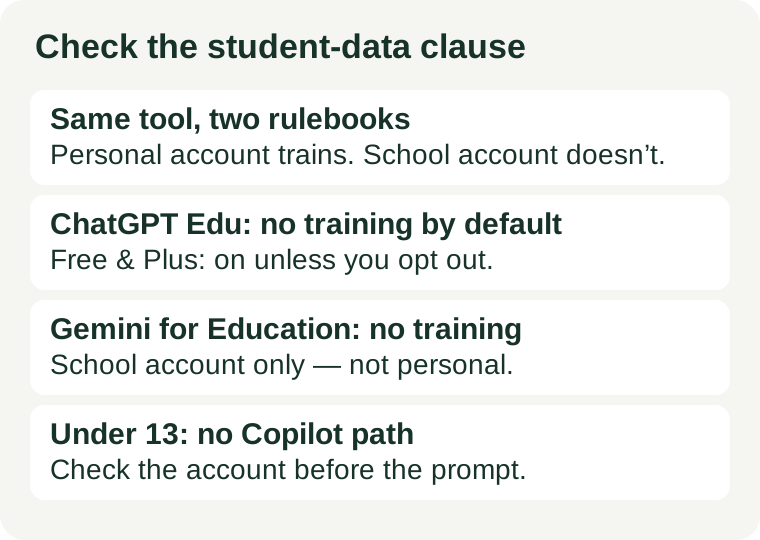
Teachers ask the wrong question first. They ask “is this tool safe for student data?” as if safety were a property of the tool. It is not. The same product — ChatGPT, Gemini, Copilot — is sold in a personal version and a school version, and the two versions carry different written promises about your data. A free personal account is a consumer product with consumer terms. A school-managed account sits under a contract between the vendor and the school, and that contract is where the real protection lives.
So the check starts before you open any tool. Look at the top corner of the screen and read which account is signed in: your personal email, or your school account. If you cannot tell, stop — that is the answer. You do not paste student data into an account you cannot identify.
What the three big vendors promise — checked 2026-11-12
Three vendors, three written positions, all read on their own pages on 2026-11-12. The pattern is the same in each case: the school version promises no training on your data; the personal version does not.
OpenAI: Edu does not train by default, personal does unless you opt out
OpenAI’s enterprise privacy page covers ChatGPT Business, Enterprise, Edu, ChatGPT for Teachers and the API Platform, and its first commitment is plain: “We do not train our models on your data by default.” You also own your inputs and outputs, and on Enterprise, Edu and Healthcare workspaces you control how long data is retained. Official page.
On a personal account the default flips. OpenAI’s help page states that on personal workspaces with ChatGPT Free, Plus or Pro, data sharing is enabled by default. The opt-out is one toggle: Settings, then Data Controls, then switch off “Improve the model for everyone.” Two details matter. First, opting out is not retroactive — what was already used stays used. Second, OpenAI’s help page notes that giving feedback on a response, for example thumbs up or thumbs down, may let it use the whole conversation to improve its models even if you opted out. A personal account can be made safer, but it starts unsafe and it stays your job to keep it that way.
Google: Gemini for Education does not train, does not share, is not human-reviewed
Google’s education page for Workspace with Gemini says it plainly: when using Google Workspace with Gemini, your data “is not reviewed by anyone to improve AI models, used to train AI models, or shared with other users or institutions.” Gemini for Education is a Core Service covered under the Workspace for Education terms, which is what makes that promise contractual rather than marketing copy. Official page.
Two practical consequences follow. First, the promise covers the school-managed account only — a student signed into a personal Google account is under different terms, so the account check matters here too. Second, “not used to train” is not the same as “not stored”: conversation history is on by default, and Google’s help guidance gives 18 months as the default retention, changeable by the school admin. Your school can review those records; Google says it does not.
Microsoft: the protection is a signed agreement, and under-13s are kept out
Microsoft’s protection for schools runs through the Microsoft 365 Education agreement, specifically its Data Protection Addendum, in which Microsoft agrees to be treated as a FERPA “school official” — the designation the law requires before a vendor can touch education records without individual parental consent for every disclosure. Microsoft also states it does not use data from users under 18 to train its foundation models, and it does not mine content for advertising.
Microsoft’s answer to the youngest students is architectural rather than contractual: children under 13 have no eligible path into Copilot Chat inside a school tenant at all, because Microsoft has not built a verifiable parental-consent flow for that age band in this product. Students aged 13 and up become eligible only once the district’s IT admin enables access. A personal consumer Copilot login carries none of this — no school-official designation, no admin control, no age gating by the school.
The two laws behind the check
You do not need a law degree. You need two facts, because they explain why the account type matters and why “the tool says it is safe” is never enough on its own.
FERPA: the school-official exception, and its four conditions
FERPA is the 1974 US federal law that protects education records, and it binds schools that receive US Department of Education funding — not the software vendors. It issues no certificate and no vendor seal; no AI company is “FERPA certified”. What it does offer is the school-official exception at 34 CFR 99.31(a)(1): a school may share records with an outside vendor without individual parental consent for every disclosure, but only when four conditions hold at once — the vendor performs a service the school would otherwise handle itself, the school keeps direct control over how the data is used, the vendor uses the data only for the authorised purpose, and the vendor may not redisclose it without permission. A signed data agreement is how a school proves those conditions hold. A free personal account has no such agreement, so the exception does not cover it.
COPPA: under 13, consent is the parent’s, not the teacher’s
COPPA covers children under 13 and requires verifiable parental consent before a service collects their personal information. A teacher cannot give that consent on a parent’s behalf, and most free consumer AI tools are simply not built for under-13 users at all — Microsoft’s exclusion of under-13s from Copilot Chat is the clearest example. If your students are under 13, the question is not which tool to pick. It is whether any personal-account tool may touch their data at all, and the answer will almost always be no.
The five-minute check before you use any tool in class
Run this once per tool, before the first real student record goes in:
- Read the signed-in account. School-managed account, or personal? If personal, the tool is a consumer product and the school-version promises do not apply.
- Find the training sentence. Open the vendor’s privacy or education page and look for the exact words about training. “We do not train on your data” is a promise; “we may use your content to improve our services” is the opposite. If you cannot find the sentence in two minutes, treat that as a no.
- Check the age floor. Does the tool allow under-13s, and under what consent? If your students are under 13 and the tool has no parental-consent flow, stop here.
- Ask who else can see it. Can a workspace admin, a school admin, or the vendor’s reviewers see the chats? School admins usually can — that is normal. Vendor human review of school-account chats is what the education promises rule out.
- Check the retention. How long are chats kept, and who can delete them? A default you cannot change is a decision you have already made.
If any step has no answer, that is not a maybe — it is a no. Use the tool only with your own material until the answer exists in writing.
What never goes into a prompt
Even on a school-managed account, some things do not belong in a prompt at all. Never paste a student’s full name together with grades, attendance, behaviour notes, health information, or special-education designations. If you need the AI to help with a struggling student, describe the pattern without the person: “a Year 8 student who confuses fractions with decimals” instead of a name and a report. Strip names from any file before you upload it, and never upload a photo of a student to a free image tool — once uploaded, you cannot fully control where it goes. Our privacy check before uploading covers the upload side of this in full.
When the free personal account is the wrong account
The decision rule is short. Use a personal free account only for your own material — your lesson drafts, your rubrics, your planning notes with no student information in them. The moment the task involves a real student’s record, switch to the school-managed account, or do not use the tool for that task at all. A free tier that costs nothing and a school contract that costs the district something are not the same product, and the difference is exactly this clause. If your school has not set up a managed AI account, that is a conversation with your IT admin, not a reason to route student data through your personal login. For picking the classroom tools themselves, start with free AI tools for teachers and AI tools for lesson planning — then run the check above on each one before it meets a student.