 KIKOMONO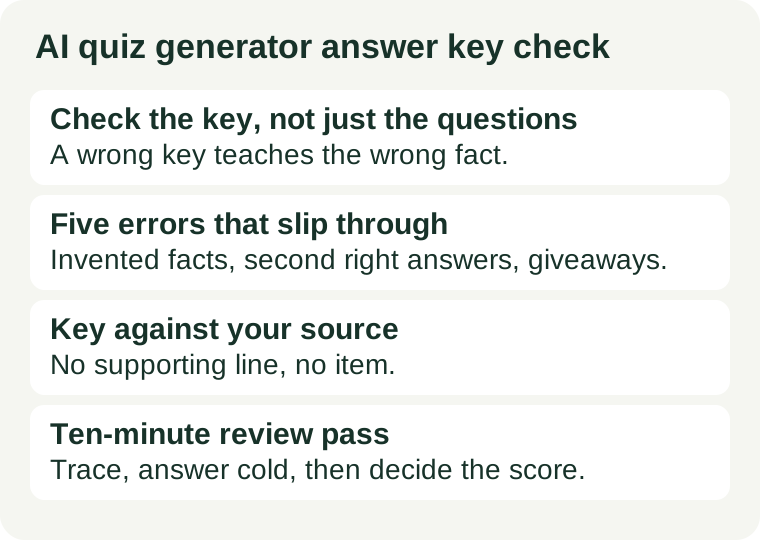
The short answer
Never hand out a generated quiz on the strength of its questions alone. Read the answer key first, item by item, against the text or notes the quiz was supposed to cover. Fix or delete anything the source does not support, anything with two defensible answers, and anything whose wording gives the answer away. Then run the quiz yourself, as a student would, and confirm that the correct answer is actually reachable from what was taught. If any item fails those checks, it does not go out — a quiz with nine good questions and one wrong key is worse than a quiz with nine questions.
The reason is simple: students trust a quiz more than a chat reply. A wrong answer in a chat thread gets questioned; a wrong answer in a marked quiz gets memorised. That is why the key, not the question set, is the part that needs your time.
Why generated keys go wrong
A quiz generator does not know your lesson. It knows patterns: what quiz questions usually look like, what answers usually follow them, and what distractors usually sound plausible. That is enough to produce a convincing quiz and a confident key — and enough to go wrong in ways that look right at a glance. The five errors below are the ones to hunt for, because each one survives a quick skim.
1. The invented fact
The key states something your source never said: a date, a number, a name, or a cause that sounds plausible and is not in your material. This is the most common failure, and the most damaging, because the quiz then teaches content you never taught. The fix is mechanical: every keyed fact must trace to a line in your source text. If you cannot point to the line, cut the item.
2. The second right answer
The key marks one option correct, but another option is also defensible from the material — or from the question as worded. Students who pick the second answer learn that careful reading gets punished, and your marking becomes an argument instead of a grade. The fix is to read each question as a student would: if two options survive a fair reading, rewrite the question, change a distractor, or accept both answers and say so.
3. The distractor that gives it away
Three options are absurd, outdated, or grammatically mismatched with the question, so the correct answer is findable without knowing anything. The quiz then measures test-taking, not learning. The fix is to make every distractor plausible to a student who half-remembers the lesson: same category, same era, same level of detail as the key.
4. The question that tests a different goal
The quiz drifts off the lesson: it asks about a detail the lesson mentioned in passing, or about background the generator added on its own. Students revise the wrong thing, and the results tell you nothing about the goal you set. The fix is the same test used in our lesson planning guide: does this item serve the learning goal you wrote before opening the tool, or does it serve a different topic?
5. The key that contradicts the question
The question asks for one thing and the key answers another — a “which is true” question keyed to a false statement, a “choose the best” question with no best option, or a true/false item whose statement is half true. These survive skimming because each half looks fine alone. The fix is to read question and key together, as one unit, never separately.
A ten-minute review pass
For a quiz of ten to fifteen questions, this pass takes about ten minutes once it becomes habit. Work through it in order, and do not skip to the questions you like:
- Trace every keyed fact to your source. Open the text or notes the quiz was built from. For each item, find the line that supports the key. No line, no item — cut it or rewrite it from the source.
- Answer the quiz yourself, cold. Cover the key and answer as a student would, from the lesson alone. Any item you cannot answer confidently from what was taught is either testing untaught content or is worded badly. Both are fixable before class; neither is fixable after.
- Read the distractors as a student. For each item, ask whether a student who half-remembers the lesson could pick a wrong option for a good reason. If yes, the item is fair and useful. If every wrong option is obviously wrong, rewrite the distractors.
- Check numbers, names and dates last, on purpose. These are the facts generators invent most smoothly, so check them against your source even when they look familiar. Familiarity is not verification — our citation check guide makes the same point for AI answers generally.
- Decide what the score means before you give it. If an item survives the pass but still has a debatable answer, say so when you hand the quiz out, or drop the item from the score. A quiz whose scoring you cannot defend is worse than a shorter quiz.
Which tool for which part
The choice is less about the brand than about the input. A teacher quiz tool that builds from your uploaded text or notes stays closer to your material than a general chatbot answering from its own training, because the source constrains the invention. Either way, the tool drafts and you verify: no tool's key ships unchecked. Our free AI tools for teachers guide covers the teacher tools worth starting from, checked 2026-10-23; free plans and educator offers change, so confirm on the official page before building a term's quizzes around any one tool. Never paste student names, grades or identifying details into any quiz tool — describe the class in general terms only.
Two habits reduce the checking load over time. First, reuse a small set of trusted source texts: a quiz built from the same chapter you taught needs less tracing than one built from a prompt you typed from memory. Second, keep a short list of your own past key errors — the invented dates, the double answers — and check new quizzes against that list first. Your own error patterns repeat faster than any tool's.
Questions teachers ask
Should I tell students the quiz was AI-generated? Tell them the quiz was drafted with AI help and checked by you. Students deserve to know the key was verified by their teacher, not generated and trusted. It also models the habit you want them to build: check before you rely on it.
How many questions can I skip checking? None. A ten-question quiz with one unchecked item has a ten percent error rate in its key, and the unchecked item is usually the one that goes wrong. Check all of them, or cut the ones you did not check.
Is a general chatbot good enough for quiz drafts? For short drafts from a text you supply, yes — with the full review pass above. For quizzes that must match a syllabus closely, a teacher tool built from your own materials needs less correction, because its input is your lesson rather than a general prompt.
What if students find an error I missed? Thank them, fix the key, and adjust the score. A found error is proof the checking culture works. The failure is not the error — it is shipping a key you never read.
Sources and review scope
This is a workflow guide, not a performance test of any tool. It draws on standard classroom practice for assessment design (one defensible key, plausible distractors, items matched to the learning goal) and on the tool access information in our free AI tools for teachers guide. No tool prices, plan limits or performance figures are cited here beyond that guide's checked descriptions, because free plans change and the provider's own page is authoritative. Tool pages re-checked in scope 2026-11-01. This article contains no affiliate links.