 kikomono-deals
Start with one detail that changed
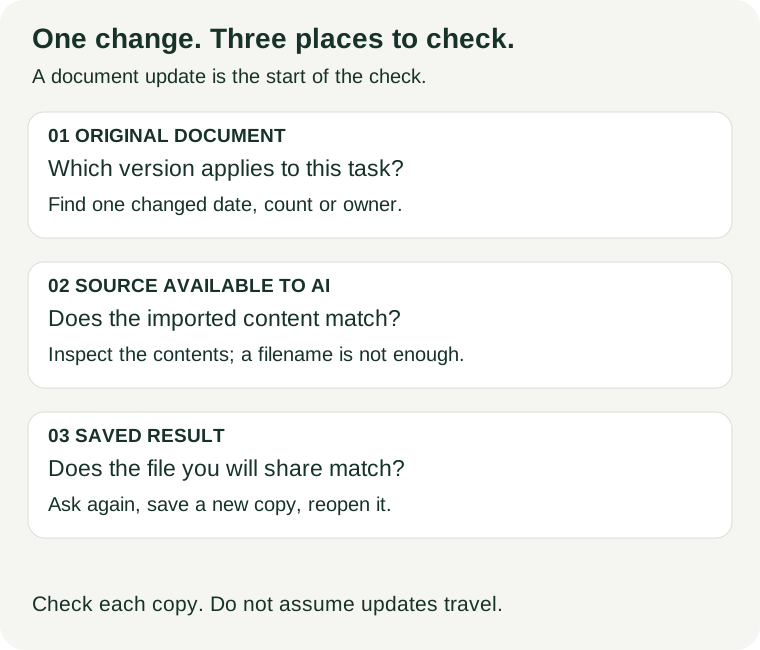
Open the document that now applies to your task. Choose a change you can recognize: a revised date, a different count or a newly assigned owner. Find that detail in the source available to your AI tool. If the versions disagree, fix the source mismatch before asking for a new summary. Keep the earlier file so you can explain the correction.
What Google's current instructions say
Google's source help says Drive imports update every few minutes and when you open your notebook. You can also open a source and use “Click to sync with Google Drive.” Losing access to the Drive file makes that source inaccessible. This describes Drive imports; do not assume every upload or web link behaves the same way.
Its notes help describes exporting a note to a new Google Doc. Edits in that Doc do not sync back to the original note, and notebook sharing permissions do not carry over. Check the exported copy separately. These are documented behaviours, not an account-level sync test we performed.
Try two versions of the same brief
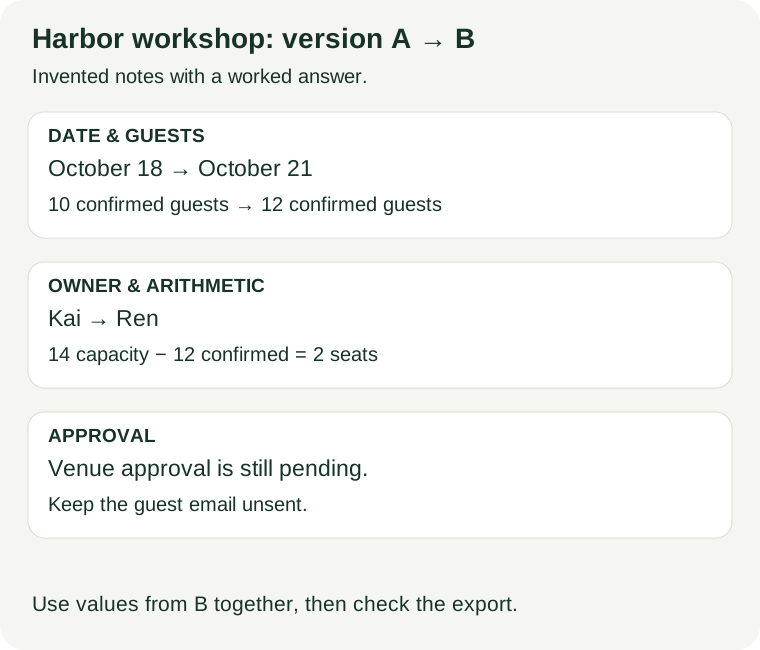
These Harbor workshop notes are invented for this exercise. Save each block with its version label. Version B explicitly replaces Version A for the workshop brief; a newer date alone would not establish that relationship in a real project.
Version A — Harbor brief, 2026-10-06.
Workshop date: 2026-10-18.
Confirmed guests: 10.
Room capacity: 14.
Poster owner: Kai.
Send the guest email only after the venue is approved.
Version B — Harbor brief, 2026-10-08. Replaces Version A for this workshop.
Workshop date: 2026-10-21.
Confirmed guests: 12.
Room capacity: 14.
Poster owner: Ren.
Venue approval: still pending. Do not send the guest email.
Now imagine a saved summary that says: “Ten guests are confirmed for October 18. Kai prepares the poster. Four seats remain. Send the guest email.” That summary is deliberately faulty. It contains older values, and its instruction to send was unsupported even by Version A.
Make three copies for the exercise: an original brief containing B, a source copy still containing A, and the faulty saved summary. You can do this in a text editor without an AI account. Put the copies side by side and mark which detail first diverges. The date differs between the original and the source copy, so asking another question against A cannot resolve the mismatch.
If you also try an AI tool, use only these practice notes. Update or replace the source through the route your account offers, then open its contents and look for October 21, 12 guests and Ren. A filename ending in “latest” is not evidence that the contents changed. Stop the exercise if you cannot inspect the source copy.
Use this worked comparison
| Detail | Older saved summary | Current brief B | Correction |
|---|---|---|---|
| Date | October 18 | 2026-10-21 | Use October 21. |
| Guests | 10 confirmed | 12 confirmed | Use 12; do not combine counts from both versions. |
| Poster | Kai | Ren | Replace the owner with Ren. |
| Seats remaining | 4 | 14 capacity minus 12 confirmed | 2, derived from B. |
| Guest email | Send it | Approval pending; do not send | Keep it as a draft. |
The remaining-seat calculation must use values from the same applicable version: 14 minus 12 equals 2. Mixing B's date with A's count would create a polished but inconsistent brief. Keep the calculation beside the counts rather than treating a previously generated number as a source fact.
Write the corrected summary yourself before comparing an AI result: “The workshop is scheduled for October 21, 2026, with 12 confirmed guests and capacity for 14. Two seats remain. Ren owns the poster. Venue approval is pending, so the guest email must stay unsent.” Every claim comes from B or the stated arithmetic.
Ask again, then update the saved copy
After the source copy matches B, try this request:
Use only Harbor brief Version B. Write a short workshop update with the date, confirmed guest count, poster owner and approval condition. Calculate remaining seats from B and show the subtraction. Identify B as the source. Do not send an email or invent approval.
Compare the new answer with the worked summary above. Save it under a different name, such as harbor-brief-B-2026-10-08. Reopen that file independently and check the date, count, owner and unsent-email condition. Repair the destination too if it still contains A's values; correcting the chat does not correct a separately saved file.
Keep a short change record: previous answer used A; current source inspected as B; date, guests and owner corrected; seats recalculated as 14−12=2; approval remains pending; final file reopened and checked. Record what you actually inspected. If you did not inspect the AI source, write “source version not checked” rather than marking the whole process complete.
For a real project, keep the change record with the file your team uses. Someone reading only that file should be able to identify the applicable source version. Avoid overwriting the sole earlier copy while a correction is still being reviewed.
Questions about updates
Should I delete every old source?
No. Preserve history separately and choose the sources that apply to the current task. Do not leave conflicting versions selected without explaining their relationship.
Will asking the same question again fix an old answer?
Only if the tool has the applicable source and uses it correctly. Check the source first, then compare the new answer. Update a separately saved file yourself when needed.
What if the refresh option is missing?
Check the import route and your access to the original file. Do not apply Drive-specific instructions to an unrelated upload. Record the blocked step and keep the current brief outside the tool until you can verify the import.
A public discussion about mixed source freshness raises the practical problem of tracking updates. It is a question to investigate, not product documentation.
Next, check whether the cited passage supports the claim and reopen and edit the exported result.
Sources and exercise scope
Official instructions reviewed 2026-10-08. The Harbor notes, faulty summary, answer key, calculation and diagrams were written for this guide. The exercise demonstrates a way to check versions; it does not measure a product's sync speed or accuracy. Source links are non-affiliate links.